How to Automate Invoicing: A CFO's Implementation Guide
Learn how to automate invoicing with a step-by-step guide for CFOs. Reduce DSO, improve cash flow, and design workflows that protect client relationships.
You send the invoice on time. Then the waiting starts.
A partner asks why a long-standing client is showing up at 47 days outstanding. A project manager says the client “probably just missed it.” Someone in finance sends a reminder from their own inbox, using their own wording, on their own schedule. The client pays eventually, but you still don't know which part of the process worked and which part introduced delay.
That's the operational reality at many professional services firms between $3M and $50M. The invoicing problem usually isn't invoice creation alone. It's the lack of a controlled, repeatable system for delivery, follow-up, payment capture, and exception handling. If you're trying to reduce DSO, improve cash flow, and preserve client relationships, that distinction matters.
Most articles about how to automate invoicing drift into accounts payable and OCR intake. Useful topics, but not the pressure point for firms that live on billed time, retainers, milestone invoices, and client trust. In practice, the bigger strategic issue is accounts receivable automation. Specifically, how to turn outbound invoicing and collections into a disciplined process that is consistent, measurable, and still human.
Beyond Reminders The Real Goal of Invoice Automation
A firm can bill accurately, send invoices on time, and still struggle to collect cash in a predictable way.
The breakdown usually happens after the invoice is issued. Follow-up timing varies by account lead. Message quality depends on who sends it. Payment links are easy for one client and awkward for another. Finance can see the aging. What they cannot always see is whether the collection process is being run with discipline.
For a CFO or Controller, that is the issue. Late cash receipts affect payroll planning, partner draws, hiring pace, and borrowing needs. In professional services, they also affect client relationships because collections activity is part of the client experience, not a back-office side task.
Control matters more than labor savings
Cost reduction gets attention, but AR automation earns its keep through consistency and visibility.
Analysts at Parseur report that top-performing automated invoice teams process invoices faster and at lower cost than manual teams, according to global AI invoice processing benchmarks. The operational takeaway for outbound AR is broader than speed. A controlled process gives finance a defined cadence for invoice delivery, follow-up, payment capture, and escalation. It also creates an audit trail. You can see which communication went out, when it went out, who approved an exception, and why an account stayed open.
That level of control changes management behavior. Teams stop asking whether someone remembered to chase an invoice. They start asking whether the collection rule, escalation path, or client contact strategy was set up correctly.
Practical rule: Good automation does not remove judgment. It assigns routine follow-up to the system and reserves human intervention for disputes, strategic accounts, and unusual risk.
Outbound AR deserves its own strategy
Many articles on invoice automation focus on AP intake, OCR, coding, and approval routing. Useful topics, but they solve a different problem.
Professional services firms need discipline on the receivables side. The challenge is not only sending reminders. It is coordinating outbound communication so the firm gets paid faster without turning collections into a client irritant. That requires a structured accounts receivable process, clear ownership, and rules that reflect account history, contract terms, and relationship sensitivity.
A strategic client with an active billing question should not receive the same sequence as a small account that ignored three prior invoices. A milestone invoice may need supporting documentation attached on day one. A retainer replenishment notice should be short, direct, and easy to pay. These are process decisions. Software helps enforce them, but finance has to design them first.
What good AR automation looks like
The strongest setups do four things well:
- Send invoices on a defined schedule with the detail clients need to approve payment quickly.
- Segment collection workflows by client type, risk, payment behavior, and open issues.
- Reduce payment friction with clear instructions and easy payment options.
- Route exceptions to people only when a human decision adds value.
That is the standard worth aiming for.
Invoice automation in AR is a cash flow control system with a client communication layer attached. Done well, it shortens DSO, improves forecast reliability, and gives finance better control over how the firm asks to be paid.
Mapping Your Current State Before You Automate
A weak process doesn't become strong because you add software to it. It becomes faster at producing the same errors.
Before you evaluate AR software for professional services, map the process you already have. Most firms think they know it. Very few have documented the full path from approved billable work to delivered invoice to collected cash.
Start with the handoffs
The biggest delays usually sit between teams, not inside one person's task list.
A billing coordinator may finish draft invoices quickly, but a partner approval sits in email. The invoice is generated, but not sent the same day. A client asks a question, sales answers it informally, and finance never sees the exchange. By the time collections starts, the aging report looks like a payment problem when the root cause was process drift much earlier.
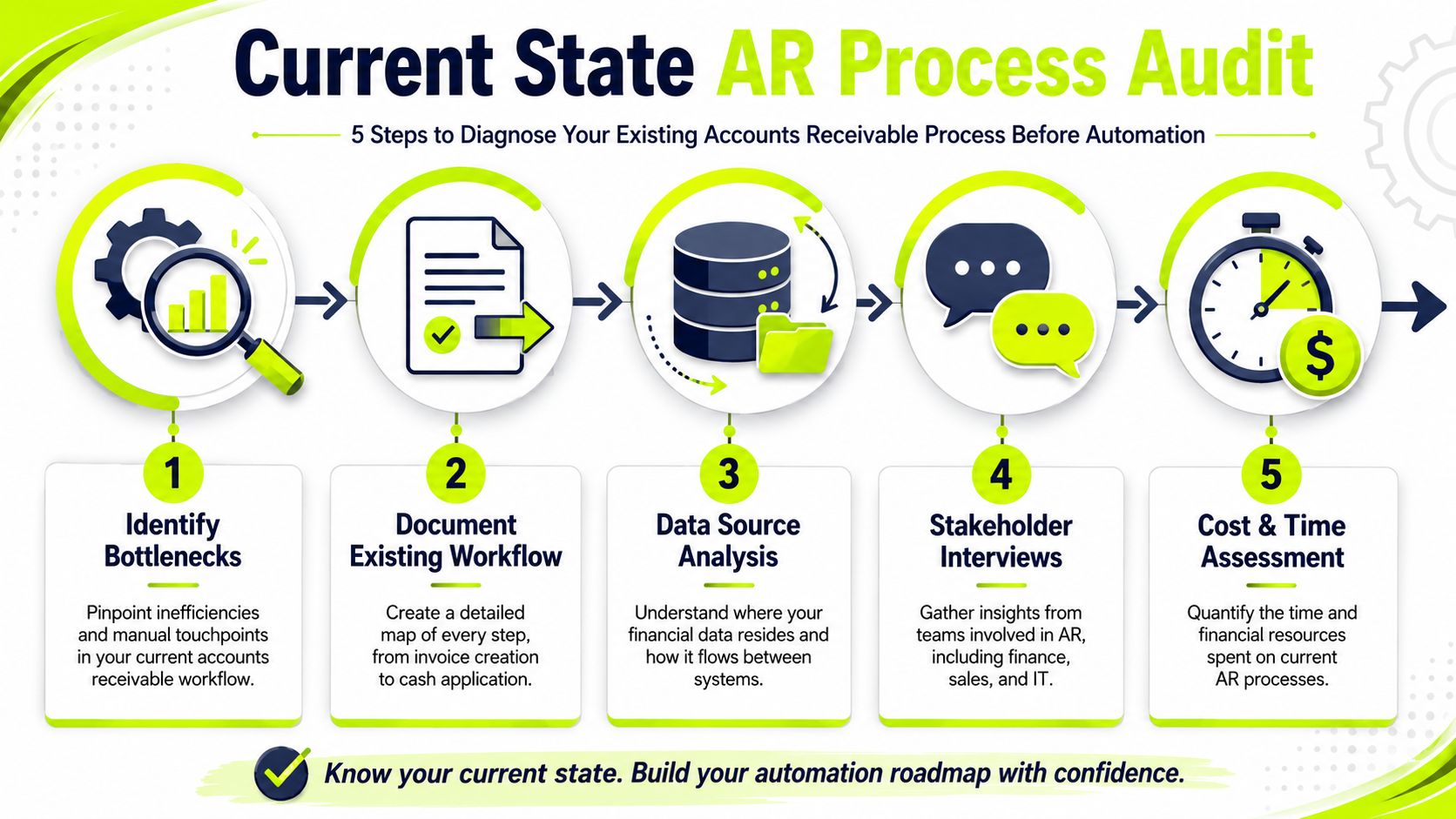
A proper audit should include five areas:
- Invoice creation to delivery lag. How long does it take for approved work to become a sent invoice?
- Reminder consistency. Are overdue follow-ups driven by policy or by whoever has time?
- Client segmentation. Do your best clients, newest clients, and chronic slow payers all get treated the same?
- System fragmentation. Where are invoice status, payment notes, dispute notes, and contact history stored?
- Manual effort. How much staff time goes into assembling invoices, sending reminders, and updating statuses?
For a useful framework, this walkthrough of the accounts receivables process is a good reference point when documenting each handoff.
Audit what people actually do
Don't map the ideal process. Map the actual one.
Sit with billing, collections, project leads, and whoever touches client communications. Pull a sample of paid-on-time invoices, disputed invoices, and long-aged invoices. Look at the timestamps. Read the emails. You'll usually find that “our process” is really a set of habits.
The first useful baseline is often embarrassing. That's fine. It gives you something real to improve.
A detailed review also helps you isolate where automation will pay off first. A granular audit to identify bottlenecks is a critical first step, and automating data extraction with OCR and AI can reduce manual entry errors by up to 90% and cut processing time from 10 minutes per invoice to 2 to 3 minutes, according to Brex guidance on automated invoice processing.
Build a baseline you can defend
For CFOs and Controllers, the point of this exercise is governance as much as efficiency. You need a before-state that supports decision-making later.
Track items like:
- Delivery reliability: invoices sent the same day they are finalized, versus delayed.
- Days to pay by client segment: not just one blended average.
- Dispute frequency: where collections stalls because the invoice package wasn't clear.
- Manual touch volume: where staff still copy, paste, chase, and reconcile by hand.
Those baselines will tell you whether automation is improving cash conversion or just changing where the work sits.
Designing Automated Workflows for Invoicing and Collections
A partner says a client is "good for it," so the invoice goes out late, the due date passes without follow-up, and finance hesitates to press because nobody wants to irritate a relationship owner. That pattern is common in professional services. It is also expensive.
Workflow design decides whether AR automation improves cash flow or only sends nicer reminders.
The core mistake is treating every invoice the same. A single reminder sequence looks orderly in a software demo, but it ignores how clients pay. Strategic accounts, retainers, milestone billing, procurement-heavy buyers, and chronically late payers need different triggers, different wording, and different escalation paths if you want to protect both collections performance and client goodwill.
Segment the workflow before you automate it
Start with risk, value, and billing context.
A client with a clean payment history and a recurring retainer usually needs a light-touch cadence. A milestone-billed engagement with backup documentation requirements needs a different sequence from day one. A client that only pays after a project lead gets involved should not sit in the same queue as an account that reliably pays on receipt.
That is the shift in outbound AR automation. The objective is not more reminders. The objective is controlled communication that matches the account.
In practice, I would segment first by client importance, then by invoice type, then by payment behavior. That keeps the model simple enough to govern and specific enough to matter. If a team starts with ten micro-segments, they usually create exceptions faster than they create cash.
What a practical rule set looks like
Here is a workable starting structure for accounts receivable automation inside a professional services firm.
Trigger | Condition | Action | Channel | Tone |
|---|---|---|---|---|
Invoice issued | Strategic client, strong payment history | Send invoice with concise note, payment link, and named contact for questions | Professional and warm | |
5 days before due date | Retainer client, no open issues | Send courtesy reminder with invoice copy attached | Light and service-oriented | |
Due date reached | Mid-market client, invoice unopened | Resend invoice with direct subject line and payment options | Clear and neutral | |
3 days overdue | Historically slow payer | Send short payment reminder and prompt to confirm receipt | SMS plus email | Direct but respectful |
7 days overdue | High-value invoice, no response | Route to account owner for personal outreach before formal escalation | Internal task plus email | Relationship-aware |
Repeated overdue pattern | Client with prior late-pay behavior | Shift sequence timing and escalate earlier in next cycle | Multi-channel | Firm and controlled |
Dispute opened | Any client | Pause dunning, assign owner, collect documentation, restart after resolution | Internal workflow | Non-collections, resolution-focused |
A good workflow encodes judgment without creating chaos.
That means defining who owns each step. Finance should control timing, escalation thresholds, pause rules, and auditability. Client service or project leadership should step in only where the relationship context changes the action. If those boundaries are vague, staff will override the system ad hoc, and your automated process will drift back into manual collections.
Use templates, but keep them credible
Template quality matters more than many teams expect. If the invoice email is vague, the attachment naming is inconsistent, or the backup is missing, collections slows down for reasons that have nothing to do with reminder timing.
For teams still assembling client-facing documents manually, Mail Merge for Gmail for personalized PDFs is a useful example of how to standardize personalized delivery without making every message feel generic. That kind of tooling helps tighten invoice presentation and reduce preventable confusion before a broader AR workflow is fully built.
If you're evaluating broader workflow orchestration, this overview of collections automation software is useful because it explains how rules, segmentation, and follow-up logic fit together in a collections process.
The standard should be simple. Every client message should answer three questions immediately: what is due, when is it due, and who should the client contact if something is wrong.
Protect the relationship by routing exceptions early
Strong automation knows when to stop and hand the issue to a person.
If a client opens the invoice twice and does not pay, that may signal internal approval delay. If the invoice is unopened, the delivery itself may have failed or gone to the wrong contact. If a strategic account has a pending scope dispute, automated collections should pause until the commercial issue is clear. Sending the same overdue notice through all three scenarios is how firms create avoidable friction.
This is where political discipline matters. Partners often want custom treatment for their accounts. Some exceptions are justified. Many are habits. Finance needs a written policy for pause reasons, escalation rights, and who can suppress a sequence. Otherwise the workflow becomes optional for influential account owners and strict only for smaller clients.
The best AR automation protects relationships by making outreach more consistent, not more aggressive.
Connecting AR Automation with Your ERP and Payments
The software demo usually focuses on reminders, dashboards, and nice-looking workflows. The implementation succeeds or fails on integration.
If your AR platform doesn't connect cleanly to your accounting system, billing source, and payment layer, you'll create a second process instead of fixing the first. For firms using NetSuite, QuickBooks, or a practice management stack with separate billing data, integration is what turns automation into a controlled finance process.
Why standalone tools disappoint
A standalone collections tool can send messages. It can't maintain financial truth on its own.
Finance needs one reliable record of invoice status, payments received, credits issued, disputes in progress, and follow-up actions taken. If collectors update one system while accounting closes the books in another, you end up reconciling your process manually every week.
That problem shows up fast in QuickBooks AR automation projects. A team wants quicker follow-up and online payments, but if payment updates don't flow back correctly, the aging report becomes noisy. Then staff start maintaining side spreadsheets to compensate. At that point, automation has added surface area, not reduced it.
The minimum viable integration architecture
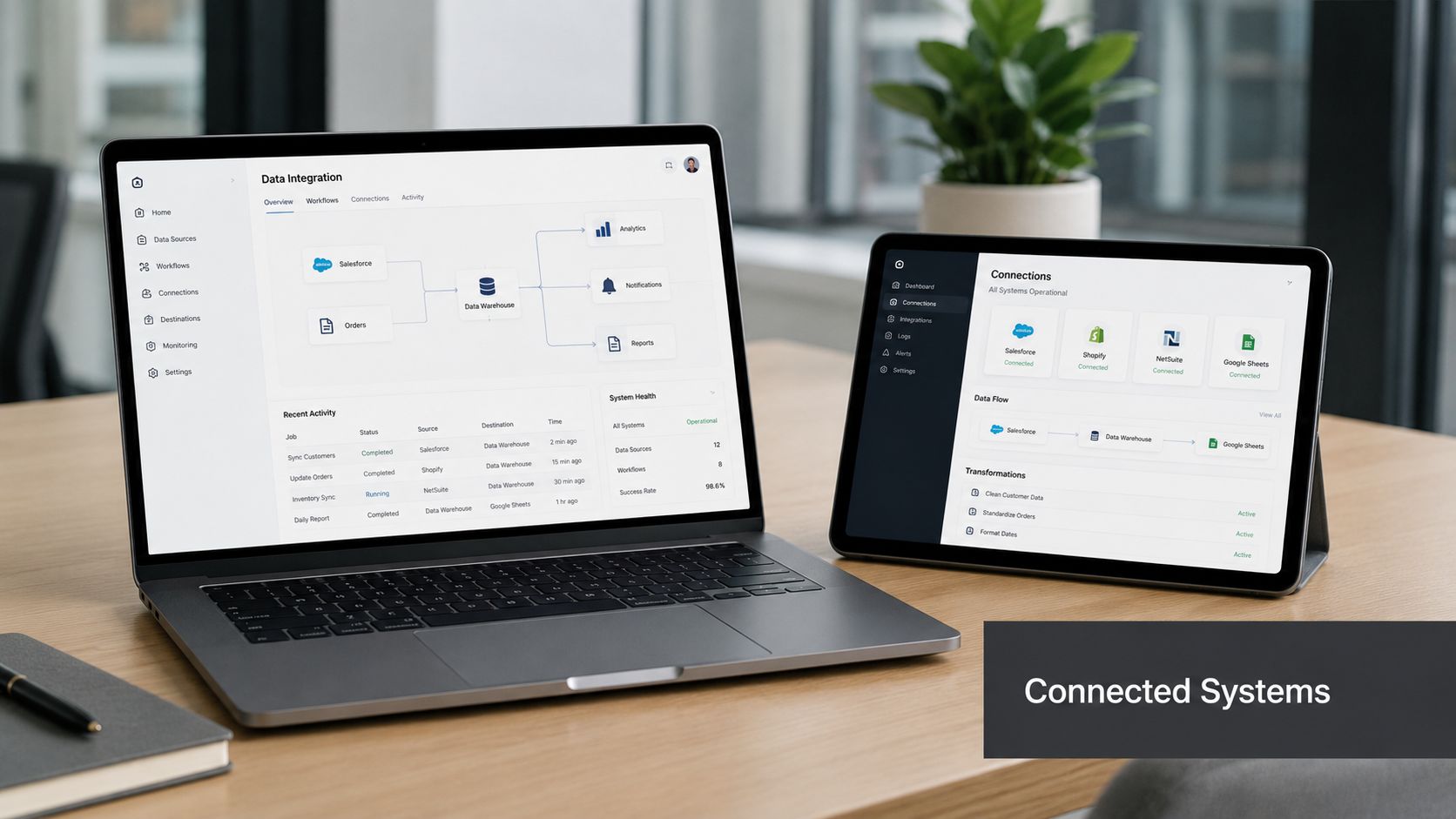
For outbound invoicing and collections, three connections matter most:
- Billing or ERP connection: invoice data, customer records, terms, credits, and status need to sync reliably.
- Payment connection: clients need a frictionless way to pay, and posted payments must update AR promptly.
- Communication and activity tracking: the finance team needs visibility into what was sent, opened, clicked, paid, disputed, or escalated.
The technical concept is straightforward. The execution isn't. This guide to API connectivity gives a practical explanation of why connected systems matter operationally, not just technically.
Payment experience affects collection performance
Many firms focus heavily on reminder cadence and underinvest in payment completion.
If the client has to print, route, or manually re-enter details to pay, you'll get delay even when willingness to pay is high. A clean payment experience shortens the path between intent and cash receipt. It also reduces the back-and-forth that clutters the AR desk.
A short walkthrough helps illustrate what connected invoice-to-cash operations look like in practice:
For CFOs, the integration test is simple. Can the team answer, in one place, whether an invoice was issued, delivered, viewed, disputed, partially paid, fully paid, or escalated? If the answer is no, the process still depends on manual reconciliation.
Key KPIs to Track and How to Manage Exceptions
Automation doesn't remove management. It makes management more precise.
If you're serious about improving cash flow, you need a KPI set that tells you whether the invoicing and collections engine is getting faster, cleaner, and more predictable. You also need an exception model that prevents the team from falling back into inbox-based firefighting.
Track outcomes, not just activity
Many dashboards overweight effort metrics. Number of reminders sent. Number of calls made. Number of accounts touched.
Those aren't useless, but they don't tell a CFO much. Better AR reporting starts with a small group of measures tied directly to liquidity and process quality.
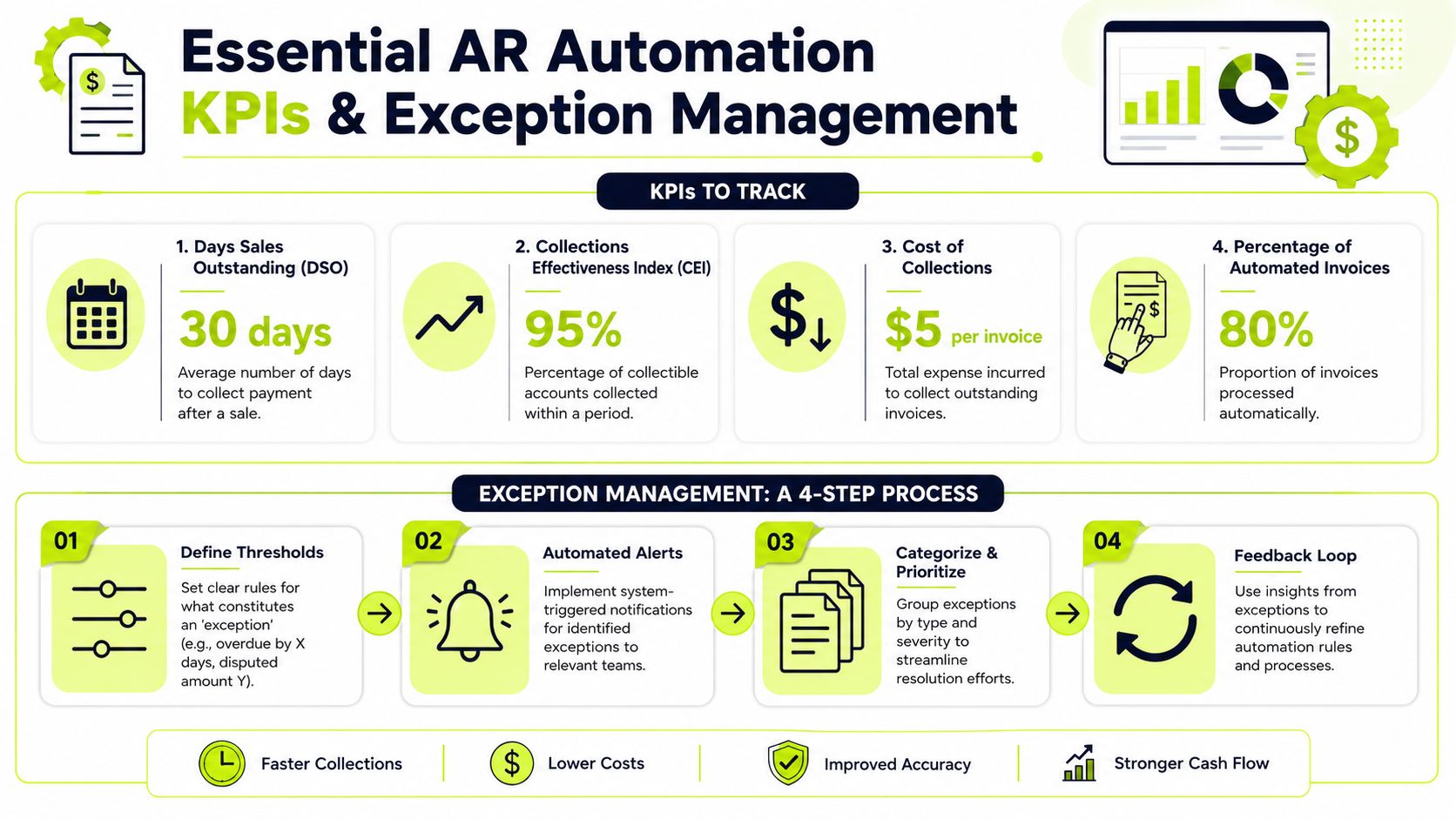
The most useful KPI set usually includes:
- DSO by segment: one firm-wide average can hide a weak client tier or service line.
- Aging mix: how much of AR sits current, moderately overdue, and seriously overdue.
- Promise-to-pay conversion: whether commitments turn into receipts.
- Auto-pay or self-service payment adoption: whether clients can complete payment without assistance.
- Dispute cycle time: how long valid issues sit unresolved.
- Collector exception load: how many accounts need human intervention.
Don't judge automation by message volume. Judge it by whether fewer invoices age unnecessarily and whether finance can forecast receipts with more confidence.
There is a solid ROI case for this discipline. In a Vanson Bourne study of finance professionals using AR automation software, 100% reported measurable gains, and firms that fully embraced automation saw up to a 40%+ reduction in Days to Pay, according to Billtrust's summary of AR automation ROI.
Exceptions are where the finance team still earns its keep
A well-run AR operation isn't fully hands-off. It is selectively hands-on.
Routine invoices should move through delivery, reminder, payment, and posting with minimal intervention. Exceptions should be deliberate. That means the system flags and routes the situations that require judgment instead of asking staff to inspect everything manually.
Good exception queues usually include:
- Disputes and documentation gaps: route to billing owner or project lead, not back into the reminder loop.
- High-value at-risk accounts: escalate early with account context attached.
- Broken payment patterns: identify clients who have shifted from reliable to erratic behavior.
- Short pays and unapplied cash: assign to a resolution path, not a generic follow-up queue.
Use a co-pilot model, not blind autopilot
For most professional services firms, the practical model is co-pilot.
The system handles standard delivery, timing, sequencing, and payment prompts. Humans handle the accounts where commercial judgment matters. That keeps the process efficient without making it brittle. It also protects the client experience when there is a legitimate issue behind the delay.
A few operating rules help:
- Define exception thresholds clearly. If finance can't explain why an account moved to human review, the rules aren't tight enough.
- Separate collections from dispute resolution. Clients with billing concerns shouldn't receive the same sequence as clients who are late.
- Review exception patterns monthly. If the same issue keeps surfacing, fix the upstream process.
The strongest AR teams don't treat exceptions as noise. They treat them as process intelligence.
When leaders ask whether accounts receivable automation is working, the answer shouldn't be “the team likes the tool.” It should be visible in collection speed, cleaner aging, and fewer accounts requiring manual rescue.
A Phased Rollout Plan and Common Pitfalls to Avoid
The safest way to automate invoicing is to start narrower than your ambition.
A big-bang rollout sounds efficient. In finance operations, it usually creates confusion across billing, collections, client service, and accounting at the same time. A phased rollout gives you room to tune the workflow, prove control, and fix edge cases before they spread.
A rollout sequence that usually works
Start with one segment where the process is important but manageable.
That might be one office, one service line, one invoice type, or a client group with repeat billing and stable contacts. The point is to test timing, message logic, payment behavior, and exception routing in a contained environment.
A practical sequence looks like this:
- Stabilize invoice output Tighten invoice format, approval handoff, and delivery timing first. If the invoice package is inconsistent, collections automation won't fix the root problem.
- Automate low-risk follow-up Begin with pre-due reminders, due-date notices, and early overdue communication for clean accounts.
- Add segmentation and escalation Introduce differentiated treatment by client history, invoice value, and account sensitivity once the baseline sequence is working.
- Expand exception handling Route disputes, short pays, and strategic accounts through clearer human review paths.
- Scale to the full portfolio Only after your finance team trusts the data, the workflows, and the payment updates.
What usually goes wrong
The most common failures aren't technical. They're operational and political.
A finance leader may support the project, but partners still want to “handle their own clients.” Sales may worry that automation sounds harsh. Billing may fear loss of control. Those concerns don't disappear because the tool is capable.
That human factor matters. Neglecting employee buy-in can cause a 15 to 20% drop in adoption rates, while successful projects correlate with high team engagement and KPI tracking before and after rollout, according to AvidXchange guidance on automated invoicing adoption.
The mistakes worth avoiding early
Some problems are predictable.
- Automating only AP thinking Many teams borrow an invoice automation playbook built for inbound payables and then wonder why receivables performance doesn't move.
- Leaving systems disconnected If invoice status, payment data, and follow-up history live in different places, staff will build manual workarounds.
- Using one sequence for every client Uniformity feels clean. It usually ignores commercial reality.
- Skipping exception design If every unusual account falls back to email and memory, the old process is still running underneath the new one.
- Failing to govern the rollout If nobody owns KPIs, rule changes, and escalation policy, automation becomes another app instead of a finance operating system.
The firms that get this right don't chase novelty. They build a calmer receivables process, with clearer rules, faster payments, better visibility, and fewer awkward client interactions.
Resolut automates AR for professional services, helping firms reduce DSO and improve cash flow with a process that stays consistent, accurate, and human. If you're evaluating a more controlled approach to accounts receivable automation, AI AR automation, or QuickBooks AR automation, Resolut is built for the operational reality finance teams manage every day.