How to Reduce Friction in Your AR Cycle: CFO Guide 2026
CFOs, learn how to reduce friction in your AR cycle with our 2026 guide. Get practical steps for invoice design, automation, & payment to cut DSO & boost cash
By the time a professional services firm feels cash pressure, the problem usually isn't a single bad payer. It's a dozen small points of friction spread across the AR cycle.
A partner approves work late. An invoice goes out with vague line items. A client has to ask where to pay. A reminder sits in someone's draft folder because the account manager doesn't want to sound aggressive. Payment arrives, but finance can't match it cleanly, so the aging report stays wrong for another few days.
This situation is common in firms between $3M and $50M. The work is profitable on paper, demand may be healthy, and yet cash still feels less predictable than it should. If you want to know how to reduce friction, don't treat collections as a reminder problem. Treat AR as an operating system. Credit policy, invoice design, outreach timing, payment methods, cash application, and dispute handling all have to work together.
For CFOs, Controllers, and firm owners, that orchestration matters more than any single tactic. It's how you reduce DSO, improve cash flow, and give your team back time for work that requires judgment.
The Real Cost of AR Friction
Every firm owner knows the tension. You want to preserve the client relationship, but you also need to collect what you've earned.
In practice, that tension shows up in small compromises. A consultant sends deliverables but delays the invoice because the statement of work needs one more review. A controller waits a few extra days before following up because the partner says the client is sensitive. An AR specialist spends the afternoon checking whether payment was sent, whether the invoice hit the right inbox, and whether the client's AP team needs a PO reference that should've been included the first time.
None of that looks dramatic in isolation. Together, it creates a weak cash cycle.
What friction looks like inside the firm
AR friction is rarely just “late payment.” It's usually a chain of operational drag:
- Manual handoffs: Billing depends on project managers, partners, and finance all moving in sequence.
- Unclear ownership: Sales owns the relationship, finance owns the receivable, and nobody owns the gray area in between.
- Inconsistent follow-up: Some clients get quick outreach. Others get silence until the invoice is badly aged.
- Administrative rework: Teams keep answering preventable questions about amount due, service details, or payment instructions.
Friction in AR doesn't just delay cash. It pulls senior people into low-value work and makes the firm look less controlled than it is.
That's why this belongs on the CFO agenda. Working capital gets tied up. Finance staff spend time chasing basic information instead of improving forecasting. Partners get dragged into collection moments that should've been resolved by process.
Trust is part of the balance sheet
The relationship cost matters too. Clients don't mind being billed professionally. They do mind confusion.
A vague invoice, a missing link, or a reminder that arrives too late and too abruptly can make the interaction feel sloppy. In professional services, that matters. The invoice is part of the service experience. It tells the client whether your back office is disciplined.
If you're evaluating accounts receivable automation, this is the lens to use. Don't ask whether the software sends reminders. Ask whether it reduces handoffs, clarifies next actions, and gives both finance and client-facing teams a cleaner process.
Redesign the Invoice for Immediate Action
Most AR delays start at the invoice itself. If the client has to interpret the bill, look up payment steps, or email someone for clarification, you've already added drag.
A good invoice doesn't just document what's owed. It tells the client exactly what to do next. That sounds basic, but many firms still send invoices that read like internal accounting documents instead of payment-ready client communications.

The non-negotiables
For professional services, a frictionless invoice should include:
- Clear service descriptions: Spell out the work in language the client's approver recognizes. If your line items only make sense to your project team, expect delays.
- Visible due date and terms: Don't bury payment terms in fine print or attachments.
- PO and reference details: If the client needs a PO number, matter code, project code, or billing contact, include it before they ask.
- A direct payment path: Don't make the client leave the email and figure out where to pay.
That last point is often the fastest win. Embedding a direct payment link in every invoice email can reduce payment time by 35–40% on average, as clients can pay in under 60 seconds without navigating external portals according to Reconciled Solutions on reducing friction in collections.
Design for approval, not just for accounting
Controllers often focus on invoice accuracy, which is right. But payment speed also depends on approval speed.
The approver inside your client organization may not be the one who signed the engagement letter. They may be someone in AP or operations who sees your invoice cold. If that person can't immediately connect the charge to the work, the bill stalls.
A practical test helps. Before you send a new invoice format live, ask someone outside finance to answer three questions in under a minute:
- What is this bill for?
- When is it due?
- How do I pay it right now?
If any answer takes effort, the invoice still has friction.
Practical rule: The best invoice is the one that doesn't generate a reply email.
Move from document creation to invoice orchestration
The right process matters as much as the template. Invoices should go out quickly after work is delivered, with the same structure every time. If you're revisiting process design, this guide to automating invoices is a useful reference for mapping where approvals, data capture, and delivery tend to break down.
It also helps to standardize the invoice itself instead of letting every team improvise. A well-built automated invoice template gives finance a repeatable format while still leaving room for client-specific requirements.
That's the first real lever in AR software for professional services. Before you add more reminders or more dashboards, make the invoice easier to approve and easier to pay.
Automate Outreach with Discipline and Nuance
Manual collections feel personal, but they usually produce inconsistency. One account gets a careful follow-up because the controller knows the client well. Another gets missed because the team assumes someone else already handled it.
That's why outreach needs structure. Not scripted rigidity, but discipline.
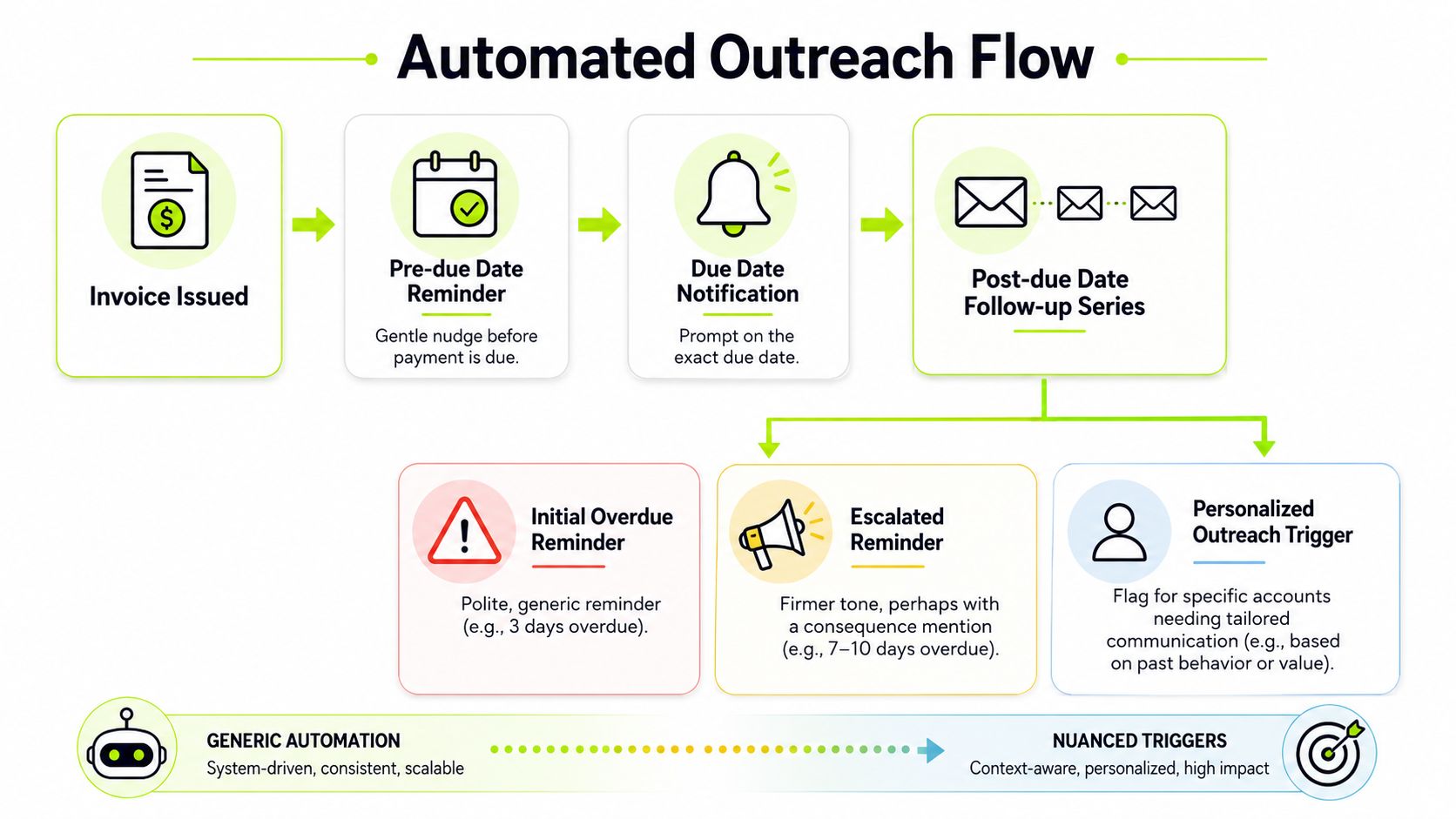
The operational shift is simple. Move from “someone remembers to follow up” to “the system triggers the right next action, and people step in where judgment matters.” That's the difference between basic accounts receivable automation and a process that protects cash flow.
What manual follow-up gets wrong
In most firms, the outreach pattern is familiar:
Situation | Manual process | Better process |
|---|---|---|
Invoice sent | Finance assumes the client received it | System confirms delivery and starts the cadence |
Due date approaching | Reminder depends on someone's calendar | Reminder triggers automatically |
Overdue status | Tone varies by whoever writes the email | Messaging follows policy, then escalates intentionally |
High-value account | Follow-up can be delayed by internal politics | Account gets flagged for earlier human review |
The problem isn't that people don't care. It's that memory, emotion, and workload distort execution.
Automating invoice delivery and reminder workflows with a regular cadence, such as a reminder after 7 days overdue and a phone call after 14 days, ensures consistent follow-up, preventing the long delays common in manual processes and reducing the administrative burden that contributes to significant annual waste in enterprise AR, as outlined in Quadient's guidance on modernizing accounts receivable operations.
Standardize the cadence, vary the treatment
A strong cadence should be fixed. The tone and channel should not always be fixed.
For example:
- Routine accounts: Use automated pre-due reminders and standard overdue notices.
- High-value invoices: Trigger a quicker internal review if the invoice starts aging.
- Strategic clients: Keep the sequence active, but route later-stage outreach through the relationship owner with finance oversight.
- Accounts with prior disputes: Adjust language early so the note feels informed, not generic.
That's where AI AR automation has a real role. Used well, it doesn't replace judgment. It helps finance tailor timing and language based on account history while still keeping the process on rails.
The firms that collect well aren't the ones that sound toughest. They're the ones that stay consistent.
Omnichannel doesn't mean noisy
Email remains the default in B2B collections, but it shouldn't be the only motion you can run. Some accounts respond to SMS. Some need a call task. Some need an internal alert to the account lead.
The point is orchestration. Sequence the touches, define escalation points, and decide in advance when human involvement becomes necessary.
If you're thinking about messaging systems more broadly, the workflow ideas in automated messaging in Sales Navigator are useful because they show how teams can structure outreach logic instead of relying on ad hoc follow-up.
The trade-off is straightforward. Pure automation without nuance can feel robotic. Pure human follow-up becomes uneven fast. The right answer is disciplined automation with clear triggers for human intervention.
Make It Effortless for Clients to Pay You
If your firm still makes clients work hard to pay, you're creating your own collections problem.
In 2026, refusing modern payment options is the business equivalent of a retail store that only accepts cash. Some customers will comply. Many will delay. A few will resent the experience. None of that helps your cash position.
For professional services firms, payment convenience isn't cosmetic. It's part of collections strategy.
Convenience changes behavior
Clients don't wake up looking for friction. They pay faster when the route from invoice to payment is obvious.
Providing clients with diverse payment methods such as credit cards, ACH transfers, and online payment portals significantly shortens the average collection period. This is critical because the global enterprise sector wastes approximately $200 billion annually due to inefficient AR processes, where 1 in 10 invoices goes unpaid, according to Solve Accounting's review of AR process improvements.
That matters even more in firms serving a mix of client sizes. Enterprise AP teams may prefer ACH. Smaller clients may want card payment. Some decision-makers now expect digital wallet options in the same way they expect a calendar link for scheduling.
What firms should offer
You don't need every payment rail under the sun. You do need to remove avoidable barriers.
A practical setup usually includes:
- ACH or bank transfer for larger invoices and lower processing cost
- Credit card for speed and convenience
- Online payment portal for self-service access
- Digital wallets where your client base uses them
For many firms, the key isn't adding one more method. It's putting all accepted methods in one clean client experience. That's where a self-service payment portal earns its keep.
If you're reviewing options, this overview of B2B online payment methods is useful for comparing what fits different billing models and client expectations.
The real trade-off
The usual objection is cost. Card fees are real. Portal implementation takes effort. Treasury teams may prefer clients to stay on ACH.
That's fair. But compare those costs against slower collections, extra manual follow-up, and the internal labor required to shepherd clients through payment instructions. Many firms optimize for transaction cost while ignoring collection cost.
For CFOs focused on improve cash flow goals, the question isn't “what's the cheapest payment method?” It's “what mix of options gets cash in with the least friction and the least rework?”
Streamline Cash Application and Dispute Handling
Getting paid is only part of the job. Cash isn't fully useful until it's applied correctly, visible in the ledger, and reflected in the aging report.
Many firms stall. They improve billing and reminders, but the back office still reconciles payments manually, hunts for remittance detail, and leaves exception items sitting unresolved. That weakens visibility just when finance needs it most.
Why internal friction matters
When cash application is slow, several things go wrong at once:
- The aging report becomes less trustworthy
- Collectors chase invoices that may already be paid
- Controllers lose time clearing exceptions
- Forecasting gets noisier than it needs to be
That's why AR orchestration has to include the post-payment workflow.
Integrating AR with ERP/CRM systems and enabling self-service payment portals cuts administrative friction by 50% and accelerates cash application from 3–5 days to under 24 hours. This integration also reduces manual reconciliation errors by 65%, based on Quadient's benchmark data on modern AR operations.
For firms running on systems like QuickBooks, ERP integrations matter even if the transaction volume isn't enterprise-scale. QuickBooks AR automation isn't just about sending invoices. It's about getting payment data back into the books quickly enough that finance can trust what it's seeing.
Build an exception process, not just a matching engine
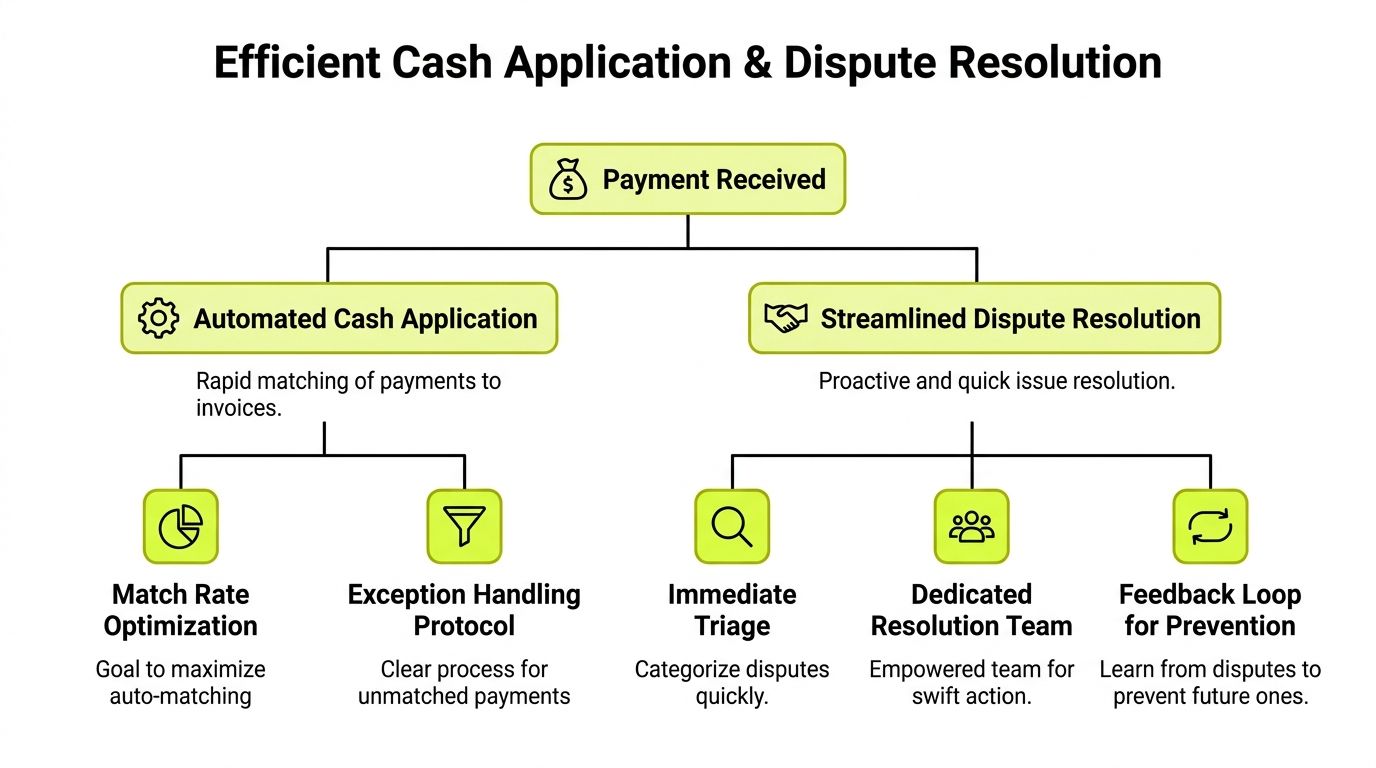
Automated cash application works best when there's also a clear rule set for what doesn't match.
A practical operating model looks like this:
Area | What good looks like |
|---|---|
Payment matching | Most payments apply automatically using invoice and remittance data |
Exceptions | Unmatched payments go into a queue with assigned ownership |
Disputes | Each issue gets categorized and timestamped |
Resolution loop | Billing errors and recurring client issues feed back into invoice design |
The dispute side matters more than many firms admit. A dispute that lives in someone's inbox becomes an aging issue. A dispute logged in a shared workflow becomes a solvable operational item.
Finance teams don't need fewer exceptions. They need faster triage and clearer ownership.
Keep disputes from becoming silent write-downs
Professional services invoices often generate avoidable disputes. Missing references. Unclear time descriptions. Charges that don't map cleanly to the client's internal approvals.
Once that happens, firms tend to over-personalize the response. The partner sends one note. Finance sends another. Nobody tracks whether the issue is resolved, pending backup, or ignored.
That's where centralized workflow matters. A systemized cash application automation process should capture both the payment match and the reason an item fell out. Over time, that gives CFOs a cleaner view of whether friction is coming from billing quality, client behavior, or internal follow-through.
Use Data to Predict and Prevent Friction
Most firms review AR data as a backward-looking scorecard. DSO is up. Aging is worse. A few large invoices are late. That's useful, but it's not enough.
The stronger move is to use AR data as an early warning system. Finance should be able to see where friction is forming before it turns into a collection problem.

Read the signals, not just the totals
Aging reports and DSO trends become more useful when you segment them. Look by partner, client type, invoice size, service line, and dispute reason. You're trying to answer a sharper question than “who's late?”
You're trying to find patterns such as:
- Invoices from one practice area take longer to approve
- Certain clients pay on time only when the invoice includes extra detail
- Specific relationship owners intervene too late
- Small disputes create long delays because nobody resolves them quickly
This is also where the softer side of collections becomes measurable. Beyond technical friction, personalized, adaptive communication that adjusts tone based on customer history can reduce DSO by up to 15%. This addresses the psychological friction gap, as 1 in 10 invoices goes unpaid not due to inability but due to perceived friction or relationship strain, according to Tratta's analysis of outstanding accounts receivable.
That finding lines up with what operators see in the field. Some clients need a direct reminder. Others respond better when the note acknowledges context and keeps the relationship intact.
What to watch every week
The best dashboards are operational, not decorative. Review data that tells you where process is breaking:
- Invoice-to-send lag: How fast bills go out after work is complete
- Open rate on invoice emails: Whether the document is reaching the right contact
- Overdue stage distribution: Where accounts are piling up in the cadence
- Dispute volume by cause: Which invoice issues recur
- Cash application exceptions: How much payment volume still needs manual intervention
A cinematic visual that often works well in board materials is a waterfall chart showing invoice value moving from issued, to due, to overdue, to disputed, to paid. Another strong option is a heat map by client and aging band that makes concentration risk obvious at a glance.
A short demonstration can help teams align on what a predictive workflow looks like in practice.
Prediction only matters if it changes behavior
Analytics without action just gives you a cleaner view of the same problem.
The finance teams that consistently reduce DSO use data to change policy. They tighten billing handoffs, alter reminder timing, escalate certain accounts earlier, and coach client-facing leaders on where relationship management helps and where it delays collection.
That's the promise of AI AR automation. Not more dashboards. Better decisions, made earlier.
From Friction to Flow
AR improves when the whole cycle gets tighter. Clear invoices reduce confusion. Automated outreach creates consistency. Better payment options remove hesitation at the point of payment. Fast cash application keeps the ledger clean. Dispute workflows stop small issues from turning into old receivables.
That's why how to reduce friction isn't a collections script or a reminder template. It's an operating design question.
For CFOs and Controllers in professional services, that design has to reflect the way firms run. Partners influence timing. clients expect flexibility. Finance needs control without making the process feel heavy. If you're benchmarking broader process changes, this practical piece on streamlining accounts receivable processes is worth a look because it frames automation as workflow discipline, not just software deployment.
When AR runs well, it does more than improve cash flow. It signals professionalism. It gives leadership better visibility. It lets the firm stay firm on payment without becoming clumsy in the client relationship.
Resolut automates AR for professional services with the control finance teams want and the client experience firms need. It brings collections, outreach, payment orchestration, and reconciliation into one operating layer so your process stays consistent, accurate, and human. Learn more at Resolut.