How to Set Up a Payment Portal: Guide for Your Firm 2026
Learn how to set up a payment portal for your firm. Get step-by-step guidance on planning, compliance, AR integration, and UX design for success in 2026.
A controller at a professional services firm often knows exactly which invoices are overdue, yet still spends the morning exporting spreadsheets, matching bank deposits, and sending reminders clients may not see. The payment link exists, but it sits apart from the billing record, the accounting system, and the collections workflow. Every manual handoff delays cash application and makes it harder to reduce DSO.
A well-designed payment portal fixes more than checkout. It connects the invoice, payment method, authentication, receipt, reconciliation, and follow-up process into one controlled flow. For firms between $3M and $50M, that connection matters because a portal should improve cash flow without creating a new compliance burden or another system finance teams must maintain.
Introduction to Payment Portal Setup
A payment portal works best when finance treats it as part of accounts receivable, not as a web form owned by IT. A client opens an invoice, confirms the amount, chooses a suitable payment rail, completes authentication, and receives confirmation. The payment then moves into the firm's accounting or practice-management system, where the team can apply cash and update the receivable without rekeying data.
That sequence changes the daily workload. Instead of asking someone to check a processor dashboard, download a settlement file, find the matching invoice, and update QuickBooks, the firm can create a traceable path from billing to cash application. This is the foundation of accounts receivable automation, whether the firm uses a dedicated AR platform, an ERP, or QuickBooks AR automation.
A payment portal also reflects how clients now expect to pay. In the euro area, online payments increased from 7% of day-to-day payments in 2019 to 21% in 2024, while their share of total payment value rose from 18% to 36%, according to European open payment data. Online checkout is no longer a secondary convenience for firms that bill digitally.
Finance operator's view: A portal isn't finished when a client can submit a card. It's finished when the payment is secure, recorded against the right invoice, visible to the AR team, and connected to the next collections decision.
The implementation therefore needs to cover planning, architecture, payment methods, security, AR integration, user experience, testing, and ongoing measurement. The right design can support AI AR automation, improve the timing and quality of collections outreach, and help the firm improve cash flow without damaging client relationships.
Planning Your Payment Portal
Start with the receivables problem, not the vendor shortlist. Bring the CFO or owner, controller, AR lead, IT or systems administrator, client-service representative, and compliance owner into the first working session. Each person sees a different risk, and the portal will fail if it solves only the checkout problem.
A practical planning meeting should answer four questions:
- What must improve? Decide whether the priority is faster payment, fewer manual postings, lower acceptance cost, better client convenience, or stronger control over payment data.
- Where does the current process break? Trace an invoice from approval through delivery, client action, settlement, reconciliation, and reporting.
- What must connect? List the accounting platform, practice-management system, CRM, payment processor, bank feeds, reporting tools, and collections workflow.
- Who owns the result? Assign operational ownership for payment exceptions, refunds, failed transactions, access reviews, and security alerts.
A hypothetical firm might find that its current DSO is 50 days and set a target of 30 days. That target shouldn't become a slogan. The AR lead should identify which invoices create the delay, whether clients lack convenient payment options, how long cash application takes, and whether reminders arrive before or after the due date. The implementation budget should cover integration work, provider fees, testing, training, monitoring, and ongoing changes, not just initial development.
Build the decision record
Document the requirements before approving a build. A hosted payment page can reduce PCI scope because the page operates in a PCI DSS compliant facility, shifting part of the security burden to the provider, as described by Paystri's hosted payment solutions. That approach often suits a services firm with limited finance-technology resources, although it gives the provider more influence over branding, checkout behavior, and release timing.
A custom portal may offer deeper control over invoice presentation and workflow, but it also creates continuing responsibility for security, browser compatibility, payment failures, and vendor changes. The least expensive build is rarely the least expensive operating model if the finance team must maintain it manually.
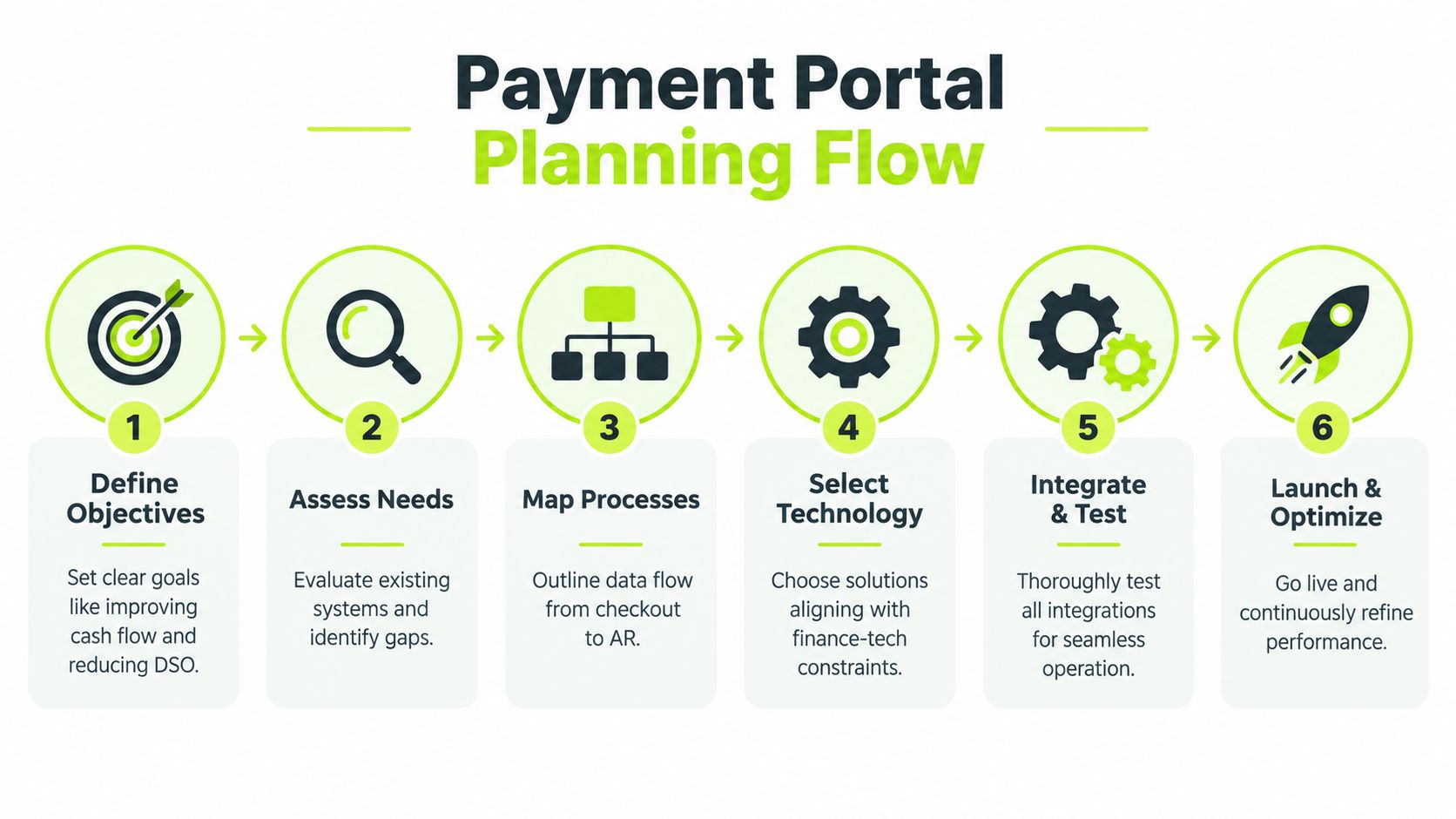
Before approval, define a baseline for payment completion, unapplied cash, failed payments, settlement timing, support tickets, and DSO. Those measures give the team a way to judge whether the portal improves AR, rather than merely launching on schedule.
Choosing Architecture and Payment Methods
The architecture decision usually comes down to control versus operational complexity. A single gateway can be straightforward to implement and easier for a small team to administer. It may also limit payment-method coverage, geographic flexibility, and the firm's ability to route transactions when an authorization fails.
An orchestration layer connects multiple processors and payment rails behind one portal. Trust Payments' discussion of online payment trends describes payment orchestration platforms and AI routing as mainstream in 2026, shifting setup away from a single-gateway model toward multi-rail routing intended to improve approval rates and lower costs. Treat that as an architecture choice, not a reason to add complexity automatically. A firm should use orchestration when the expected benefit from routing, coverage, or resilience justifies the additional vendor and governance work.
Hosted checkout reduces development and can narrow the firm's direct compliance exposure. Embedded checkout offers more control over the client experience, but every page element, script, integration, and update requires careful review. For firms evaluating payment gateways for business, the useful comparison is not just the headline processing rate. It's the total cost of acceptance, reconciliation, exception handling, support, and compliance.
Match payment rails to invoice economics
Cards are familiar and convenient, especially for smaller or urgent invoices. Bank transfers can be more economical for large professional-services invoices, while digital wallets can help clients who prefer stored credentials or mobile checkout.
Payment Method | Typical Fee |
|---|---|
Card payments | Around 2.9% + $0.30 per transaction |
ACH bank transfers | About 1% with a minimum fee |
Digital wallet and card combinations | May price similarly to cards, depending on the processor |
These fee benchmarks come from GoCardless' payment gateway fee guide. The portal should show the method clearly and let the finance team decide whether to steer clients toward a lower-cost rail without making the experience feel punitive.
Tokenization, 3-D Secure 2.3.1, and velocity controls belong in the design conversation from the beginning. For cross-border or higher-risk payments, authentication can reduce exposure, but added steps can also create abandonment. Use transaction data to distinguish a genuine fraud-control improvement from a checkout obstacle.
Ensuring Security and Compliance
A payment portal can pass an audit and still expose card data through an altered checkout script. Set security controls alongside the architecture, then test functional, security, and performance paths before production monitoring begins. Use the PCI Security Standards Council standards library to anchor requirements and evidence.
The implementation sequence should be documented: map the architecture, select the provider, build the integration, test expected and failure paths, record evidence, and monitor production behavior. Finance owns the control model even when engineering configures the systems. That ownership matters for AR automation because an insecure portal can interrupt collections, delay cash application, and increase DSO.
Keep the checkout surface under control
PCI DSS 4.0.1 requires firms to inventory every script on payment pages and continuously monitor those scripts for unauthorized changes. The guidance on payment-page security after audit frames this as an ongoing control rather than a one-time audit task. Marketing tags, analytics tools, chat widgets, and fraud tools can all affect the payment surface.
Scripts used strictly for 3DS processing may be exempt from separate validation under Requirement 6.4.3, while other checkout scripts remain in scope. Record that distinction in the implementation evidence so reviewers can verify it without relying on developer notes.
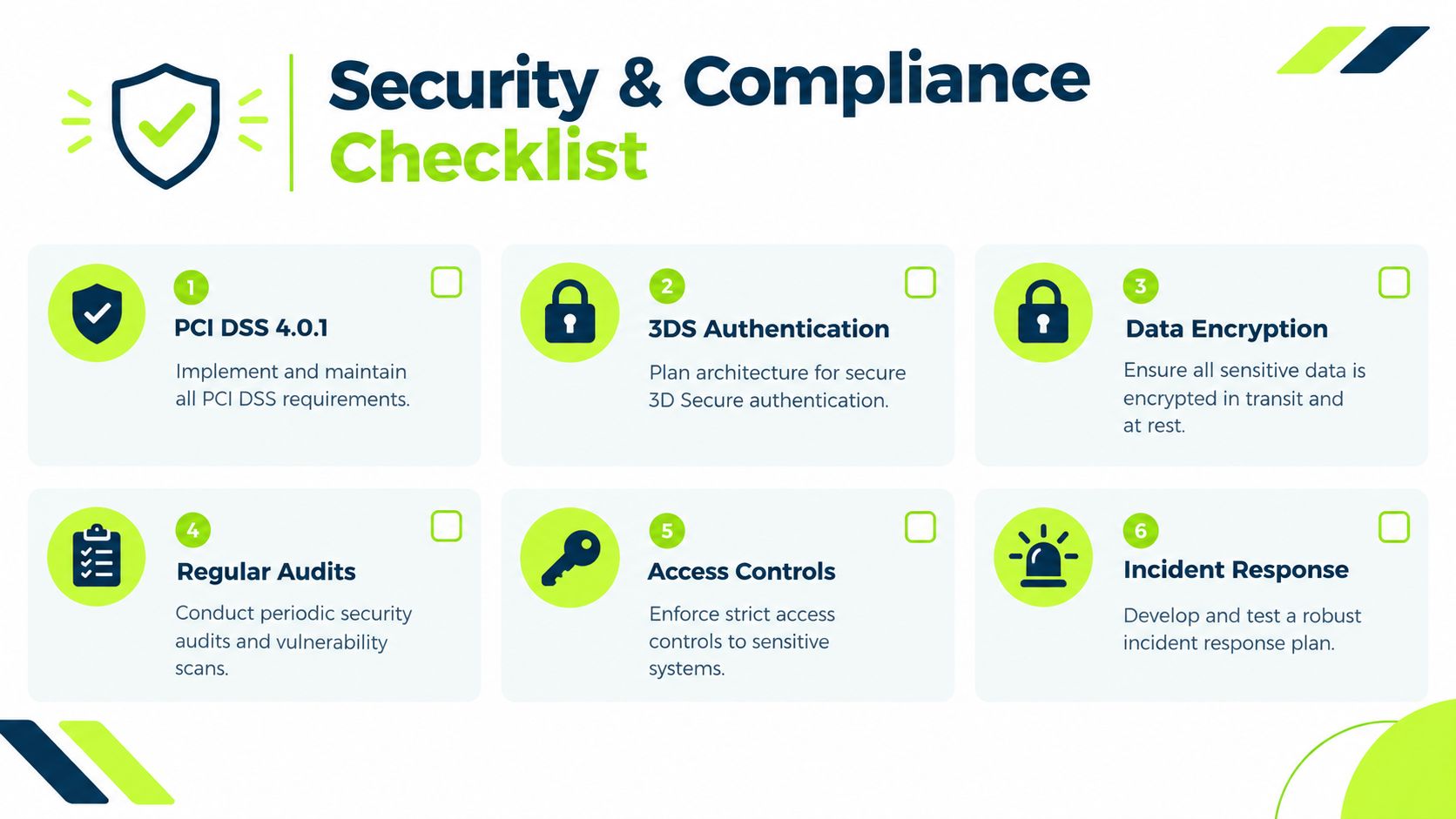
Assign named owners to a repeatable control checklist:
- Script inventory: Record each payment-page script and its purpose.
- Change monitoring: Alert the security or systems owner to unexpected changes.
- Authentication controls: Confirm ACS, DS, and 3DS components stay in approved environments.
- Access reviews: Remove unnecessary administrative access and retain review evidence.
- Webhook protection: Authenticate, sign, and monitor inbound payment events.
- Incident response: Define who pauses acceptance, contacts the provider, investigates, and communicates with clients.
A hosted payment gateway can reduce PCI scope, but the firm remains responsible for provider oversight, integrations, permissions, and monitoring. Connect alerts to AR operations so payment interruptions are handled before they extend collection cycles. Compliance continues after launch, with security monitoring supporting faster cash collection and lower DSO.
Integrating with AR Systems and Cash Application
A portal that accepts money but leaves the accounting record untouched is only partially implemented. The useful workflow begins when the billing system creates an invoice and a secure payment link, continues through the client's payment choice, and ends when the accounting or practice platform receives a verified transaction and applies it to the correct receivable.
Consider a consulting firm using an ERP or QuickBooks. The billing system sends the invoice number, client identity, balance, due date, currency, and payment link to the portal. After payment, the processor sends a controlled event containing the transaction status and reference. The AR system validates that event, updates the invoice, posts the receipt, and routes exceptions such as partial payments, overpayments, failed settlement, or unmatched remittances to a work queue.

Design the exception path first
The happy path is easy to demonstrate. Controllers should spend more time on the transactions that don't fit.
- Partial payment: Keep the invoice open and record the remaining balance without creating a duplicate receivable.
- Multiple invoices: Apply the payment using remittance details or route it for review when allocation is unclear.
- Refund: Preserve the original transaction reference and reverse the accounting entry consistently.
- Failed webhook: Retry safely without creating duplicate cash postings.
- Disputed payment: Flag the invoice and preserve the evidence needed for follow-up.
AR automation workflows that sync digital payments directly into accounting platforms can eliminate up to 80% of manual reconciliation steps, speeding cash application and improving visibility, according to Deltek's AR automation example. The value comes from reliable data movement and exception discipline, not from removing human review entirely.
Teams should also document ownership across systems, especially where integrations cross internal and external platforms. A practical guide to addressing enterprise integration challenges can help teams think through data ownership, failure handling, permissions, and system boundaries.
The AR dashboard should show more than successful payments. Include unapplied cash, failed transactions, aging by payment method, refunds, disputes, settlement status, and invoices with repeated payment attempts. That visibility lets the collections team act on the reason for delay instead of sending the same reminder to every client. A dedicated workflow for cash application automation should connect payment events to reconciliation rules and human review queues.
Designing UX and Billing Flows
Clients don't experience your AR architecture. They experience an invoice, a payment page, a confirmation, and whatever happens when something goes wrong. The design should make the next action obvious while preserving enough context for the client to verify the invoice before paying.
Begin with the invoice itself. Display the client name, firm name, invoice number, service description, amount due, due date, accepted payment methods, and a clear payment action. Keep the link tied to the specific invoice so the client doesn't have to search for an account balance or manually enter a reference.
Remove avoidable decisions
A well-structured form asks only for information the processor or accounting workflow needs. Prefill client and invoice data from the AR system, group cards, bank transfers, and wallets under clear labels, and explain any processing or settlement timing before the client submits the payment.
Use a different flow for different situations. A recurring client may need a fast repeat-payment experience, while a first-time payer may need stronger identity or 3DS authentication. A client paying a large invoice may prefer a bank transfer, even if a card is the most familiar option.
A useful design review asks:
- Can the client identify the invoice immediately?
- Does the page work on the devices clients use?
- Are payment methods presented in a neutral, understandable order?
- Does an error explain what to do next?
- Does the confirmation show the amount, invoice reference, and receipt path?
- Can the AR team see whether the client opened the link or started payment, where the system supports that visibility?
Payment options should reflect local behavior and economics. In Singapore, PayNow can be free when it goes directly into business accounts, while card payments commonly cost about 2.8% to 3.5% and digital wallets often fall between 1.5% and 3.3%, according to Wise's comparison of online payment methods. Those differences affect both client completion and the firm's net collections economics.
Design principle: Don't make a client choose between convenience and clarity. Offer the right rails, explain the transaction, and keep the payment action close to the invoice context.
Branding should support trust without adding decorative weight. Consistent colors, recognizable firm details, accessible text, and a clear receipt experience matter more than visual effects. Teams reviewing invoice layouts can also learn from examples of effective painting billing forms, particularly the way service descriptions, amounts, payment terms, and calls to action are organized.
Testing Rollout and Measuring Success
Most portal rollouts experience unnoticed failures. The page works for the project team, but a client uses a different device, selects an unsupported payment method, fails authentication, or pays without enough remittance information for automatic application. A production-ready test plan must cover successful payments and every meaningful failure path.
Instrument the funnel with begin_checkout, add_payment_info, and purchase events. Review where users leave, then connect the behavior to operational causes such as form complexity, payment-method mismatch, processor decline, or authentication failure.
Set the operating thresholds
Average checkout conversion rates sit around 45% to 55%, with more than 60% considered good and more than 70% excellent. A result below 40% indicates major friction in the payment flow, according to checkout conversion benchmarks from Accelero. Use those figures as diagnostic reference points, not as a substitute for your own baseline.
Track the portal alongside AR outcomes:
- Checkout conversion: Separate invoice views, payment starts, payment details submitted, and completed purchases.
- Approval rate: Review results by country, card type, provider, and payment method.
- Settlement timing: Measure when funds become available and when the accounting entry posts.
- Unapplied cash: Monitor value and volume of receipts requiring human allocation.
- DSO: Compare the post-launch trend with the documented baseline.
- Exception workload: Count refunds, disputes, failed webhooks, and payment support cases.
Before full release, test on supported browsers and devices, then run controlled transactions for each payment rail. Confirm receipts, ledger postings, webhook retries, permissions, refunds, and reporting. Roll out to a manageable client group, give the AR team a named escalation path, and review results frequently enough to correct routing, copy, or payment-method coverage before expanding.
A payment portal should become part of the firm's AR operating rhythm. Controllers should review its performance with collections, cash application, and security owners, while finance leadership checks whether the system is helping the firm reduce DSO and improve cash flow. Resolut automates AR for professional services, consistent, accurate, and human.
Resolut connects client payments with invoice follow-up, cash application, and receivables visibility, helping professional services firms manage the full AR workflow rather than a standalone checkout page. Visit Resolut to see how its payment portal and AR automation can support faster, more controlled collections.