Invoice Payment Confirmation: What to Send and When
Learn how to automate invoice payment confirmation for AR: required fields, channel templates, matching rules and the KPIs that prove cash arrived.
Month-end is open, the bank feed looks healthier than the aging, and a client email says "paid today." Someone on your team is about to close the invoice so the cash forecast holds. I would stop there.
An invoice payment confirmation is not the finish line. It is a control against overstating liquidity. The message is proof of cash only after the bank has verified settlement and the dollars are applied to the right invoice. A portal stamp, or a note from the client's accounts payable clerk, can arrive while the money is still in transit or while the receivable stays open.
What follows is for CFOs, controllers, and owners of professional services firms between $3 million and $50 million. The record you send, the state that earns a client receipt, the match that posts the cash, and the monthly check that keeps forecasts honest are the whole job.
Fields Every Payment Confirmation Must Carry
A controller opens the bank feed and finds a $48,000 transfer labeled only with a company name that fits two clients. The payment succeeded at the bank. It can still sit unapplied when the invoice reference, the amount, or the adjustment detail never arrived with it.
That is why confirmation is its own step, not a prettier bank notice. A 2026 analysis from the Federal Reserve Bank of Kansas City describes the payment phase as payment instructions, payment receipts, remittance advice, and receipt processing. After approval, the buyer's accounts payable creates the payment and a remittance advice that may include invoice numbers, amounts, payment dates, discounts, reduced obligations, and other adjustments. The supplier then matches funds to those records. The same analysis reports that nearly 90% of U.S. businesses still use checks for at least some B2B payments, so the record has to survive ACH, wires, and paper.
Before you freeze the template, compare remittance advice and EOBs. The comparison shows how a short advice line differs from a long benefits-style statement. A services firm needs the short version, complete enough to post.
Who each field serves
Payer legal name and invoice number decide which receivable closes. The end-to-end reference lets matching run before names or amounts are compared. Amount applied, currency, and deductions show partial payments, short pays, discounts, and credits. Payment date and settlement status separate the client's claim from the bank's verification. The bank or source reference is what you pull when a posting is disputed weeks later.
Field | What it holds | Why it matters |
|---|---|---|
Payer legal name | Entity that owes the invoice | Prevents crediting the wrong client when names are similar |
Invoice number | Exact receivable being closed | Lets cash post to one invoice rather than a balance |
End-to-end reference | Unique ID carried from request to payment | Supports exact matching ahead of names or amounts |
Amount applied | Portion of cash allocated to this invoice | Reveals partial, overpaid, and short-paid cases |
Currency | Currency of the bank transaction | Catches mismatches on cross-border payments |
Payment date and value date | When the payment was initiated and when funds were available | Drives DSO accuracy and cash forecasts |
Settlement status | Whether the bank verified settlement or the payer only supplied the claim | Separates proof from assertion |
Deductions and adjustments | Discounts, credits, withholding, or short pays | Stops silent write-offs |
Bank or source reference | Message ID or statement line | Supports audit trail and dispute response |
Unapplied balance | Cash received but not yet matched to an invoice | Shows what remains open and should not be closed |
Practical rule: Pull ten recent confirmations. Each one should tie a payer, an invoice ID, an amount, a date, and any deductions to a single bank record. If any of the ten fail, the template is missing data, not the bank.
Run that test in the AR software for professional services you already run. Cleaner application is one of the few ways to reduce DSO without asking clients to pay sooner. Unapplied cash is still open receivables, even when the bank balance looks fine.
Confirmation States and What Each One Proves
A downloadable receipt is not cash. Payment instruction, bank acceptance, settlement, and ledger posting are different events, and firms blur them when a portal and a bank statement disagree.
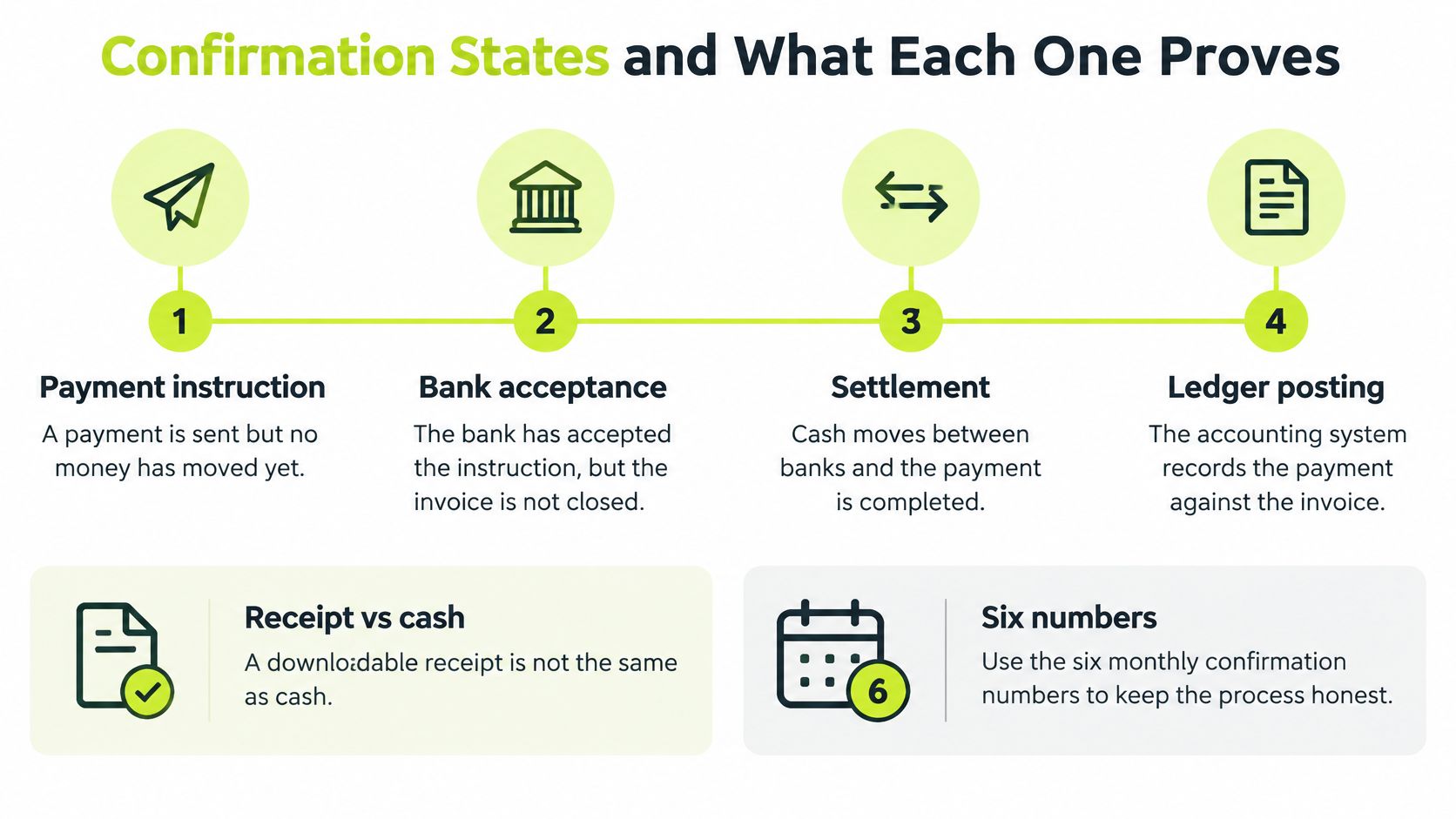
ISO 20022 remittance documentation separates accepted, settled, matched, and posted, and it says a payer-facing receipt should go out only after settlement evidence. Internal alerts can fire earlier, on initiation or bank acceptance. Structured messages can re-associate a payment with open invoices when the cross-reference is strong enough. Thin references still need a person.
QuickBooks Payments guidance in the UK states that funds arrive within 2 business days after payment. If a client says they paid and the money is missing, open the invoice, check whether it shows paid, review the payment emails, confirm the connected bank account, and call the bank if needed. A paid status can mean processed while settlement is still pending. Counting that status as cash inflates the forecast and weakens planning to improve cash flow. The settled state is the one that moves the number.
The same lag shows up outside accounting software. The Reliance Property Accounts payment timing guide walks through how long a payment can take once it leaves the payer's bank. Your clients may not use a trust account. The gap between "sent" and "cleared" is still yours to label.
State | What it proves | Client-facing wording | Internal action |
|---|---|---|---|
Scheduled | A payment date is set, no money has moved | Payment expected on the stated date | Forecast only, no ledger entry |
Initiated | The payer has sent the payment instruction | Payment sent, not yet received | Track as pending, keep invoice open |
Accepted | Bank or processor has accepted the instruction | Payment accepted for processing | Hold, do not close the invoice |
Settled | Bank confirms funds in your account | Payment received, reference included | Post cash and apply to the invoice |
Returned | The payment was rejected or reversed | Payment could not be completed | Reopen the invoice and contact the payer |
Reconciled | Cash is matched to invoice and ledger | Formal receipt issued | Close the item and update aging |
Scheduled items belong in the forecast only. Initiated and accepted payments can be acknowledged, and they should not close invoices. Settled means bank-verified funds, and only then should a receipt go out. A return reopens the invoice. Reconciled means the cash is matched and posted.
Write down two triggers before you automate anything. One state releases the client receipt. Another state posts the ledger. If those two are the same click, you will close receivables on promises.
Build the Confirmation Workflow and Matching Rules
Three triggers keep the message honest. Payment initiation sends an internal alert and leaves the invoice open. Bank acceptance moves the status to accepted and still does not close it. Settlement evidence is what releases the client receipt and the ledger posting.
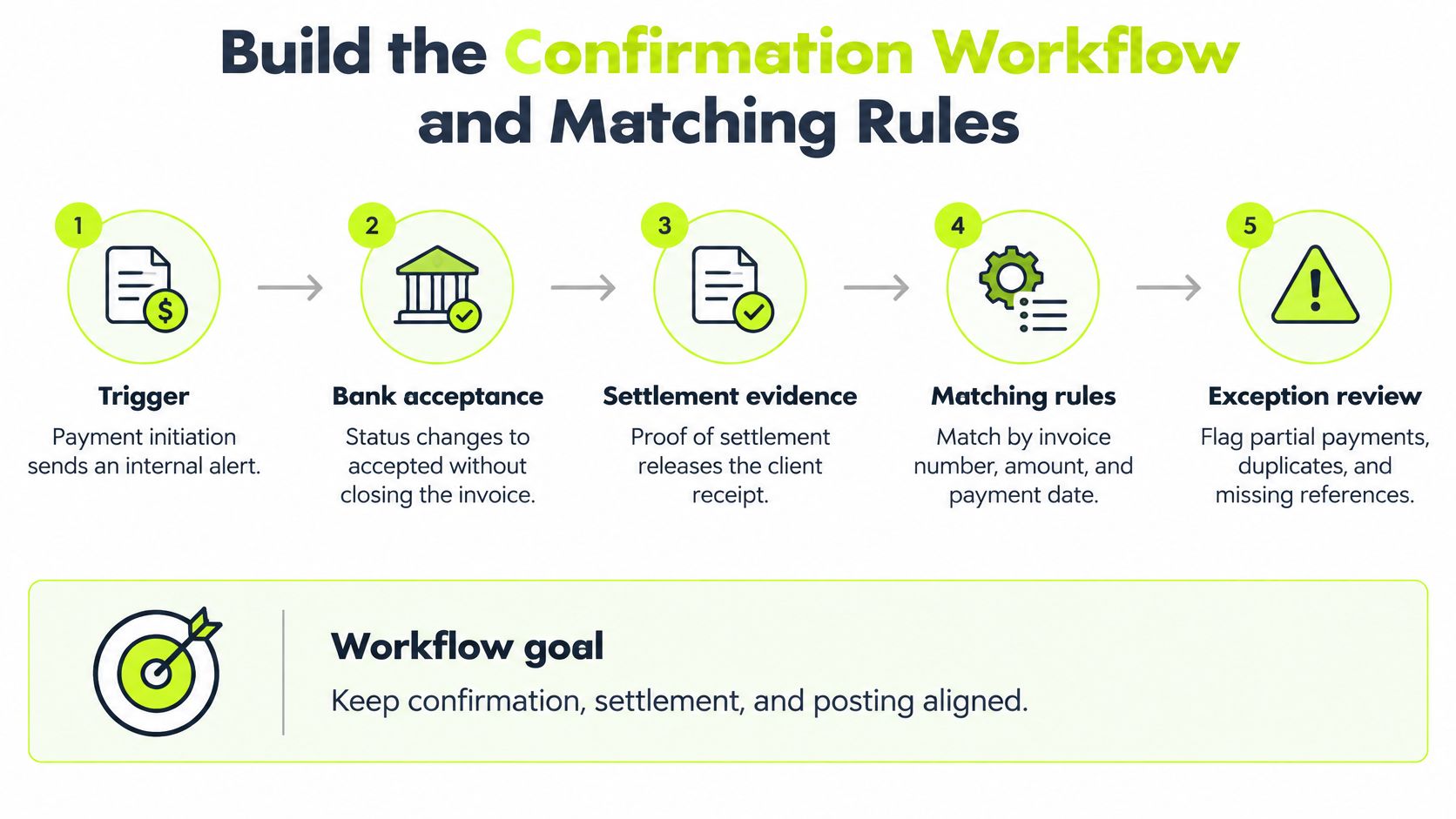
ISO 20022 guidance on linking a payment request to a credit transfer says the same End-to-End Identification should travel from the request into the credit transfer. Structured remittance then ties the bank line to one invoice, several invoices, a credit, a discount, or a partial settlement. Names and amounts alone are a weak key. A reused invoice number, a missing remittance block, a currency mismatch, or one payment covering several invoices will break a name match every month.
Six steps, in order
- Issue a reference that never changes. Generate a unique payment or invoice reference when the invoice goes out. Do this before anyone can type a free-text note on the check stub. The common slip is recycling last year's number because the project code looks familiar.
- Put that reference in three places. Embed it on the invoice, in the payment request, and in the remittance fields the client's bank will pass through. If it lives only in the email body, the bank file will not carry it.
- Ingest the bank file every business day. Pull the confirmation or camt report on a set clock, not when someone remembers. A Friday file left until Monday is how a settled payment misses the forecast you already published.
- Match in four tiers, highest confidence first. Exact end-to-end reference. Then exact structured creditor reference. Then a unique invoice-plus-amount match. Then a probabilistic pass on payer identity, amount tolerance, currency, date, and remittance text. Stop at the first tier that is unique. For a deeper pass on rule design, see how automated invoice matching treats one-to-many and many-to-one cases.
- Auto-post only the first three tiers. Log the matched fields, the confidence level, the timestamp, and the bank message ID on every automatic posting. Low-confidence matches wait for a person. Duplicate references, split payments, credit notes, discounts, and partial payments are never closed by a tolerance band.
- Name an exception queue. Tier-four matches, short pays, overpays, and multi-invoice payments go to one queue with an owner and an aging limit. ISO's remittance guidance draws the same line. Automatic re-association when the cross-reference is enough, and a manual account update when it is not. A healthy day-one record holds the reference, the matched invoice ID, the applied amount, the unapplied balance, and the bank reference together.
A short pay that should not vanish
Say an invoice is $12,400 and the client pays $12,000. The $400 gap goes to the queue with a reason code, not to a write-off and not to a silent close. Write the tolerance in a one-page rule and review it each quarter. A band that was fine for retainers will hide a withholding line on a cross-border engagement.
QuickBooks AR automation changes the handoff, not the rule. When QuickBooks Online is connected, invoice payment status syncs live. AI AR automation still has to respect the queue. Resolut detects "paid" stamps on uploaded PDFs and turns off outreach for that invoice automatically. Users can also mark any invoice paid manually in one click. Outreach should stop. The ledger should close only after settlement and a clean match.
A confirmation means more than "funds received." It carries settlement status, matched invoice IDs, applied amount, unapplied balance, and the bank reference.
Channel Templates for Email, SMS and Client Portals
The same confirmation has to read differently by channel. Email is the formal record. SMS is a heads-up. A portal is the running file the client's accounts payable team can open without calling you. If every channel carries the full ledger, people stop reading. If SMS carries account numbers, you have created a fraud path.
Channel | Best use | Include | Avoid |
|---|---|---|---|
Formal receipt and remittance detail | Invoice number, amount, dates, reference, attachment | Long ledger extracts in the body | |
SMS | Short heads-up on a large or urgent payment | Amount, invoice number, reply path | Account numbers or bank details |
Client portal | Ongoing record for the client's AP team | Status by invoice, downloadable receipts | Requests that need a signature |
A payment portal is the right home for status by invoice and for receipts the client can download later. Keep signature requests, disputes, and bank-detail changes out of that page and on a controlled path.
Three lines you can adapt
Email, sent only at settlement. Thank the client, then name the invoice number, the amount applied, the settlement date, and the bank reference. Attach the receipt. Do not paste the open aging into the body.
SMS, sent at acceptance. "We accepted your payment of $18,200 for invoice 4418 for processing. The receipt follows after the bank settles. Reply here if the amount looks wrong." No account number. No routing detail.
Portal notice on a short pay. Show the amount received, the balance still open, and a plain request for the difference. Do not mark the invoice paid in full.
Never write "received" when the payment is only initiated. That single word is how a forecast gets ahead of the bank.
Reminders stay in the firm's voice. Reminders are sent from the user's own domain, signed by the user's team, using the template the user wrote. Only the sending is automatic. A generic sender name is harder for the client to trust and easier for an impostor to copy.
Use this settlement email as the model, and swap the brackets.
Subject: Payment received for invoice [number]
Thank you for your payment of [amount] on [settlement date], applied to invoice [number]. Bank reference: [reference]. Your formal receipt is attached.
Regards, [name], [title], [firm]
Send that note after settlement, not after the client clicks pay. If the payment later returns, a second note reopens the balance in the same thread, with the same reference, so the record does not fork.
Fraud Checks Before You Confirm Bank Details
A client's AP address emails on a Friday: new bank details, invoice attached. The amount matches an open receivable to the dollar, the logo is right, and the thread resembles the last six. That is how the loss usually starts. When the remit-to field moves and nobody calls the number on file, the payment leaves your customer's account correctly and lands with a stranger.
The 2026 AFP Payments Fraud and Control Survey, based on 465 corporate professionals and summarized in Truist's key highlights, found that 96% of respondents had policies to verify changes to invoices, bank deposits, and contact details. A policy in a binder does not block a transfer. A named person making a callback before the vendor master changes does.
What to verify, and from where
- Payer and payee. Match both legal names to the record on file, not to the signature block in the new email.
- Invoice reference, amount, currency. Tie all three to the open receivable before anyone confirms receipt.
- Destination account. Call a number stored from the last verified change. Skip the reply address and any number printed in the payment request.
- Bank-detail changes. Run each one as its own approval: callback to the known contact, a second approver, and a dated record of who signed off.
- Access and alerts. Keep invoice references immutable, scope portal access by role, and raise an alert whenever a contact email or phone number changes.
Name the evidence tier in the confirmation itself. Client assertion, remittance advice, and a camt line on the statement are three different things, and a lower tier should never pass as a higher one in the same sentence.
The liquidity cost sits behind all of this. A diverted payment leaves the invoice open, so the cash you counted on never lands, and you reissue the invoice while the bank trace runs. Confirmations that skip the callback produce a forecast number that flatters the month right up until the reconciliation.
Screening the payment itself belongs next to the wording. A practical walk-through of managing payment compliance reviews helps when confirmations arrive across several portals and the evidence is split between them. More channels make the manual check harder to skip, not easier to justify skipping.
Pick one vendor or one client this week. Compare the bank details on their last payment against the last verified source, and write down who approved the most recent change. If no name comes back, the confirmation process is easier to spoof than the template suggests.
Measure Confirmation Accuracy Every Month
Accurate confirmations show up in six numbers. A monthly review of those numbers is what keeps the process honest. A clean email template will not tell you that cash is sitting unmatched.

Metric | Definition | How to read it |
|---|---|---|
Straight-through application rate | Share of payments posted with no manual touch | A rising rate means the matching rules are working |
False-match rate | Auto-posted matches later reversed | Should stay near zero; any rise needs a rule review |
Exception aging | Days items remain in the exception queue | Long tails hide unapplied cash |
Unapplied cash balance | Received cash not tied to an invoice | Overstates open AR if left unresolved |
Duplicate-posting rate | Payments posted more than once | Should be zero |
Settlement-to-posting time | Median days from bank settlement to ledger posting | Shorter times keep aging and DSO accurate |
Straight-through rate tells you the tiers are doing their job. False matches tell you a tier is too loose, and any rise means you review the rule before you widen tolerance. Long exception aging is where unapplied cash hides, usually on multi-invoice wires and short pays nobody owns. Unapplied cash left on the books overstates open receivables and invites a collection call on money you already have. Duplicate postings should be zero. If they are not, two people are posting the same bank line.
The monthly pass
Pull the six numbers, compare each with last month, and review the top ten exceptions by dollar value. Assign every one of those ten an owner and a date. A queue without an owner is a write-off waiting for quarter-end.
Settlement-to-posting time is the metric that ties accounts receivable automation to the aging your board sees. Shorter median days from bank settlement to ledger posting keep DSO from drifting for a mechanical reason. That is a reason to reduce DSO with application speed, not with a harder collection tone. The definitions and a simple scorecard live in this note on cash application metrics.
I would set a baseline this month and review the ledger against it before adding another automation step. If the false-match rate is not near zero, do not turn on wider auto-posting. Fix the reference first.
Resolut automates accounts receivable for professional services firms so confirmation, settlement, and cash application stay consistent, accurate, and still human when a match is uncertain. If you want that control in one place, from the receipt you send to the invoice you close, visit Resolut.