Invoice to Cash Process: Every Stage, DSO and Fixes
Learn each stage of the invoice to cash process, from invoicing and credit checks to cash application, plus the DSO metrics that show where cash stalls.
In 2023, 39% of CFOs reported that their accounts receivable teams were weeks or months behind on invoices and would never catch up, according to Versapay's 2024 accounts receivable statistics report. That backlog rarely starts with a weak overdue notice. It starts earlier, with a wrong purchase order, a late invoice, or remittance detail nobody captured.
For CFOs, controllers, and owners of professional services firms, the invoice to cash process works best as one chain with named owners. Separate credit risk from process friction, and each stalled invoice points to a different fix.
The Invoice-to-Cash Cycle Stage by Stage
Think of the cycle as a series of handoffs. A missing PO number at billing delays client approval. An invoice sent late can miss the client's payment run. A deposit that nobody matches hides cash that's already in the bank and makes a paid client look overdue.
Each stage has to produce something usable before the next stage can start. Billing setup produces clean client data. Invoice delivery produces proof of receipt. Collections produces a dated promise, not a vague assurance. Cash application produces a ledger you can trust at close.
Where Cash Stalls Between Teams
The owner changes at almost every handoff, which is why delays sit between teams. The engagement lead knows the scope, billing knows the rate, the controller knows the risk, and AR knows who promised what. If those facts don't travel together, each team waits for the next one.
A useful visual here is a horizontal swimlane diagram. Put the seven stages across the top, the owner under each one, and the output checkpoint at every handoff. Controllers can then see at a glance which checkpoint is missing.
Stage | What happens | Owner | Output to check |
|---|---|---|---|
| Contract terms, rates and client data entered | Engagement lead, billing | Correct legal entity, PO and payment terms |
| Invoice issued and sent on schedule | Billing or AR | Sent date and delivery confirmation |
| Client credit limit and risk reviewed | Controller or CFO | Approved limit and risk tier on file |
| Reminders and escalation before and after due date | AR team | Contact log and promise-to-pay dates |
| Funds arrive by ACH, card, check or wire | Treasury or AR | Bank deposit and remittance advice |
| Payment matched to invoices | AR accountant | Matched invoices and unapplied cash balance |
| Ledger and bank balances agreed | Controller | Zero unexplained variance at close |
Start with a simple diagnostic. Pull your last ten overdue invoices and mark the stage where each one stopped.
- Name the holder: Record the person who had the invoice longest, not just the department.
- Name the missing output: Was it a PO, a credit decision, a delivery record, or remittance advice?
- Fix that handoff first: Don't rewrite the whole process until the pattern is clear.
An invoice isn't stuck in AR in general. It's stuck at one handoff, with one owner, waiting for one output.
That discipline gives accounts receivable automation something solid to build on later. Software can't repair a handoff that nobody owns.
Invoicing and Credit Checks That Set the Pace
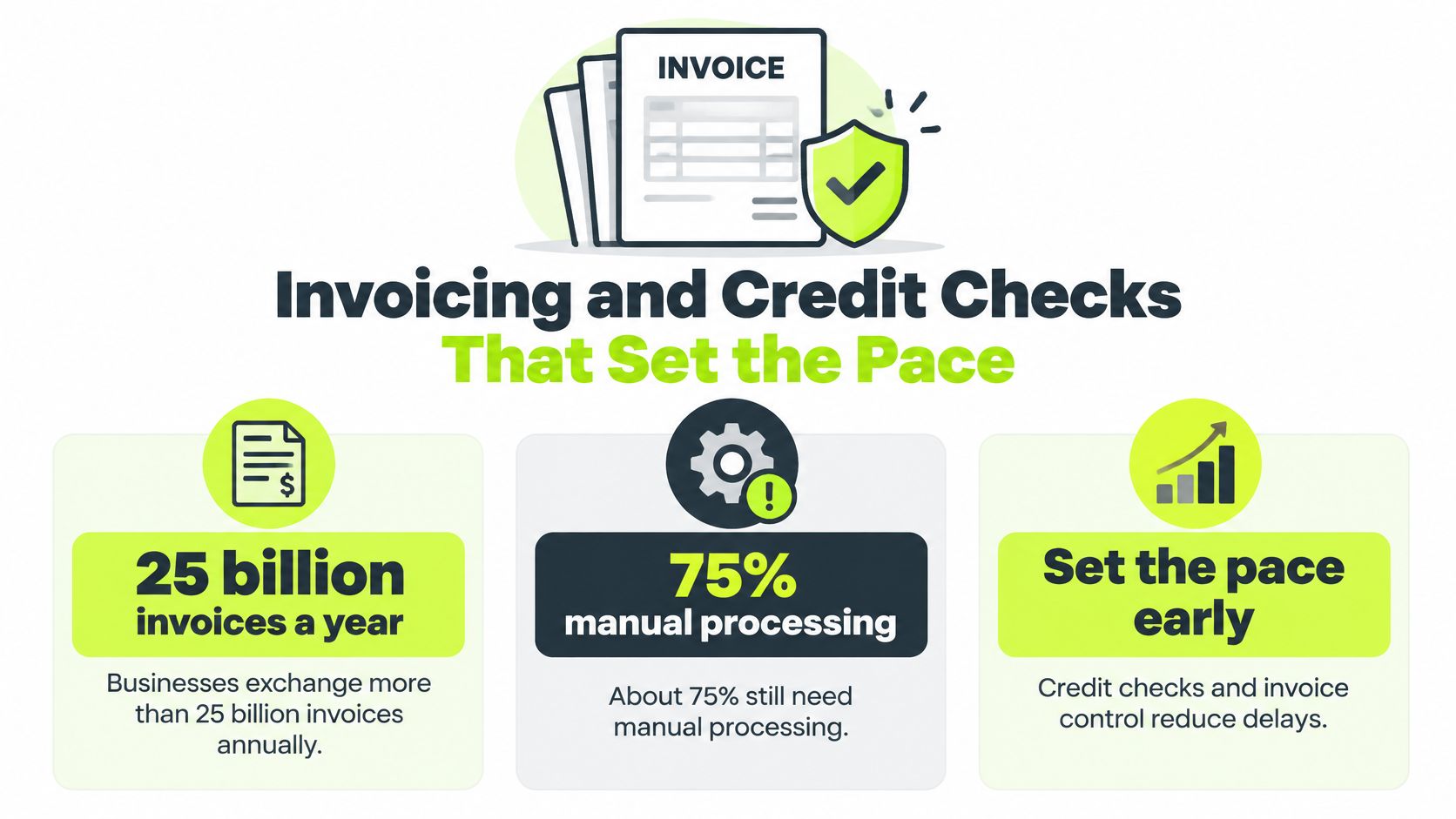
Manual handling sets the pace for everything downstream. The U.S. Federal Reserve reports that businesses exchange more than 25 billion invoices annually, and approximately 75% still require manual processing. The estimated annual cost of this manual invoice workload is approximately $200 billion, with potential savings of roughly $4 to $8 per invoice from improving business-payment efficiency.
For a professional services firm, the cost shows up as time. Every manual check between work completed and invoice received adds days. Every corrected and resubmitted invoice can restart the client's approval clock.
Run a Pre-Send Check Every Time
Don't rely on billing staff remembering client quirks. Put the check in the workflow and run it before any invoice leaves.
- Legal entity and tax data: Match the exact client legal name and tax registration to the signed agreement.
- PO or engagement reference: Use the reference the client's AP team needs for approval.
- Currency and line totals: Confirm currency, rates, hours, and totals against the signed scope.
- Payment instructions: Show the payment link and bank details the client should use, with no conflicting instructions in the email.
If invoices are bouncing back from your accounting system or clients can't open them, work through troubleshooting QuickBooks invoicing issues before you blame the collections cadence. A delivery problem looks like a payment problem until you check the send record. For QuickBooks AR automation to help, the underlying invoice has to be right first.
Set Credit Limits That Mean Something
Say a new client signs a $25,000 monthly retainer and has no payment history with you. I'd set a limit covering two invoices, keep standard 30-day terms, and schedule a review at the third invoice. That gives the client room to establish a record without letting exposure drift.
Re-review when a balance crosses the limit or a payment runs 10 days late. Structured credit risk assessment tools help you record the decision, the limit, and the review trigger in one place.
Separate risk from friction before you act. A late invoice from a client with a clean record usually points to process causes, such as a wrong approver or a missing reference. A client whose payments slip across two cycles is giving you a credit signal, and that calls for a new limit or shorter terms.
Test your own output this week. Pull the last 20 invoices, run the pre-send list against them, and count how many a client's AP team would have queried. A simple bar chart comparing manual and automated cost per invoice makes the case to partners more clearly than a memo does.
Measuring DSO and Days Delinquent
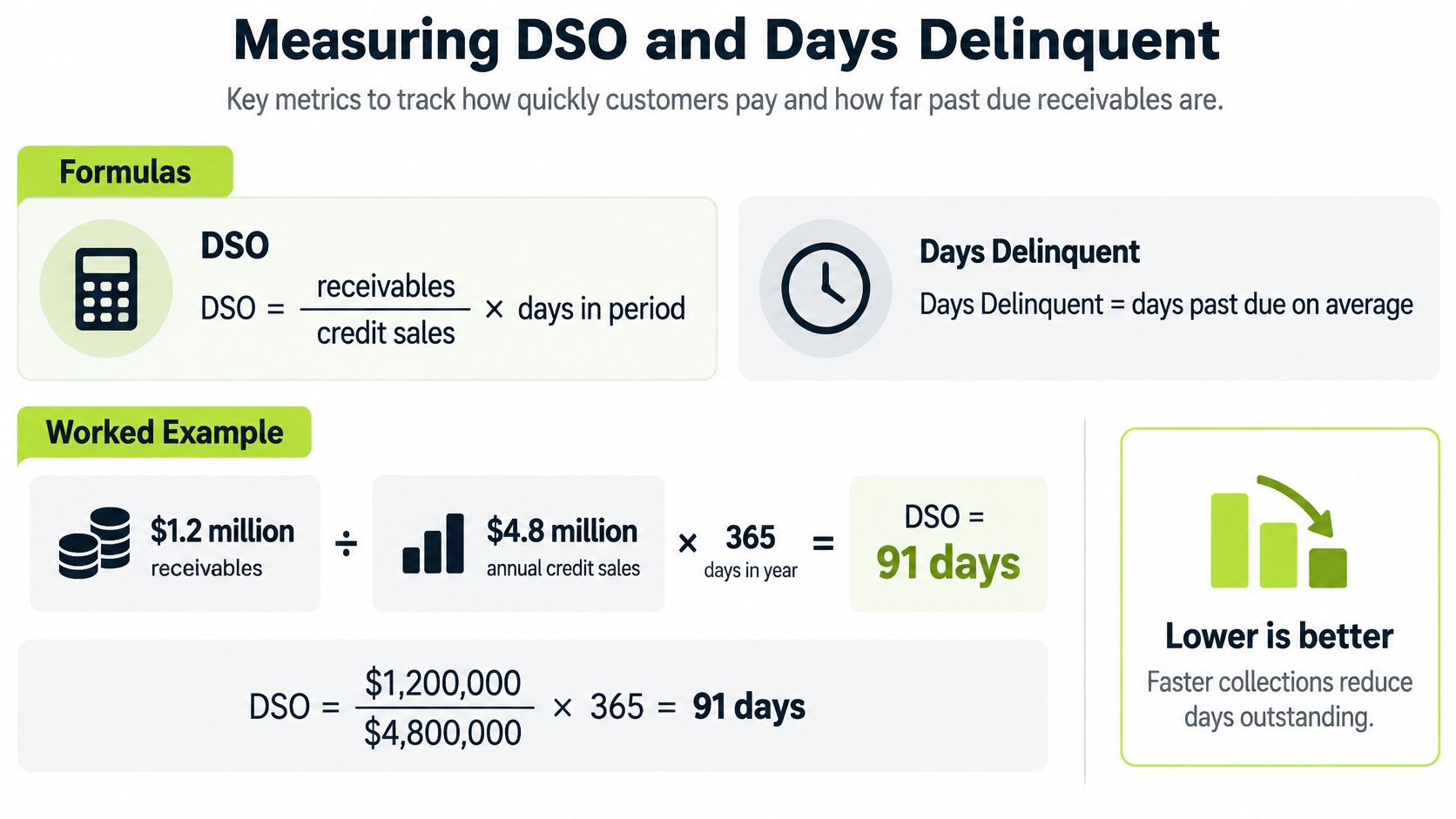
Start with the formula, not a benchmark. DSO equals receivables divided by credit sales, multiplied by the days in the period. It tells you how long revenue sits in receivables on average.
Say your firm has $1.2 million in receivables and $4.8 million in annual credit sales. The calculation is 1.2 ÷ 4.8 × 365, which gives a DSO of 91.25 days.
Now calculate best possible DSO using only current receivables. If current balances are $0.6 million, that's 0.6 ÷ 4.8 × 365, or 45.6 days. Subtract that from DSO and you get days delinquent of about 46. That gap is the part collections and process fixes can move. A step-by-step walkthrough of how to calculate DSO is worth keeping beside your month-end checklist so every controller uses the same period and sales base.
Terms Are Not the Same as Delay
Recent analysis in Sidetrade's data lake release, covering more than $8 trillion in B2B transactions involving over 42 million buying companies, found that businesses were paid in an average of 51 days in 2025, made up of 32 days of agreed terms plus 19 days of delay. Late payments therefore represented roughly 37% of the total payment cycle, and the same analysis found 18 days of delay in Europe versus 29 days in the United States.
That split changes the management question. Shortening terms from 30 to 21 days won't help if invoices arrive late, approvers can't find the PO, or disputes sit unanswered. To reduce DSO, measure the delay component by client, invoice type, and payment channel, then attack the cause you find there.
A stacked bar is the clearest visual for partners. Show 32 days of terms and 19 days of delay as two blocks making one 51-day cycle. Then show your own firm's two blocks beside it.
Metric | Formula | What it shows | Watch for |
|---|---|---|---|
DSO | Receivables ÷ credit sales × days in period | Average days to collect | Rises when large clients slip |
Best possible DSO | Current receivables ÷ credit sales × days in period | Days to collect if every client paid on time | Compare against agreed terms |
Days delinquent | DSO minus best possible DSO | Days added by late payment | Targets where collections effort pays off |
Days to cash | Settlement date minus invoice date | Actual time per invoice | Segment by client and payment terms |
Dispute cycle time | Days from dispute opened to resolved | Time lost to disputes | Assign an owner and a target |
Unapplied cash | Payments received but not matched | Overstatement of open AR | Clear weekly and age the balance |
Calculate DSO monthly and split it by client segment. A single firmwide number hides the retainer clients who pay reliably and the project clients who don't. Track days to cash per invoice, dispute cycle time, and unapplied cash alongside DSO, because those three show whether a process change worked or just moved the delay.
Collections Cadence That Protects Client Relationships
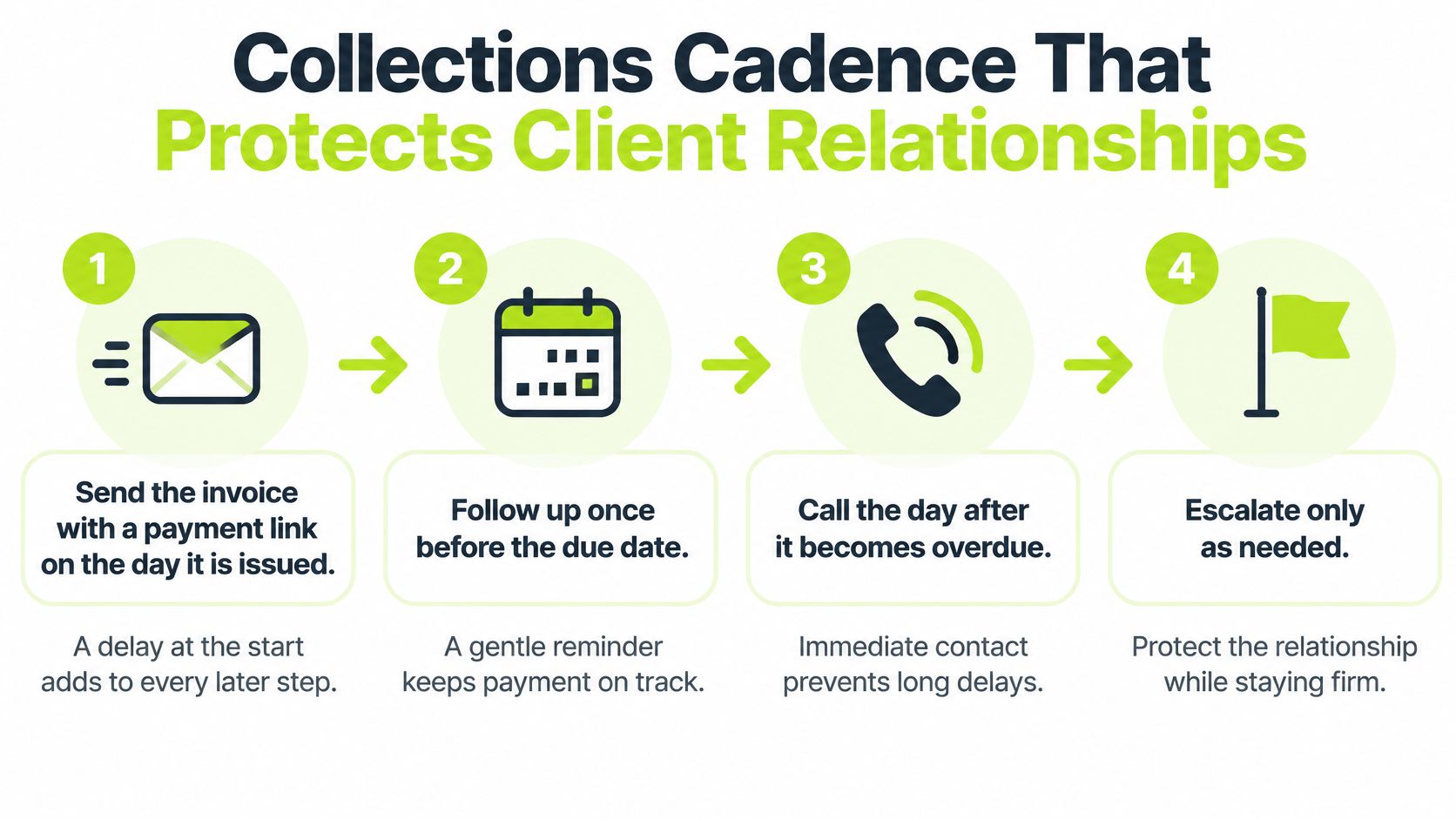
A good cadence is predictable. Clients should never be surprised by your timing, only reminded by it. Each step below has one job, and skipping early steps makes later steps feel abrupt.
The Six-Step Sequence
- Send the invoice with a payment link on the day it's issued. A delay at the start adds to every later step, and the link removes the excuse of searching for bank details.
- Send a friendly reminder three days before the due date. This keeps the invoice near the top of the approver's inbox while there's still time to raise a query.
- On the due date, confirm receipt and ask whether any question is open. You're surfacing disputes now, not discovering them at day 20.
- At seven days overdue, call the approver, not only the AP mailbox, and ask for a payment date. A named person can release an invoice. A shared inbox can't.
- At fifteen days overdue, send a written account statement and log a promise-to-pay date. The statement ends arguments about what's outstanding.
- At thirty days overdue, escalate to the engagement partner with the full contact history. The partner brings relationship weight, and the log shows the client was treated fairly throughout.
Log every contact and every promise in one place. If a client breaks a promise-to-pay date, that's a credit signal, not just another reminder to send. Hand that fact to the controller who owns the limit.
Make the Easy Payment Method the Default
Put ACH, card, and digital wallet options on every invoice and portal page. Federal Reserve data summarized in the 2026 AFP Payments Fraud and Control Survey highlights shows business ACH payments increased from 3.6 billion in 2015 to 8.7 billion in 2024, while checks fell from 32% to 13% of B2B payment volume and ACH rose from 25% to 41%.
Method | Earlier share | Recent share | Volume note |
|---|---|---|---|
ACH | 25% | 41% | 3.6 billion (2015) to 8.7 billion (2024) business ACH payments |
Checks | 32% | 13% | Falling share of B2B payment volume as ACH volume rose |
Keep checks as a fallback rather than banning them outright. Some clients, including regulated utilities whose oversight involves questions such as what the Ontario Energy Board regulates, move slowly on payment change because their own approval rules are strict. Meet them where they are, but make electronic payment the prominent option. Electronic payments also carry cleaner remittance data, which your cash application step needs.
Measure adoption by client and invoice, not in aggregate. If your largest client still pays by mailed check, your headline adoption rate overstates your progress. AI AR automation earns its keep here, timing reminders to each client's past behavior instead of sending every client the same sequence.
Tone rule: Be firm on dates, neutral in wording, and put nothing threatening in writing before step 5.
That tone protects the relationship while the sequence protects the cash. For professional services firms, where the next engagement often depends on how the last invoice was handled, both matter equally. Consistent follow-up is also the fastest way to improve cash flow without winning a single new client.
Cash Application and Reconciliation Without Guesswork
Receiving cash and applying cash are two different events. A payment isn't applied until the payer, amount, invoice, and remittance details agree. Treating a bank deposit as settled revenue before that match is how firms chase clients who've already paid.

The constraint is usually remittance data, not effort. A 2026 industry compilation of AI payment reconciliation statistics citing 2025 finance surveys reported that 38% of B2B payments still lacked structured remittance information, while AI-assisted cash application handled about 83% of incoming applications automatically. The remaining exceptions commonly involved overpayments, underpayments, split remittances, disputed invoice references, and foreign-currency discrepancies.
So the design question isn't only how to match faster. It's how to create fewer exceptions upstream, through clearer payment instructions, usable portals, and multi-invoice payment guidance. A documented cash application process should cover both sides, the matching rules and the remittance requirements you ask clients to follow.
Match in a Fixed Order
Work the queue in the same order every day. First, take exact matches on amount and invoice number and post them straight through. Next, use client-level patterns for recurring retainer amounts. Leave the rest for manual review, sorted by value, then age, then root cause, so the largest and oldest items get attention first.
Say a client pays $18,400 in one ACH transfer with no remittance detail. The AR accountant identifies four open invoices that sum to that amount, confirms the allocation with the client, and only then posts the cash. Posting on a guess would clear the wrong invoices and corrupt the aging report the collections team works from.
The short video below walks through matching discipline in practice.
Keep duties separate. The person who applies cash shouldn't approve write-offs on the same balance. That separation protects the firm and the employee when a client later questions a cleared invoice.
Daily discipline beats month-end heroics, and teams that follow a T+1 reconciliation checklist catch mismatches while the client still remembers sending the payment. Run this check this week: total your unapplied cash older than 30 days and assign every item a named owner and a clearance date. That balance is overstating your open AR and distorting every report built on it.
Bottlenecks and the Fixes That Clear Them
Most late payment isn't a client refusing to pay. Research cited by Singapore's Infocomm Media Development Authority indicates that 61% of late payments result from compliance or administrative problems, including incorrect invoices or invoices received too late for processing under established credit terms, and notes that matching payments to invoices often remains heavily manual.
Trace the chain once and the pattern is clear. Incorrect master data triggers a buyer exception. The exception delays approval. Delayed approval pushes settlement into the next payment run. Incomplete remittance then forces manual cash application at your end. One bad field creates work in four places.
Match Each Symptom to One Cause and One Fix
Don't launch a general AR improvement project. Diagnose the symptom in front of you and apply the specific control.
Symptom | Likely cause | Fix |
|---|---|---|
Client disputes the amount | Wrong rate, missing PO or scope mismatch | Validate against signed scope and PO before sending |
Client says the invoice never arrived | Wrong AP address or email, no delivery record | Confirm the AP contact in writing and track delivery |
Payment arrives but stays unapplied | Lump-sum payment with no remittance detail | Request remittance advice and set matching rules |
Overdue invoices with no call made | Reminders sent by email only, no named owner | Assign an owner per client and call at day 7 |
Write-offs climb each quarter | No approval threshold on write-offs | Require a second approver above a set amount |
Client pays late by check | Check-only payment instructions | Offer ACH and card on the invoice |
Disputed amounts and missing invoices usually come first in frequency because both start at billing. Unapplied payments and uncalled overdue accounts are workflow failures, not client failures. Rising write-offs point to a control gap. Check-only lateness is a payment design choice you can change on the next invoice run.
Notice what this table doesn't say. It doesn't say send more reminders. Reminders can't clear a dispute about a rate, deliver an invoice to the right inbox, or split a lump-sum payment across four invoices. The right AR software for professional services makes these exceptions visible by root cause instead of burying them in one overdue list.
Sort exceptions by value, age, and root cause. Fix the most common cause first, so you clear the largest recurring delay before chasing one-off cases.
That ordering matters for small finance teams. Clearing one recurring cause, such as a wrong AP contact for a major client, removes delay from every future invoice to that client. Chasing individual invoices one at a time removes delay from those invoices only.
Where Automation Fits and Which Stage to Fix First
Automation pays off after the manual stages are defined and the delay is measured. Automating a broken handoff just produces bad output faster. Use your metrics to find the stage holding the largest delay, then place automation there.
The highest-value placements are usually follow-up sequences for overdue invoices, risk scoring for clients likely to pay late, cash forecasting built from promise-to-pay dates, and automatic cash application for high-confidence matches. Each one removes repetitive work while leaving judgment calls with your staff.
Resolut is built for those stages and fits professional services firms running QuickBooks Online. To be direct about fit, we don't support QuickBooks Desktop. QuickBooks Online imports cleanly, and when it's connected, invoice payment status syncs live.
Setup has three steps. Connect QuickBooks or drop PDFs, pick a workflow and adjust the cadence, then Resolut does the chasing while your team handles exceptions. That's the right division of labor. Machines send on schedule every time. People resolve disputes and manage relationships.
A platform lowers DSO only when invoice data is accurate and every exception has a named owner. Get those two basics in place and automation compounds them. Skip them and you'll automate confusion.
Your next step is specific. Calculate DSO for the last quarter, split it by client segment, separate the delay from the terms, and fix the stage holding the largest delay first.
Resolut automates AR for professional services, consistent, accurate, and human, handling follow-ups, risk scoring, and cash application so your team can focus on exceptions and client relationships. If your delay component is larger than you'd like, visit Resolut to see how the cadence, payment portal, and live QuickBooks Online sync work together to shorten your invoice to cash cycle.