Legacy System Replacement for AR: A Practical Playbook
A finance-operator playbook for legacy system replacement in AR. Scope the project, migrate data, integrate, test, and measure ROI without losing cash flow.
Tuesday starts with a small accounting problem that isn't small at all. The aging report doesn't reconcile to the general ledger. A spreadsheet macro broke after a Windows update. Then a top client emails asking for ACH instructions and a payment portal, and nobody can answer without checking three systems and a shared workbook.
That's the moment a controller recognizes the real issue. Manual workarounds have become infrastructure. The business is still collecting cash, but DSO is drifting upward, invoice history is scattered, and the team can't explain which process is responsible until cash gets tight.
I've replaced three finance systems. The bruises came from treating replacement as an IT project instead of a working-capital decision. For a professional services firm, the right question isn't whether an old platform should go. It's whether the replacement will preserve invoice history, connect cleanly to the ERP and banks, reduce manual effort, and produce measurable cash improvement.
This playbook gives you a disciplined way to scope legacy system replacement for AR, migrate data without losing evidence, test the failures that happen at cutover, and defend the economics in a board meeting. The operating measures are practical: DSO days, reclaimed labor hours, exception rates, and cash applied without AR intervention.
The Moment Every Controller Knows It's Time
The Tuesday problem usually exposes three failures at once. The aging report is wrong, the spreadsheet is fragile, and the customer experience is behind what clients now expect. None of these problems should be solved by adding another spreadsheet owner.
The deeper problem is that the old AR process has become a collection of undocumented dependencies. A collector knows which customer needs a PDF with a purchase order on page two. Someone in sales remembers that a credit memo must be approved through an email chain. The cash application clerk keeps a private list of bank remittance formats. Those workarounds aren't temporary anymore. They are the operating system around the operating system.
That matters because AR sits close to revenue, client relationships, and the general ledger. A 2021 global survey by Tata Consultancy Services found that more than 70% of CxOs considered mainframe or legacy modernization a strategic priority for the following three years. The same survey found that over two-thirds of respondents used legacy applications for core operations, while more than 60% used them for customer-facing functions. Replacement is risky because the system isn't peripheral. It carries business logic.
Before selecting software, build an AR-specific scope checklist. Don't begin with a feature catalog. Begin with the four modules that cause the most trouble.
Decide what stays and what changes
Invoice delivery and templates should be replaced when staff manually touch invoices for more than two minutes each, or when customers can't reliably receive the format and payment options they need. Keep stable templates that already satisfy customer and tax requirements. Encapsulate templates that depend on ERP-controlled fields or regulated calculations.
Collections workflow and dunning should be replaced when collectors manage follow-ups in spreadsheets, email folders, or personal reminders. Keep a workflow that already has clear ownership and approval rules. Encapsulate customer-specific terms when the ERP remains the authoritative source for contractual billing logic.
Cash application and remittance matching deserve replacement when bank files require manual downloads, matching, or journal entries. Keep a dependable bank reconciliation control. Encapsulate any posting logic tied directly to the ERP, particularly where an automated match could create an incorrect accounting entry.
Management reporting should be replaced when the team can't produce a consistent view of DSO, aging, disputes, and unapplied cash. Keep board reports that are already trusted and documented. Encapsulate reports containing tax, revenue recognition, or other controlled accounting logic inside the ERP.
AR Module | Keep If… | Replace If… | Encapsulate If… |
|---|---|---|---|
Invoice delivery and templates | Templates are accurate and customer requirements are met | Manual touches exceed two minutes per invoice or delivery is unreliable | ERP fields, tax, or regulated calculations control the output |
Collections workflow and dunning | Ownership and approval rules are clear | Follow-ups depend on spreadsheets or personal reminders | Customer-specific terms must remain in the ERP |
Cash application and remittance matching | Bank reconciliation is dependable | Matching and posting require repeated manual work | Posting logic must remain under ERP control |
Management reporting | Reports are trusted and documented | DSO, aging, disputes, or unapplied cash lack a consistent view | Tax, revenue recognition, or controlled accounting logic is involved |
Scope traps appear early. “While we're in there” feature requests turn AR replacement into a general ERP redesign. Custom credit memo flows expand testing faster than anyone expects. Inherited customer-specific terms create exceptions that nobody included in the original estimate.
Practical rule: If more than 60% of the project scope is AR, the legacy system is the problem, not the new system.
Keep the accounting foundation visible throughout the design. If your finance team is still evaluating how transaction flows should work in a software business, this resource on double-entry accounting for SaaS companies is useful context. For internal ownership, document who controls each decision, not just who attends meetings. Your controller responsibilities should include the reconciliation standard, approval controls, and go-live sign-off.
Getting Stakeholders Aligned Before Code Is Written
Stakeholder alignment isn't a kickoff slide. It's an operating exercise that determines whether the new AR process works when a salesperson promises a special term, a client disputes an invoice, or a bank sends an unexpected remittance format.
Start with a four-column RACI. Use AR, Sales, Ops, and IT as the role columns, then assign responsibility for invoice issuance, credit holds, collections, and dispute resolution. AR usually owns execution, Sales contributes customer context, Ops owns service or project facts, and IT owns system configuration and integration support. The controller should challenge every row where “everyone” appears responsible.
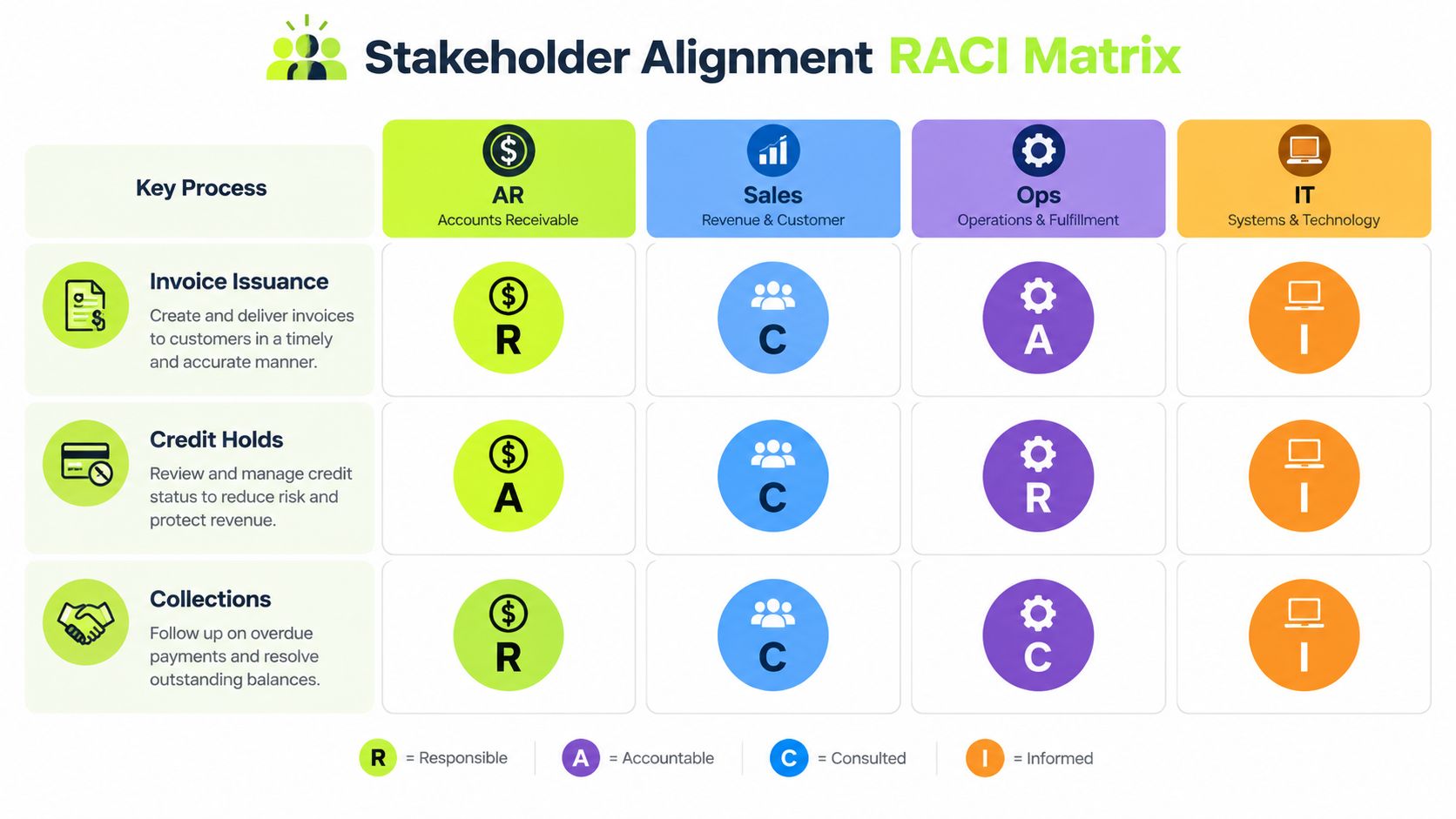
Use a 60-minute alignment meeting with a fixed agenda. Spend the first portion confirming the process map, then force answers to five questions:
- Customer master data: Who owns creation, changes, duplicates, and parent-child relationships?
- Sales compensation: Which commission or compensation plan depends on invoice fields?
- Credit memos: Where does each credit memo post, and who approves a reversal?
- Board reporting: Which AR, cash, and aging reports go to the board?
- Desktop reconciliation: Which bank reconciliation steps still run on a desktop or local workbook?
The warning signs are easy to spot. A salesperson who says, “I just need one more field on the invoice,” may be protecting a downstream dependency. An IT lead who describes the project as data migration alone may not have mapped the operating change.
A controlled program needs a repeatable modernization method, not a one-time discussion. Guidance on scalable system modernization can help frame that broader discipline, but your governance must remain specific to AR.
Meet weekly until cutover. The meeting should review open decisions, changed requirements, failed tests, unresolved ownership, and the next exit gate. Alignment achieved once at kickoff is not alignment. It expires as soon as someone discovers a hidden customer exception.
Data Migration Strategy for AR That Won't Break
Data migration is four separate activities. Treating it as one cutover event is how invoice history disappears and opening balances become a political argument.
Extract and map the fields
Start by extracting the complete AR population from the legacy platform. Map the open invoice number, original amount, current balance, aging bucket, customer PO, payment terms, and dispute notes. Include closed transactions when they support customer questions, audit evidence, or collection history.
Mapping should happen field by field, with an owner who can explain the source and destination. “Balance” isn't enough. You need to know whether the balance includes unapplied cash, approved credits, disputed amounts, or partially written-off items.
Cleanse before loading
Resolve duplicate customer records before migration. Standardize payment-term codes so “Net 30,” “30,” and a local abbreviation don't become separate logic in the new platform. Reconcile partially written-off balances instead of carrying ambiguous values into a cleaner system.
Credit memos deserve their own review. A common migration error converts a credit memo into an invoice or loses the relationship between the credit and the original charge. Review customer-parent and child hierarchies as well. Professional services firms often invoice a subsidiary while the payment arrives from a parent account.
Reconcile and run in parallel
Produce side-by-side aging reports from both systems using the same close date. Resolve every variance over $50 before sign-off. The threshold comes from the migration control, not from a vendor promise, so document who investigates and who approves an exception.
Then run live invoices and cash application in both systems for 2 to 4 weeks, with the legacy platform remaining the source of truth. Compare invoice totals, applied cash, unapplied cash, credits, and adjustments daily. Archive reporting access for at least 24 months, because historical questions rarely arrive on the migration team's schedule.
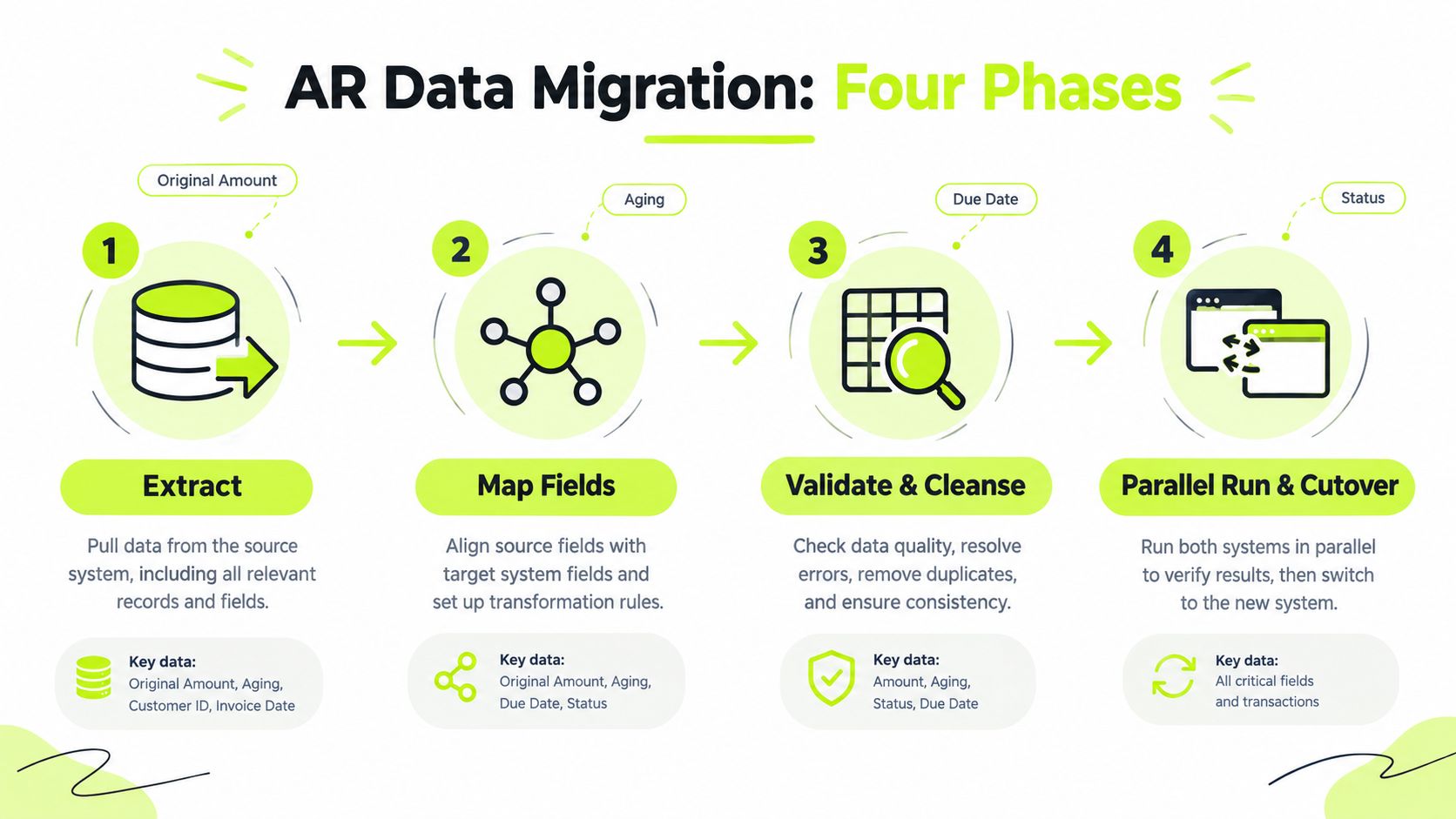
Use the accompanying AR data migration walkthrough as a training aid, then convert its relevant checks into your own reconciliation script. A migration isn't complete when records load. It's complete when the controller can trace an invoice from source record to posted balance and explain every difference.
Integrations Testing and Rollout That Actually Stick
The integration sequence should follow the accounting dependency chain. Connect the ERP first, because invoices and payments must reconcile to the general ledger. Add bank feeds for cash application, the payment gateway for card and ACH intake, and the customer portal for self-service invoice access.
Put credit-checking services, collections automation, and CRM synchronization in the second wave unless one is essential to day-one control. A phased sequence narrows the failure surface and gives the AR team a stable foundation before adding convenience features.
Test every integration in three ways:
- Unit test: Send one transaction through the full round trip and verify the source, destination, status, and accounting result.
- Scenario test: Force a failed payment, refund, chargeback reversal, duplicate remittance, and credit adjustment.
- Volume test: Process a full month of invoices in one batch and inspect performance, error handling, and reconciliation output.
The payment gateway deserves special attention. Many teams test successful payments and stop. That isn't enough. A failed ACH, a reversed card payment, or a refund posted after month-end can create a cash and customer-service problem even when the happy path works.
Set the go/no-go gate before testing begins. Require zero unresolved reconciliation breaks, written sign-off from the AR lead and controller, and a staffed 48-hour rollback window. The rollback plan should identify the system of record, who can stop outbound communications, how duplicate invoices will be prevented, and how cash received during the window will be handled.
Pilot one customer segment or region for 2 weeks, then expand only after the reconciliation results hold. Train AR staff during the parallel run, not after go-live. For the ERP dependency map and practical integration controls, document the decisions alongside your ERP system integration plan.
Measuring ROI and KPIs After Go-Live
A defensible ROI case has three layers: cash impact, labor reclaimed, and risk reduced. Don't let a vendor define success as users logging in or invoices leaving the system.
Cash impact starts with DSO reduction. Add collections effectiveness index, percentage of cash auto-applied without AR touch, unapplied cash, and aging by customer segment. AI-powered accounts receivable automation benchmark studies report DSO reductions of about 20% to 30% within 12 months, while end-to-end order-to-cash automation reduced DSO by roughly 8 to 12 days from baseline, according to AR automation benchmark research. Treat those figures as external benchmarks, not a promise for your firm.
Independent research from Billtrust found that 99% of companies using AI in accounts receivable successfully reduced DSO, and 75% reported a reduction of six days or more. Your board case still needs your own baseline and actual results.
Labor reclaimed means hours per invoice, hours per cash application, and AR hours redirected to credit and dispute work. Risk reduced means bad-debt write-offs, manual journal entries, aging over 90 days, and unresolved reconciliation items.
KPI | Pre-Replacement Baseline | 90-Day Target |
|---|---|---|
DSO | Document the current close-period result | Improve against baseline without increasing disputes |
Collections effectiveness index | Record current calculation and scope | Improve with consistent ownership and follow-up |
Auto-applied cash | Measure current percentage | Increase without reconciliation errors |
Hours per invoice | Time a representative invoice sample | Reduce manual touches and rework |
Manual journal entries | Count AR-related entries | Reduce avoidable corrections |
Aging over 90 days | Record balance and customer concentration | Reduce exposure with documented actions |
Review cash-application accuracy weekly during the first month. Review DSO and collections effectiveness index monthly for the first 90 days, then take a board-level view quarterly. Build one page with the baseline, 90-day actuals, and 12-month forecast.
Rising exception rates and unresolved bank reconciliation items predict ROI slippage earlier than a disappointing quarterly DSO result. Investigate those signals immediately. The 2025 AR automation survey identified risk-based collections prioritization as the top current DSO action for 45% of respondents, while automating invoice delivery and follow-up was the top planned action for 56%. Those mechanics belong in the operating dashboard, not just the implementation backlog.
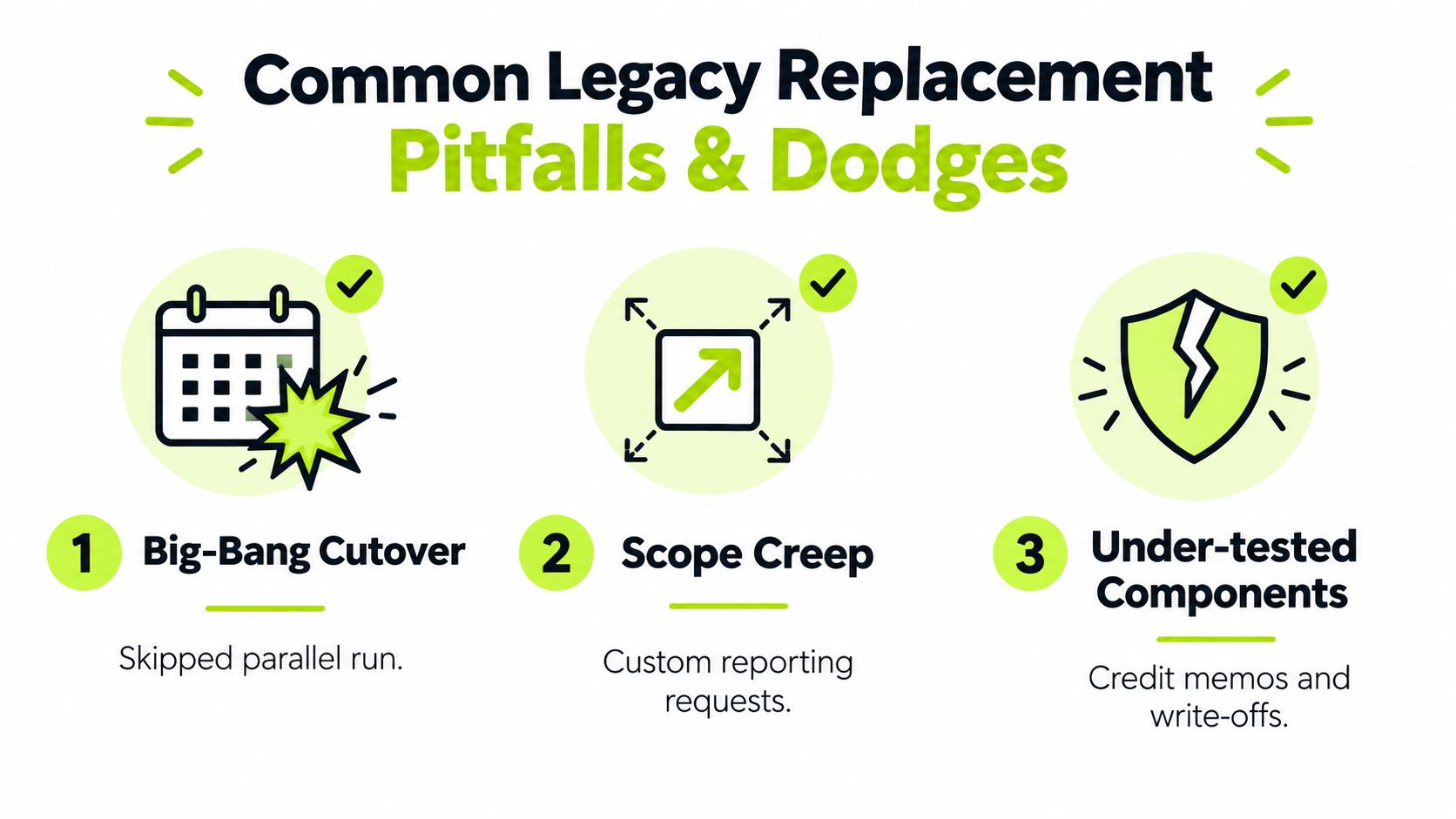
Common Pitfalls and How to Dodge Them
The expensive failures are predictable. They happen when finance treats replacement as software risk instead of cash-flow risk.
Big-bang cutover
A big-bang cutover skips the parallel run and forces the team to discover data and integration issues while customers are waiting for invoices. The warning signal appears about two weeks out, when nobody can produce a side-by-side aging report or explain the rollback sequence.
Use a phased module cutover. Run invoice delivery and cash application against the legacy system before moving collections automation or reporting. The incremental approach also aligns with independent benchmarking that found encapsulate and API façade programs had an 88% on-budget completion rate, compared with 24% for big-bang rewrites, as reported in legacy migration challenge benchmarking.
Scope creep
Custom reporting requests often arrive after design review. A new field seems harmless until it changes invoice templates, sales reporting, customer exports, and test cases. Freeze scope at design review, create a documented change-control process, and defer nonessential reports.
Under-tested components
Credit memos, write-offs, refunds, and reversals expose weaknesses that successful invoice tests hide. Two weeks before cutover, ask for executed reversal scripts, not assurances. Require mandatory reversal tests in user acceptance testing and preserve the evidence.
Stale customer master data creates another trap. Duplicate accounts and incorrect parent-child relationships can make a clean migration look accurate while collections still reach the wrong contact. Cleanse customer data before loading, then validate ownership and payment instructions with Sales and AR.
Bank integrations can also break when file formats change. Require a contractually documented API test harness, maintain representative files, and test malformed or incomplete remittance data. Practical data migration and testing tips are useful, but your own test evidence must control the release decision.
Controller's test: If the failure would delay invoicing, misapply cash, or create a customer dispute, finance owns the go/no-go decision.
Your 90-Day Replacement Timeline
A 90-day plan works when the scope is AR-specific and the gates are real. It won't work if discovery turns into an open-ended ERP redesign.
Discovery from weeks 1 to 3
Map invoice issuance, collections, cash application, disputes, customer master ownership, and reporting. Quantify current pain in DSO, manual touches, unapplied cash, and reconciliation time. Shortlist vendors that can integrate with your ERP and bank feeds, including Resolut for mid-market AR automation.
Don't let vendor demonstrations substitute for process evidence. Give each vendor the same invoice, remittance, credit memo, failed payment, and reporting scenarios. Compare the outputs, controls, exception handling, and audit trail.
Build from weeks 4 to 8
Configure the selected workflows, write customer master migration scripts, and develop ERP and bank-feed integrations. Establish invoice templates and approval paths early. The build is also when Sales and Ops should validate customer-facing language and service-specific billing requirements.
Keep a decision log. Every unresolved question should have an owner, due date, and consequence if it remains open. A project that has no visible unresolved decisions usually has poor reporting, not perfect alignment.
Pilot from weeks 9 to 11
Run parallel invoicing and cash application against the legacy platform. Reconcile each invoice to a tolerance of $0.50 per invoice. Investigate every exception, even when the total balance appears immaterial.
Train AR clerks on invoice correction, collectors on workflow ownership, and Sales Ops on customer data and dispute routing. Training during parallel run gives users a safe place to make mistakes while the old process still protects production.
Cutover from weeks 12 to 13
Hold a hard go/no-go meeting. Freeze new customer setup 48 hours before cutover so the master data doesn't change while the migration package is being validated. Confirm rollback staffing, bank-feed status, ERP posting, customer communications, and the first close-date reconciliation.
Week | Phase | Key Activities | Owner | Exit Gate |
|---|---|---|---|---|
1 | Discovery | Map AR processes and dependencies | Controller and AR lead | Current-state map approved |
2 | Discovery | Quantify DSO, labor, disputes, and exceptions | Controller | Baseline dashboard complete |
3 | Discovery | Shortlist and test vendors with real scenarios | CFO and project team | Vendor and scope decision |
4 | Build | Configure invoice and collections workflows | AR lead and implementation team | Design review signed |
5 | Build | Cleanse customer master and map fields | AR and data owner | Mapping exceptions assigned |
6 | Build | Develop ERP and bank-feed integrations | IT | Unit tests pass |
7 | Build | Configure payment gateway and portal | IT and AR | Scenario tests scheduled |
8 | Build | Complete reports, controls, and training materials | Controller and project team | UAT package ready |
9 | Pilot | Begin parallel invoicing | AR lead | Invoice variance within tolerance |
10 | Pilot | Run cash application and reversal scenarios | AR and treasury | Cash reconciliation approved |
11 | Pilot | Train clerks, collectors, and Sales Ops | Functional owners | Users complete sign-off |
12 | Cutover | Freeze new customer setup and finalize migration | Controller and IT | Go/no-go evidence complete |
13 | Cutover | Launch, monitor rollback window, and reconcile | Controller and AR lead | First production close accepted |
Use the implementation timeline guidance to pressure-test sequencing, but keep the exit gates tied to your own invoices, customers, banks, and close process. The schedule is only credible when someone has authority to stop cutover.
Professional services firms have a direct AR use case for automation because reminders and digital payment options can shorten billing cycles and remove collection bottlenecks, as described in AR automation for professional services. The right platform should support human review where judgment matters and automation where repetition creates delay.
Resolut automates AR for professional services, including collections workflows, payment options, and cash application, with a focus on consistent execution and finance control. Visit Resolut to evaluate whether its accounts receivable automation fits your ERP, bank, customer portal, and go-live requirements.