Payment Gateway Comparison for B2B Finance Leaders
A CFO-focused payment gateway comparison. We analyze fees, AR automation integration, and reconciliation to help you reduce DSO and improve cash flow.
A client pays an invoice. The notification hits your inbox. Finance should be done with that transaction.
It usually isn't.
Someone still has to match the payment to the right invoice, post it into the ledger, resolve any short pay or fee variance, and make sure the ERP, AR aging, and cash position all reflect reality. For a professional services firm, that work matters more than the checkout screen.
That's why a good payment gateway comparison starts in the back office. CFOs, Controllers, and firm owners don't need another list of glossy features. They need to know which gateway supports clean reconciliation, reliable settlement data, lower manual effort, and faster cash application so they can reduce DSO, improve cash flow, and build a durable accounts receivable automation stack.
Your Payment Gateway Is More Than a Transaction Tool
A payment gateway sits in the middle of your cash conversion process. It doesn't just capture a payment. It shapes how fast your team can apply cash, close invoices, answer client questions, and trust the numbers in the aging report.

The market has become too important to treat casually. The global payment gateway market was valued at $32.7 billion in 2025 and is projected to reach $116.7 billion by 2035, growing at a CAGR of 14.1%, according to Global Market Insights payment gateway market analysis. That expansion reflects how central gateways have become to financial operations, not just ecommerce.
In a professional services environment, the risk isn't usually abandoned cart volume. It's hidden finance labor. A gateway can create friction long after the client clicks pay. If payment records arrive late, lack invoice references, or don't map cleanly into your accounting workflow, your team ends up stitching together reports by hand.
A clean gateway decision usually improves three things at once:
- Cash visibility because settlement and remittance data are easier to trust
- Team efficiency because finance stops chasing mismatched payments
- Client experience because disputes and payment questions get resolved faster
For firms evaluating payment gateways for business operations, this is the right lens. The gateway is part of your receivables infrastructure. If it creates manual work after the payment lands, it's not helping finance. It's just moving the problem downstream.
What finance leaders should notice first
The wrong gateway often looks fine in a demo. It accepts cards. It supports bank payments. It has a modern portal.
Then month end arrives.
A payment tool that saves sales time but adds finance cleanup isn't efficient. It's a cost transfer.
That's the core issue. The most useful payment gateway comparison for B2B finance leaders isn't about which provider looks best on a pricing page. It's about which one reduces operational drag across billing, collections, reconciliation, and reporting.
Look Beyond the Rate Key B2B Evaluation Criteria
Organizations often begin with rate cards. That's understandable. It's also where many selection processes go off track.
The lowest advertised rate rarely tells you the full cost of running payments through a professional services firm. What matters is how the gateway behaves once payments start flowing into accounting, client service, and reporting.
Evaluation area | What to assess | Why it matters for professional services |
|---|---|---|
Integration depth | ERP, accounting, and AR connectivity | Prevents manual rekeying and broken cash application |
Payment methods | Cards, ACH, bank transfers, wallets | Lets clients pay the way that fits the invoice context |
Reconciliation detail | Invoice IDs, remittance data, fee visibility | Speeds close and reduces unapplied cash |
Dispute workflow | Chargeback alerts, evidence handling, case tracking | Limits distraction and protects margin |
Security and compliance | PCI posture, tokenization, encryption controls | Reduces risk without burdening finance |
Reporting quality | Export depth, settlement reports, exception visibility | Supports auditability and cash forecasting |
Pricing structure | Full effective rate, not just headline fee | Prevents margin leakage at scale |
Operational fit beats headline simplicity
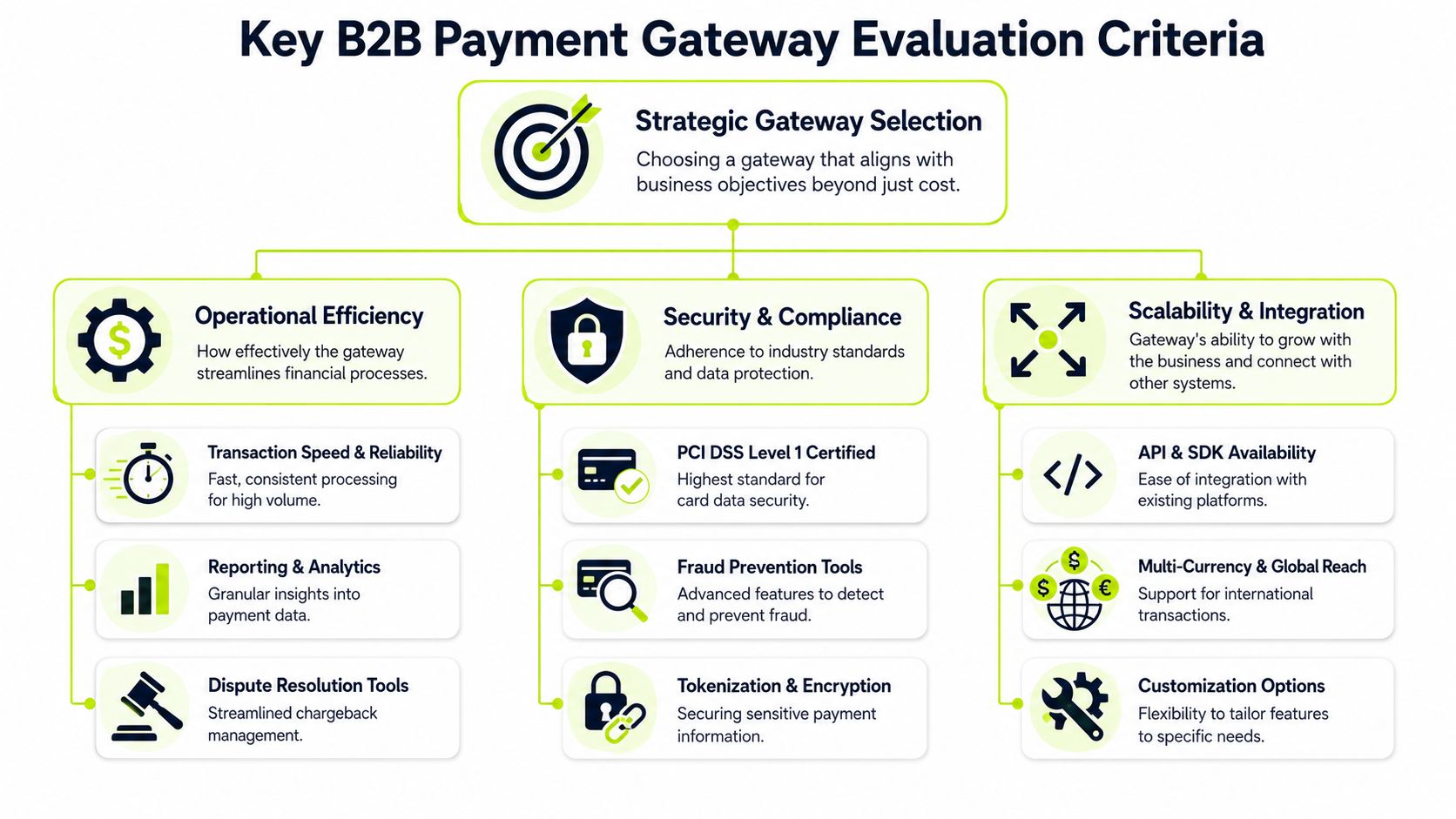
A rigorous comparison should focus on total cost transparency, including monthly fees, PCI compliance charges, chargeback fees, non-compliance penalties, and FX costs. The better method is to calculate the effective rate using your own recent transaction data, not a hypothetical pricing example, as outlined in this PCI-compliant payment gateway comparison guide.
That advice matters because B2B payment flows aren't clean consumer checkouts. You may be handling deposits, retainers, partial payments, milestone invoices, international clients, and client-specific remittance instructions. A gateway that can't handle these patterns cleanly will create avoidable finance work.
Questions that actually change the outcome
Ask sharper questions during vendor review:
- How does the gateway pass invoice and customer reference data back to accounting systems?
- What happens when a client makes a partial payment?
- Can the team separate fees, settlements, and net deposits without spreadsheet cleanup?
- How are disputes managed, documented, and escalated?
- Does the provider support the payment methods your clients prefer for invoice settlement?
Practical rule: If the vendor can explain checkout design but struggles to explain reconciliation, that's a warning sign.
Chargebacks matter less often in professional services than in high-volume retail, but they still disrupt finance time. If your firm also operates payment-heavy commerce channels, it's worth reviewing resources on effective Shopify dispute protection to see how structured dispute workflows reduce noise and response delays.
The criteria many teams miss
Integration quality is where a lot of gateway decisions succeed or fail. Finance often inherits a tool selected by operations, product, or IT. The result is a gateway that can process money but can't support QuickBooks AR automation, real-time cash posting, or efficient exception handling.
For firms in the $3M to $50M range, the winning gateway usually isn't the one with the longest feature list. It's the one that supports accounts receivable automation, fits your accounting stack, and gives your team control without adding manual reconciliation burden.
A Practical Comparison of Leading Payment Gateways
Three names come up often in a serious payment gateway comparison for B2B finance leaders: Stripe, Adyen, and Braintree. Each can work. Each also comes with trade-offs that matter once finance owns the downstream process.
The better question isn't which platform is best in the abstract. It's which one aligns with how your firm gets paid, how clients prefer to settle invoices, and how much operational complexity your team can absorb.
Side by side comparison
Gateway | Best fit | Strength in a professional services context | Watch-out for finance teams |
|---|---|---|---|
Stripe | Firms that want flexible APIs and broad ecosystem support | Strong developer tooling and wide adoption | Finance may need more deliberate setup around reporting and reconciliation workflows |
Adyen | Firms with global complexity and unified payments strategy | Strong fit for multi-region payment operations | Can feel heavier than needed for a mid-market services firm |
Braintree | Firms that want flexibility and PayPal adjacency | Useful for businesses blending card and wallet acceptance | Back-office workflow design still needs scrutiny, especially around reporting detail |
Stripe
Stripe is often the default shortlist option because it's flexible, widely supported, and relatively easy for technical teams to implement. That can be an advantage if your firm needs custom billing logic, embedded payment experiences, or customized client portals.
For finance, the benefit depends on implementation discipline. Stripe can fit well inside a strong AR workflow, but it doesn't automatically solve reconciliation by itself. If the accounting mapping, metadata structure, and reporting outputs aren't designed carefully, the platform's flexibility becomes extra configuration work.
Stripe is often easy to buy and easy to launch. The real test comes at close, when finance asks whether every payment can be traced cleanly from client to invoice to bank deposit.
It's also important to separate payment methods by use case. Authorization rate is a critical benchmark, and practical success ranges vary meaningfully by method. They are 82 to 88 percent for ecommerce credit cards, 90 to 95 percent for digital wallets, 88 to 93 percent for BNPL, and 92 to 97 percent for SaaS ACH and B2B enterprise bank transfers, according to Tagada's payment processor comparison. For professional services firms, that's a strong reminder that ACH and bank transfer support may be more valuable than optimizing only for card acceptance.
If you're weighing hosted versus embedded experiences, this overview of a hosted payment gateway model is useful framing. Hosted flows can reduce implementation burden, but they can also limit how tightly payment events map into your broader receivables process.
Adyen
Adyen tends to make the most sense when the payment environment is broader and more international. If your firm invoices across regions, handles multiple payment methods, or wants tighter control over a unified global payments layer, Adyen deserves attention.
The trade-off is complexity. A mid-market professional services firm can end up buying more infrastructure than it needs. If your payment volume, geographic footprint, or internal systems don't justify that depth, the platform can become harder to manage than the problem requires.
What finance leaders should like about Adyen is the strategic coherence. What they should test is whether that coherence translates into easier settlement reporting, exception handling, and accounting integration for their specific environment.
Braintree
Braintree often enters the discussion when firms want customization without committing to the heaviest enterprise stack. It can be a reasonable middle ground, especially where PayPal acceptance still matters for certain client segments.
That said, Braintree should be reviewed with the same discipline as the others. Don't assume familiar brands guarantee clean back-office execution. Ask to see reporting exports, settlement breakdowns, dispute flows, and how the provider handles the practical messiness of B2B invoice payments.
The gateway that looks most polished in product demos isn't always the one your Controller will trust during month-end close.
What works and what doesn't
What works:
- Matching payment methods to invoice context
- Choosing platforms that pass useful reference data
- Testing settlement and reconciliation before rollout
- Letting finance evaluate reporting, not just IT
What doesn't:
- Selecting purely on card fees
- Assuming consumer checkout strength equals B2B finance fit
- Ignoring bank transfer and ACH workflows
- Waiting until implementation to define how payments close invoices
A practical payment gateway comparison should end with a clear view of operational fit. The right provider depends less on who has the biggest brand and more on who helps finance keep the ledger accurate with the least manual effort.
Calculating the True Cost of Payment Processing
CFOs should ignore the teaser rate and calculate the effective rate. That's where the actual economics show up.
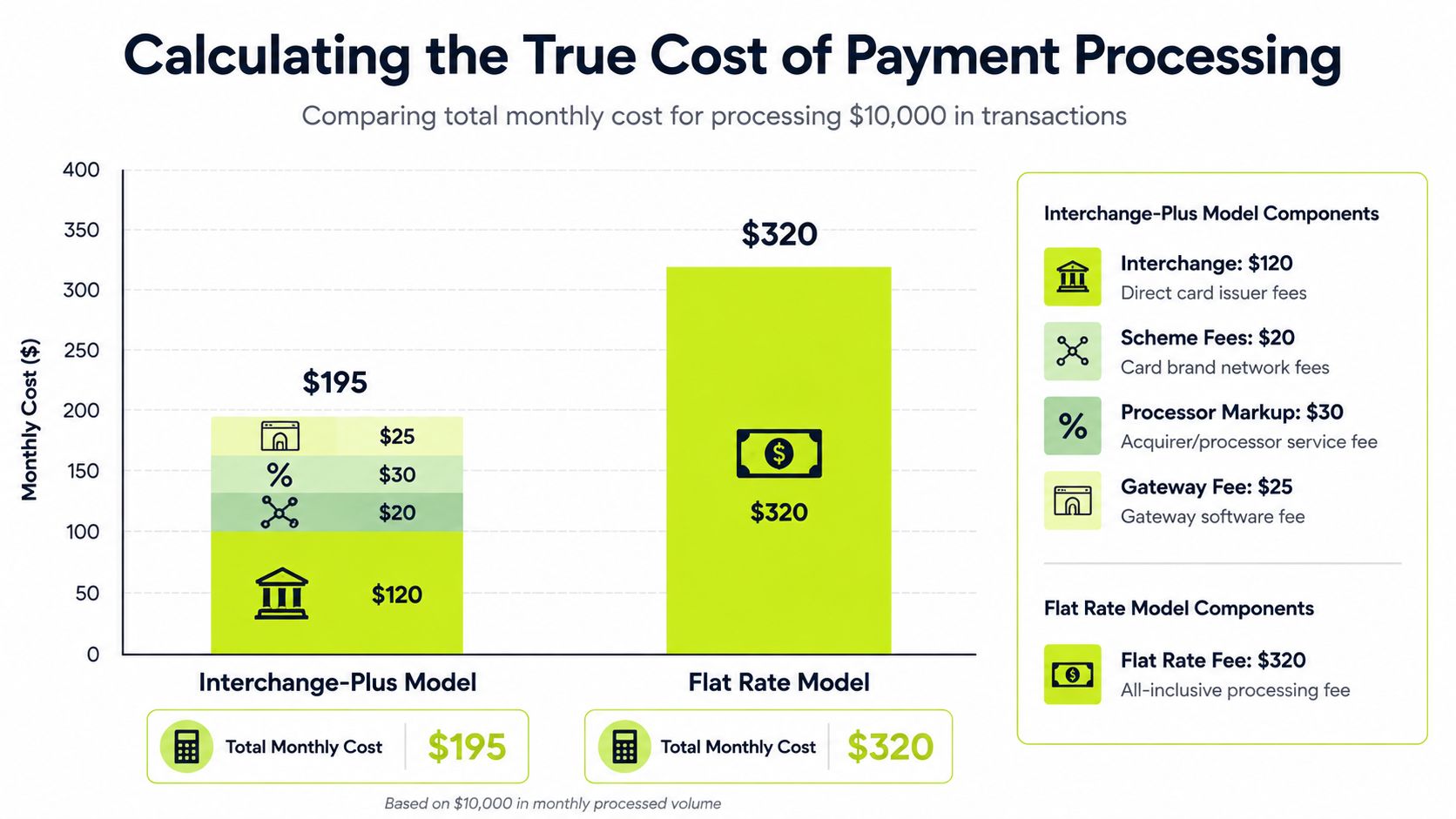
A sound payment gateway comparison looks at the full cost stack. That includes transaction fees, monthly platform charges, PCI costs, chargeback fees, foreign exchange expense, and any non-compliance penalties. If you only compare the advertised processing line, you're not measuring what finance will bear in total.
Flat rate versus interchange-plus
Flat-rate pricing is easy to understand. That's why many firms start there. It offers simplicity in procurement and straightforward forecasting when volume is low or variable.
Interchange-plus takes more effort to evaluate, but it often becomes the more rational choice as payment volume grows. According to Helcim's guide to payment gateway pricing, businesses processing above $500k per year can save 0.5% to 1.2% annually on processing fees with interchange-plus compared with flat-rate models.
That's not a small planning issue. It affects margin, cash flow, and pricing discipline.
How to calculate your real cost
Use your own recent payment data. Last month is enough to start. Build the review like this:
- Pull gross payment volume by method. Separate cards, ACH, bank transfers, and international transactions.
- Add every direct fee shown on processor and gateway statements.
- Isolate indirect costs such as PCI charges, chargeback handling, and FX expense.
- Divide total cost by total processed volume to get your effective rate.
- Review by client segment or payment type if your firm has meaningful variation.
A simple internal worksheet can expose problems quickly:
Cost area | What finance should inspect |
|---|---|
Card processing | Blended cost versus client willingness to pay by card |
ACH and bank transfers | Lower-cost paths for larger invoices |
Monthly platform fees | Whether fixed cost is justified by reporting or automation value |
Chargeback handling | Time cost as well as direct fee cost |
FX and cross-border | Margin erosion on international client payments |
Don't ask which gateway is cheapest. Ask which gateway is cheapest after fees, exceptions, and staff time are all included.
Where firms get misled
The biggest error is choosing “simple” pricing without modeling scale. A rate that feels harmless at lower volume can become persistent drag once invoices get larger and payment frequency rises.
The second error is ignoring labor. If the gateway creates export cleanup, partial payment confusion, or fee reconciliation work, finance pays for that with headcount time. The P&L feels it even if the processor statement doesn't show it clearly.
At this stage, AR software for professional services starts to matter. The best finance teams don't separate gateway cost from receivables operations. They look at the combined effect on collections effort, cash application speed, and how quickly they can improve cash flow without adding overhead.
How Gateways Fit into AR Automation Workflows
A gateway on its own only captures money. It doesn't close the loop.
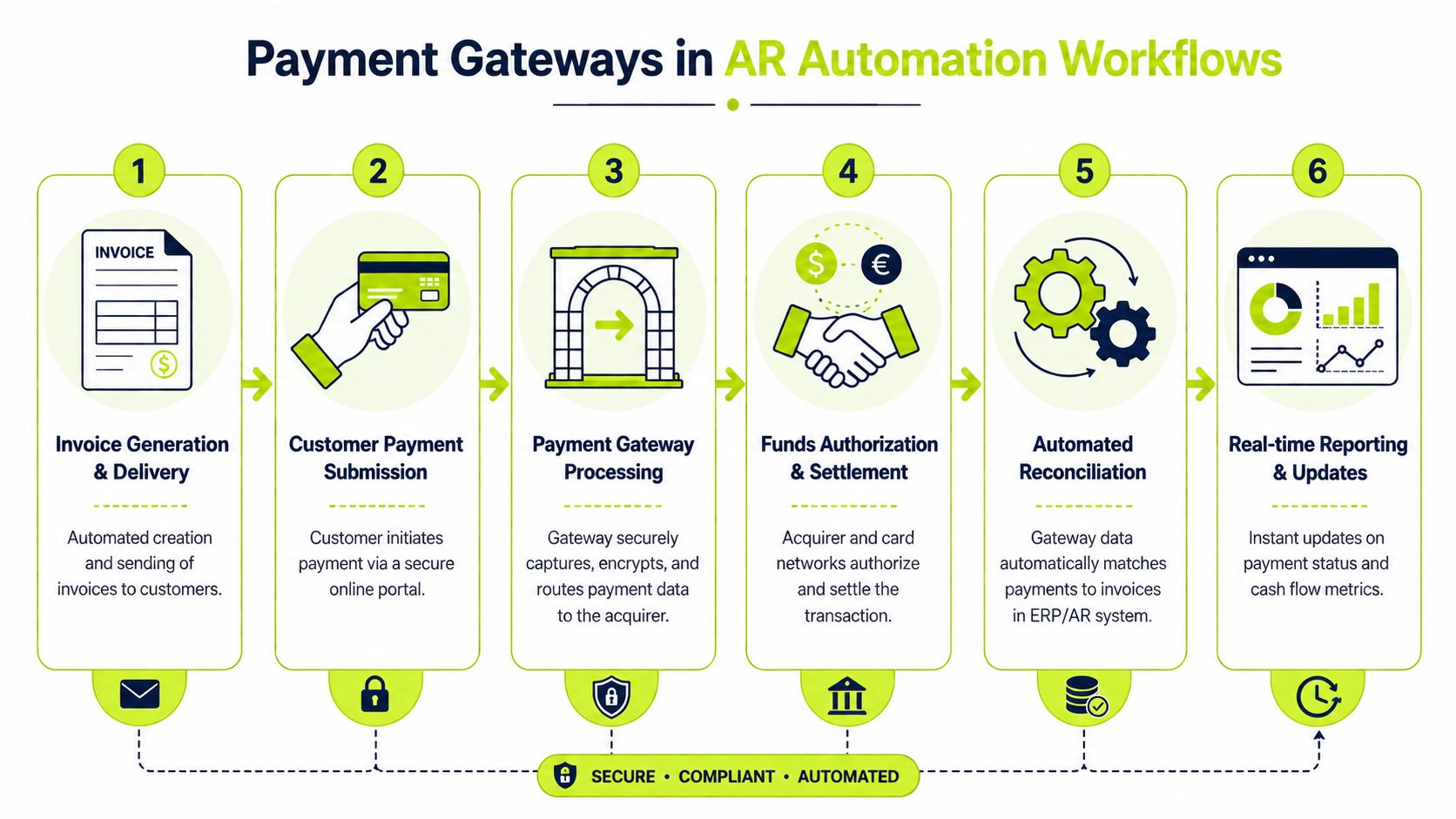
In practice, the value shows up when the gateway feeds a broader accounts receivable automation workflow. That means payment data moves into the accounting environment cleanly, invoices close automatically, exceptions route to the right person, and finance can trust the dashboard without building side spreadsheets.
A disconnected gateway breaks that chain. The payment clears, but cash application stalls. Someone has to inspect the remittance, identify the client, verify the invoice, and update the ledger manually. That's exactly the kind of friction that slows close and keeps aging inaccurate.
According to the U.S. Chamber discussion of payment gateways versus processors, 40% of finance teams waste 15+ hours per month manually reconciling payments due to fragmented gateway-to-ERP data flows. That's why gateway selection belongs inside a larger cash management discussion.
What a connected workflow should do
A strong workflow should handle these steps with minimal human intervention:
- Invoice creation and delivery with payment options tied to the client record
- Payment capture through the gateway using the right method for the invoice context
- Automatic matching of payment, invoice, and customer data
- Ledger updates inside accounting or ERP without manual re-entry
- Exception handling for short pays, unapplied cash, or disputed transactions
- Reporting that gives finance real-time visibility into open and paid balances
If your team is building a stronger process, the Nexist accounts receivable playbook is a useful reference for tightening the broader receivables discipline around billing, follow-up, and payment control.
Why this matters for DSO
AI AR automation changes the conversation. The objective isn't just faster reminders or prettier payment links. The objective is to reduce DSO by removing the lag between payment activity and financial recognition.
When gateway events trigger downstream accounting actions, finance gets a shorter path from invoice to cash visibility. That improves forecasting. It also reduces the constant checking and rechecking that burns time in mid-market firms.
A useful architecture increasingly includes payment orchestration within receivables systems, especially when firms support multiple payment methods, different client terms, or cross-border collections. The gateway becomes one component in a coordinated process rather than a standalone payment form.
If a payment reaches the bank but not the invoice record, finance still has a collections problem.
Where QuickBooks users feel this most
Firms running lean teams often feel this pain inside QuickBooks first. The payment came in. The deposit is visible. But the invoice is still open, or the fee treatment is unclear, or the client paid several invoices in one batch.
That's where QuickBooks AR automation becomes more than a convenience. It gives the team a way to connect receipt, posting, reconciliation, and reporting so the ledger reflects what happened without repeated manual intervention.
For professional services firms, this is usually the hidden payoff in a payment gateway comparison. The best gateway isn't merely the one that takes payment. It's the one that supports an end-to-end workflow that helps finance improve cash flow with less effort.
A Decision Framework for Your Next Gateway
A gateway decision should be scored like any other financial infrastructure decision. Not by brand familiarity. Not by whichever team shouts loudest. By operational fit.
Start with a simple scorecard and force the vendor review to answer finance questions, not just technical ones.
Use this shortlist test
Decision area | Strong answer looks like |
|---|---|
Payment method fit | Supports the methods your clients use for invoice settlement |
Accounting integration | Passes usable data into your existing accounting or ERP workflow |
Reconciliation quality | Handles partial payments, fees, and references cleanly |
Reporting discipline | Produces settlement and exception reports finance can use immediately |
Pricing transparency | Lets you model effective rate with your own transaction mix |
Dispute process | Gives your team a manageable workflow when issues arise |
Implementation risk | Can be rolled out without interrupting live collections |
Match the gateway to the operating need
If your main need is flexibility and your team has technical support, Stripe may be the better fit.
If your firm operates across multiple regions and wants one broader payments layer, Adyen may be worth the added complexity.
If you want a middle path with customization options and familiar wallet support, Braintree may be appropriate.
None of those answers are universal. The right choice depends on where the pain sits today. For some firms, it's settlement visibility. For others, it's high card cost. For many, it's still manual posting and delayed cash application.
Plan the migration like a cash project
Migration risk is usually operational, not theoretical. Protect live cash flow during the switch.
- Map active payment flows before any cutover. Recurring invoices, saved payment methods, and old payment links need explicit handling.
- Test accounting outputs early. Don't wait until go-live to check how payments appear in the ledger.
- Communicate with clients carefully if the payment experience changes.
- Run old and new workflows in parallel long enough to catch exceptions.
- Assign finance ownership for exception review during the first close cycle after launch.
The payoff can be meaningful when the gateway is part of a broader automation strategy. A Vanson Bourne study on AR automation outcomes found that 100% of finance professionals surveyed reported measurable gains, while fully automated users achieved a 40%+ reduction in Days to Pay.
That's the standard worth aiming for. Not a cheaper headline fee. A payment operation that gives finance better control, cleaner books, and faster cash.
Resolut automates AR for professional services. It helps finance teams connect billing, collections, payment capture, and cash application in one workflow. The result is more consistent posting, fewer manual touches, and a more human way to improve cash flow. Learn more at Resolut.