
What Is a Remittance Advice: Optimize Your AR in 2026
Discover what is a remittance advice in 2026. Learn how it differs from an invoice & how AR teams use it to boost cash flow and reduce DSO with automation.
A remittance advice is a payment communication from a payer to a payee that identifies which invoices a payment covers, and in modern cash application workflows it can help automation reduce manual reconciliation work by over 90% in mature organizations. It isn't a legal requirement, but it is one of the most useful control points in accounts receivable when you need clean reconciliation, tighter working capital visibility, and fewer delays in applying cash.
If you lead finance at a professional services firm, this probably sounds familiar. A payment hits the bank. The amount is substantial. It doesn't line up cleanly with a single invoice, project, or retainer. Your team opens QuickBooks, checks email, searches shared inboxes, and starts asking account managers what the client meant to pay.
That's not a document problem. It's a control problem.
When people ask what is a remittance advice, they usually expect a simple definition. The better answer is this: it's an operational data point that tells your team how to apply cash correctly, fast, and with confidence. When that data is missing, delayed, or buried in the wrong format, cash sits unapplied, client statements stay messy, and DSO drifts in the wrong direction.
For firms between $3M and $50M, that matters more than it gets credit for. Lump-sum client payments often cover multiple matters, milestones, or monthly fees. Without clear remittance detail, your team can't post cash cleanly, and your reporting loses precision right where it matters most.
The Role of Remittance Advice in Financial Control
A client wires $85,000 on the last business day of the month. The cash hits the bank. Your team still cannot close AR cleanly because no one knows whether that payment clears three invoices, tops up a retainer, or includes a short-pay deduction.
That delay affects more than posting speed. It distorts aging, inflates unapplied cash, and weakens the quality of the numbers leadership uses to manage collections and working capital.
Remittance advice is one of the controls that keeps that from happening. It gives finance the payer's instructions for how cash should be applied. In practice, that makes it operational data, not just payment paperwork. If the advice arrives in the wrong format, arrives late, or never shows up, AR loses time, and DSO usually moves the wrong way.
Why finance leaders should care
Invoices state what was billed. Remittance advice states how the payer wants the payment allocated.
That distinction matters in firms with complex billing. One payment can cover several invoices, a partial settlement, reimbursable expenses, or charges across business units. Parent entities also pay on behalf of subsidiaries, which creates another layer of ambiguity if the remittance is incomplete.
AR teams can work around missing detail. They do it every day. The trade-off is manual research, higher posting risk, and slower visibility into which balances are collectible.
A practical rule applies here. If a payment can reasonably be posted to more than one invoice, the control is weak until remittance detail confirms the intent.
What remittance advice actually controls
Handled well, remittance advice improves three areas that finance leaders watch closely:
- Cash application accuracy. Teams post funds to the right invoices instead of leaving them in unapplied cash or suspense accounts.
- Collections discipline. Collectors do not chase balances a customer already paid under a different reference or entity name.
- Cash flow visibility. Finance gets a cleaner view of open receivables, which supports better forecasting and tighter working capital control.
This is why remittance advice belongs inside the broader AR control framework, not at the edge of it. If you want a broader refresher on process ownership, dispute handling, and cash discipline, this accounts receivable management guide is a practical companion.
One point matters operationally. A remittance advice does not confirm settlement. It confirms intent. Treasury still needs to verify that funds were received and cleared through the bank before AR treats the item as fully resolved. That distinction becomes clearer once you review what it means to remit payment.
In strong AR functions, remittance advice helps shorten the distance between money received and money applied. That is how a small data point turns into better close quality, lower DSO pressure, and more control over working capital.
Anatomy of a Modern Remittance Advice
A payment hits the bank for $184,260. The bank reference shows only the customer's parent company name. Three invoices are short-paid. One credit memo was taken. Without usable remittance data, cash sits unapplied, collectors chase the wrong balance, and DSO gets worse for reasons the team cannot explain quickly.
That is why the quality of a remittance advice matters. It is operational data your AR team uses to turn a bank deposit into a clean ledger entry.
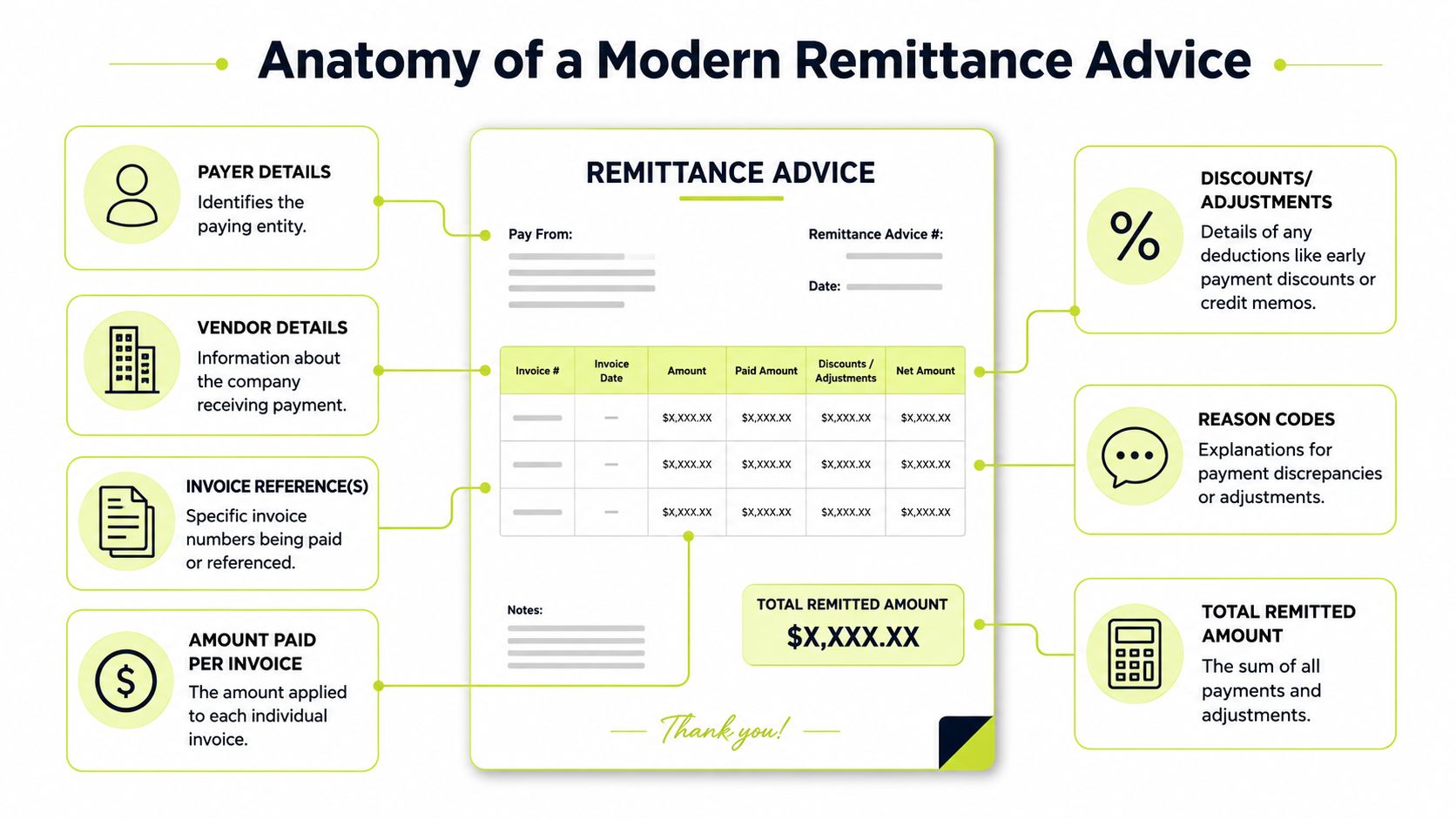
The fields that matter most
A usable remittance advice gives AR enough information to apply cash with confidence and enough context to route exceptions fast.
At minimum, it should show the payer, the payee, the payment date, the total amount remitted, and the invoice references covered by the payment. The stronger versions also show how the total breaks down by invoice, whether any discounts or deductions were taken, and who to contact if something does not match.
Core fields usually include:
- Payer details: Legal entity name and contact information. This matters when a customer pays through a parent, shared service center, or third-party processor.
- Vendor details: The receiving company or billing entity. This prevents misposts when your business has multiple subsidiaries, locations, or practice groups.
- Invoice references: Invoice numbers and often invoice dates. Standard remittance data usually includes invoice identifiers, invoice amounts, and any discounts taken because recipients need that detail to allocate payments correctly.
- Amount paid per invoice: Needed when one transfer settles multiple open items or only part of an invoice.
- Discounts or adjustments: Early payment discounts, credits, shortages, tax differences, chargebacks, or disputed amounts.
- Total remitted amount: The figure AR and treasury match against the incoming deposit.
Good remittance data also supports faster invoice reconciliation workflows, especially when deductions or partial payments create breaks between what was billed and what was received.
What makes one usable versus useless
Specificity decides whether the advice helps or slows the team down.
A weak remittance says, “Payment sent for recent invoices.” That forces AR to search open items, guess at deductions, and email the customer for clarification.
A strong remittance ties exact amounts to exact invoice numbers and explains every variance. If invoice 10458 was short-paid by $2,300 because of a pricing dispute, say that clearly. If the customer netted a credit memo, list the memo number. If the payment covers five invoices across two billing entities, separate them.
Format matters too. Many remittances now arrive through email attachments, supplier portals, EDI, XML, or JSON feeds that can move directly into cash application tools. The practical trade-off is simple. Structured formats are easier for systems to read, but many customers still send PDFs, spreadsheet attachments, or free-text emails. AR teams have to handle both.
The best remittance advice is the one your system can read and your team can trust.
A fast quality check for your team
Use this checklist to judge whether a customer's remittance data is good enough for clean posting:
Check | Why it matters |
|---|---|
Invoice numbers listed | Reduces misapplied cash |
Payment amount tied to each invoice | Handles bundled payments and short-pays cleanly |
Adjustments explained | Cuts exception research time |
Payer entity identified | Prevents cross-entity confusion |
Payment date included | Improves bank matching and posting logic |
Missing fields do not make the payment invalid. They make the payment slower to apply, harder to reconcile, and more likely to create noise in AR reporting. That is the actual cost.
Distinguishing Remittance Advice From Other Documents
Finance teams lose time when they use the right words loosely. Document confusion creates process confusion.
The cleanest way to think about it is this. An invoice requests payment. A remittance advice explains a payment. A payment confirmation shows payment was processed or received.
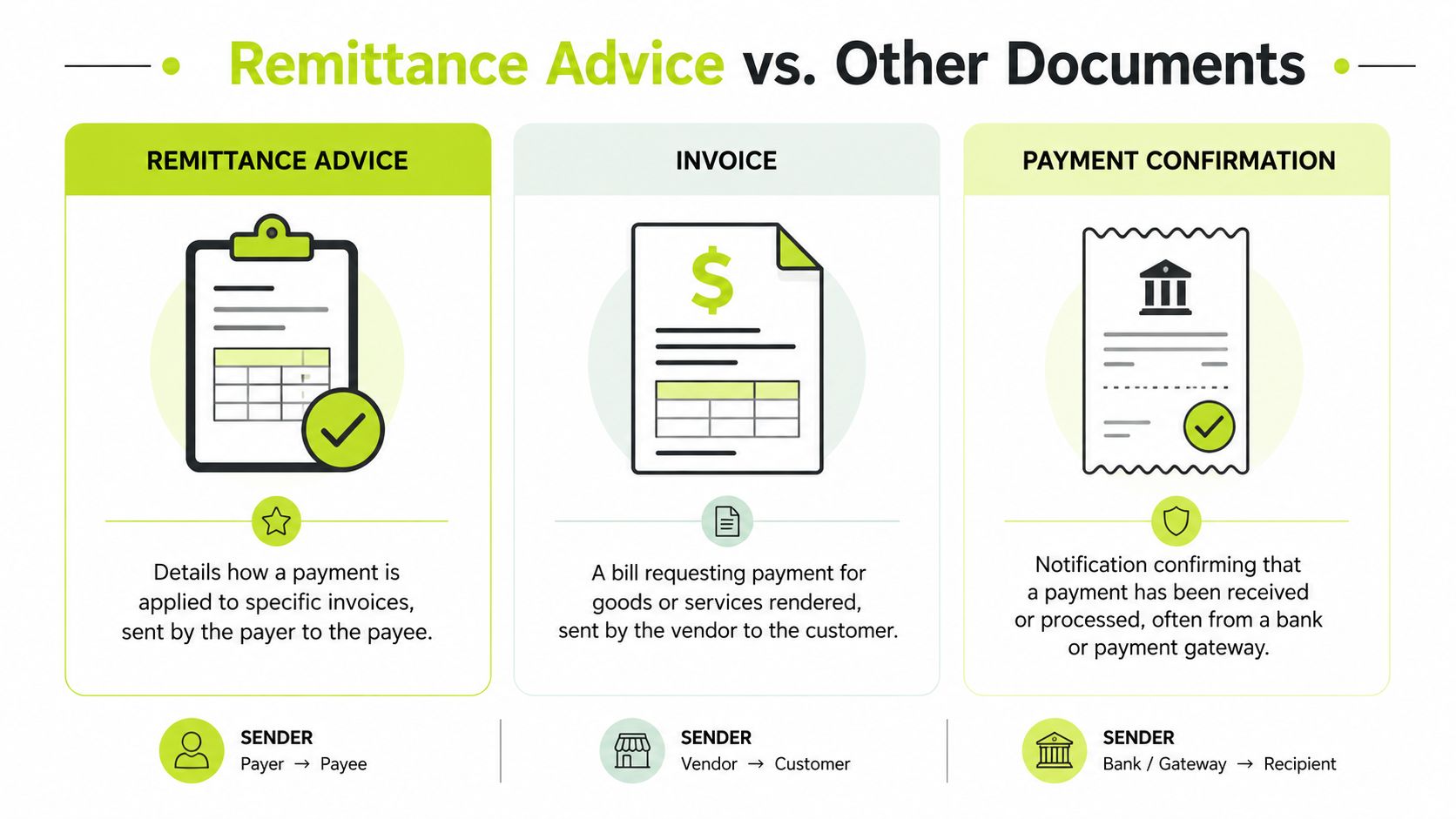
Side-by-side comparison
Document | Purpose | Sent By | Sent To |
|---|---|---|---|
Remittance Advice | Explains how a payment applies to specific invoices | Payer | Payee |
Invoice | Requests payment for goods or services | Vendor or service provider | Customer |
Remittance Slip | Returns with a payment coupon or reference to help identify an account | Payee or biller originally includes it, payer returns it | Usually returned to the biller |
Where teams usually get mixed up
An invoice is a demand document. It starts the collection timeline.
A remittance advice comes later. It's a communication tied to payment activity. It tells your AR team what the payer intended that transfer to settle.
A remittance slip is different again. In many billing environments, it's a detachable portion of the bill that the customer sends back with payment. It helps identify the account, but it doesn't serve the same operational role as a modern remittance advice emailed after a bank transfer.
Remittance advice versus payment confirmation
This is the distinction that matters most in practice.
A remittance advice can say, “We sent payment for invoices A, B, and C.” That helps your team know what to expect.
A payment confirmation typically comes from a bank or payment gateway and confirms processing or receipt status. It answers a different question.
If your team treats remittance advice as proof of settlement, they'll post confidence where they should post caution.
That's why the accounting sequence matters. First, use the advice to identify intended application. Then reconcile against bank activity. Then close the loop in the ledger. If your team is standardizing that handoff, a clear review of invoice reconciliation helps tighten the process.
A practical mental model
Use this framing in team training:
- Invoice: “Please pay this.”
- Remittance advice: “Here's what this payment is for.”
- Payment confirmation: “The transaction processed or settled.”
- Remittance slip: “Use this reference when sending payment back.”
That sounds basic. It isn't. Small language errors often become posting errors, and posting errors become collection noise, month-end cleanup, and client confusion.
In healthcare, the document is more formalized. Electronic Remittance Advice in ANSI X12 835 serves as the operational record that posts payments, adjustments, and denial reasons directly into billing systems, including CARC and RARC codes (PCH Health on remittance advice). Most professional services firms won't use that exact format, but the lesson is relevant. When remittance data is standardized, payment posting gets faster and cleaner.
The High Cost of Manual Cash Application
Manual cash application rarely fails in a dramatic way. It wears teams down gradually.
A payment arrives by ACH. The bank feed updates. Nobody can tell from the payment line what invoices were covered. The remittance advice might be in a shared inbox, attached to an email from AP, uploaded to a client portal, or missing altogether.
Then the actual work starts.
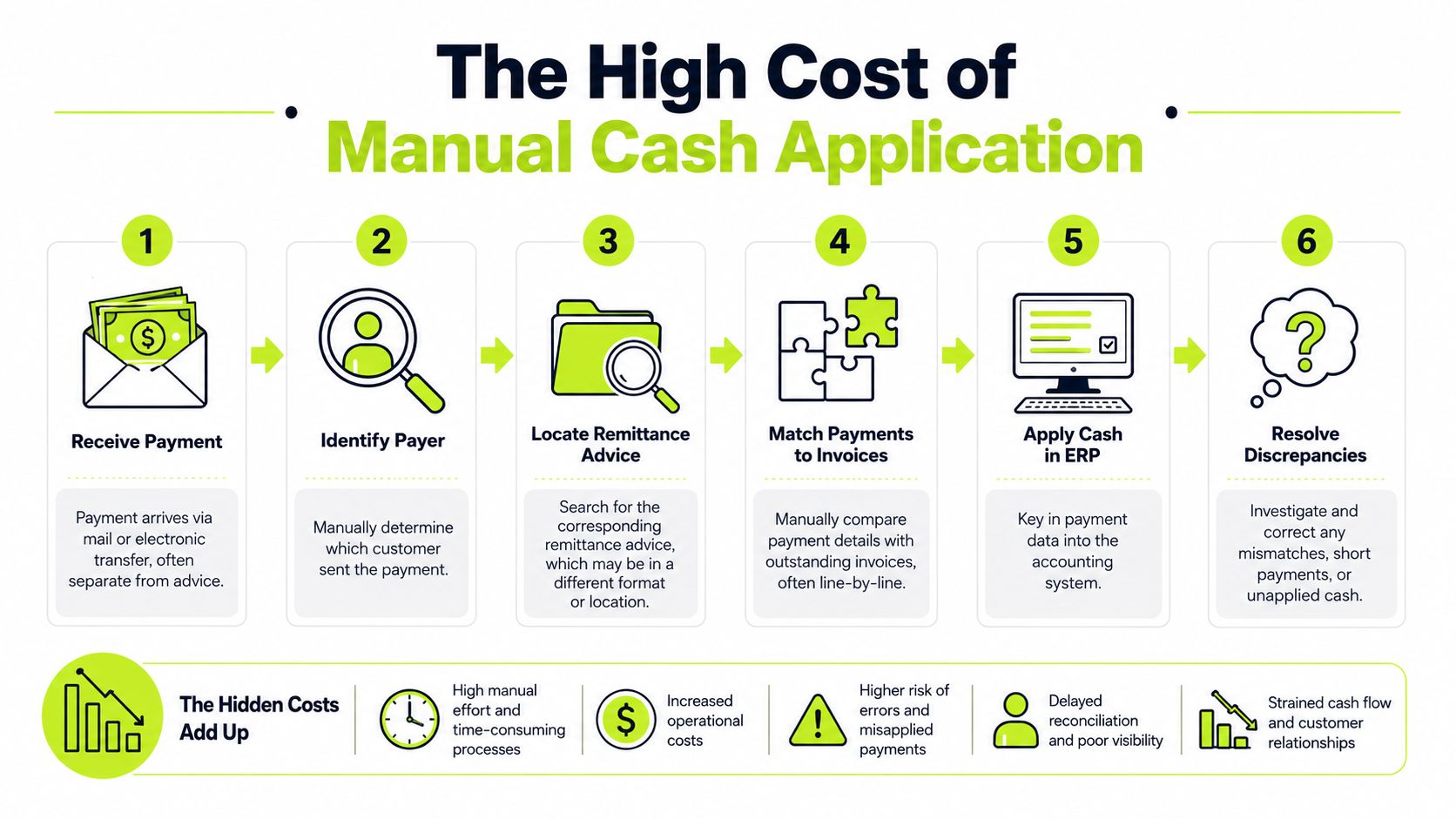
What the manual process actually looks like
In many firms, the workflow still looks like this:
- Receive payment: The transfer lands, but reference data is thin.
- Identify the payer: The bank descriptor is abbreviated or tied to a parent entity.
- Locate remittance advice: Someone searches Outlook, PDFs, or client portals.
- Match to invoices: AR compares open items manually, often inside QuickBooks or another ERP.
- Post cash: The team keys entries into the accounting system.
- Resolve exceptions: Short pays, credits, and disputes get parked for later.
Each step is manageable on its own. Together, they create delay and error risk.
Why this hits professional services firms hard
Professional services billing creates complexity that product businesses often don't face. Payments may span retainer balances, milestone invoices, reimbursable expenses, and partially approved work.
Versapay notes that for professional services firms, AR automation software streamlines the invoice-to-cash cycle by automating billable hours tracking, retainer management, and approval workflows, helping firms reduce DSO, shorten billing cycles, and remove bottlenecks that slow revenue collection (Versapay for professional services).
That point matters because bad cash application doesn't start in posting. It often starts earlier, where billing structures are more nuanced and payment intent is harder to decode.
Manual cash application doesn't just consume staff time. It delays visibility into what customers actually paid and what still needs attention.
The hidden operational costs
The obvious cost is labor. The less obvious cost is decision quality.
When remittance handling stays manual, firms usually deal with:
- Slower cash posting: Payments sit unapplied while staff investigate references.
- Messier collections: Collectors follow up on invoices that may already be covered.
- Poorer forecasting: Controllers can't trust AR aging until cash is applied correctly.
- More exceptions in QuickBooks: The ledger fills up with unapplied cash, credits, and temporary workarounds.
That's why QuickBooks AR automation has become a practical topic for firms that have outgrown email-and-spreadsheet workflows. The goal isn't just speed. It's control. If you're evaluating where your current handoffs break down, this explanation of cash application automation is a useful reference point.
How AI AR Automation Streamlines Remittance Processing
A payment hits the bank. Treasury sees cash. AR still cannot close the item because the remittance is sitting in an email thread, a portal download, or a PDF with unclear invoice references.
That gap is where DSO gets distorted.
AI AR automation closes it by treating remittance advice as operational data, not inbox clutter. The system pulls payment details from the formats customers use, structures that data, matches it to open invoices, and sends only the unclear cases to a reviewer. Cash gets applied faster. The ledger gets cleaner faster. Finance gets a more accurate view of working capital.

What changes when AI handles remittance inputs
Manual remittance processing forces AR staff to interpret every payer format by hand. Email body. PDF attachment. Spreadsheet. Portal export. EDI file. The work is repetitive, but the risk is not. One missed invoice number or deduction code can leave cash unapplied and send collections after the wrong balance.
AI helps by converting those inputs into structured fields your team can use. It extracts invoice references, payment amounts, payer names, dates, short pays, and deductions. Then it applies matching rules against the open AR ledger.
The main improvement is control at the right point in the workflow. Staff stop spending hours on low-value reading and rekeying. They review exceptions, disputed items, and ambiguous matches where judgment matters.
For controllers and CFOs, that matters because remittance speed affects reporting quality. If payments arrive on Tuesday but are not applied until Friday, AR aging is overstated for three days. That distorts collection priorities and muddies the cash picture.
The measurable case for automation
The business case is tied to cash performance.
Accounting Seed reports that 99% of companies using AI in accounts receivable saw a reduction in Days Sales Outstanding, and 75% cut DSO by an average of 6 days or more (AI in accounts receivable and DSO impact).
That result makes sense operationally. Faster remittance capture shortens the delay between payment receipt and payment application. Finance teams get fewer unapplied cash balances, fewer avoidable collection touches, and a clearer view of what is overdue.
Good automation also changes where control lives. Instead of reviewing every payment, the team reviews the exceptions. That is usually the better trade-off. You keep human oversight on partial payments, deduction disputes, and weak references without slowing down every straightforward match.
What a cleaner workflow looks like
A well-designed process usually follows this sequence:
- Capture from multiple channels: Email, attachment, portal file, and structured payment formats.
- Extract the remittance data: Invoice numbers, amounts, payer identity, dates, and deduction details.
- Match against open receivables: Apply rules based on invoice references, customer history, and payment patterns.
- Route exceptions for review: Hold short pays, credits, and uncertain matches for a person to confirm.
- Post back to the accounting system: Keep QuickBooks or your ERP aligned with actual payment activity.
The trade-off is straightforward. Higher automation rates improve speed, but overly aggressive matching can create posting errors if your billing patterns are complex. Service firms with retainers, milestone invoices, and client-specific deductions usually need tighter exception rules than a company with simple recurring invoices.
If you're comparing approaches to payment matching and reconciliation design, this walkthrough on how to Automate financial workflows with Suby is worth reading alongside your own process map.
A short demonstration helps make the workflow concrete:
Where QuickBooks teams usually benefit first
QuickBooks teams usually feel the gain first in posting speed. Remittance data stops living across inboxes, shared drives, and customer portals. Payments move into the ledger sooner.
The second gain is cleanup. Teams spend less time chasing down unapplied cash, credit balances, and temporary posting workarounds. The third gain is better follow-up. Once payment intent is captured and matched earlier, client outreach is based on current information instead of stale aging.
That shift starts as an AR process fix, but it quickly becomes a finance control improvement. Better remittance handling improves cash visibility, shortens the time between receipt and application, and gives leadership a firmer grip on DSO and working capital.
Best Practices for Optimizing Your Remittance Workflow
A payment hits the bank. The cash is real, but AR still cannot post it because the remittance is sitting in the wrong inbox, missing invoice numbers, or bundled across entities. That gap is where DSO slips and cash visibility gets distorted.
Teams that run this well treat remittance advice as operating data. The goal is consistent intake, fast exception handling, and clean application into the ledger. That is how finance gets tighter control over working capital.
Tighten the process before you add tools
Start with the workflow. Software will not fix unclear customer instructions or loose posting rules.
Set one intake path for remittance details. Tell clients where to send them, which references to include, and who to contact if a payment does not map cleanly. If customers can send remittance advice through five channels, your team will spend time searching instead of posting.
Then document how cash gets applied in edge cases. Partial payments, short pays, credits, disputed lines, and consolidated payments should all have defined handling rules. This matters most in service businesses where retainers, milestone invoices, and client deductions create more exceptions than simple recurring billing.
A few process rules do a lot of work:
- Require usable references: Invoice numbers, customer name, payment date, and amount should be standard.
- Separate remittance from proof of funds: Use remittance advice to guide application. Use bank records to confirm receipt.
- Route exceptions by type: Deductions, missing invoice references, and cross-account payments should not sit in one generic queue.
- Review repeat failures monthly: If the same issue keeps showing up, fix the process or customer instruction behind it.
Choose automation that fits your billing reality
The right system should match how your customers pay and how your invoices are structured. A company with straightforward invoice-to-payment matching needs speed and accuracy. A firm with milestone billing and client-specific offsets also needs strong exception control.
Look for practical capabilities:
- Multi-format capture: Email, PDF, portal downloads, and payment files
- Structured exception workflows: Clear queues for disputed, incomplete, or ambiguous remittance data
- ERP or accounting integration: Especially if QuickBooks AR automation is part of your plan
- Operational reporting: Visibility into unapplied cash, aging exceptions, and posting cycle time
As noted earlier, AR automation can remove a large share of repetitive capture and matching work. The primary trade-off is not manual versus automated. It is whether your team spends its time keying remittance details or resolving the exceptions that require judgment.
Use remittance data to improve financial control
Captured consistently, remittance advice shows patterns that matter. Finance can see which customers combine invoices into one payment, which accounts take routine deductions, and which billing formats create confusion before collections turn those issues into aging problems.
That makes forecasting more reliable. It also improves collection timing because the team can act on known payment behavior instead of waiting for month-end cleanup. If you want broader AR discipline that helps reduce bad debt and improve cash flow, remittance workflow is one of the first places to tighten.
The point is simple. Faster remittance processing is useful, but tighter cash application control is what moves the finance metrics that leadership cares about.
Resolut automates AR for professional services. Consistent, accurate, and human.