What Is AI Automation? a Guide for Finance Leaders
What is AI automation? A plain-English guide to how it works, what it measurably delivers, and where finance teams should start.
It's late Tuesday. The controller at a professional services firm has QuickBooks open, payroll coming due, and an aging report with a reliable client past terms beside a genuine dispute no one has called about. The due-date reminder went out ten days late, drafted between meetings.
AI adoption has grown quickly among organizations, but a finance workflow still needs a measured baseline and clear controls. For example, automation can help identify which invoices need attention and prepare routine follow-ups, while leaving disputed or unusual cases for a person to review.
That is the practical meaning of what is AI automation in receivables. It can read invoice and payment information, rank accounts by priority, and draft an ordinary reminder. Like an operating layer between the ledger and the collections team, it handles defined steps while people set the rules and oversee exceptions. The goal is a more consistent process, not a handoff to full autonomy.
What AI Automation Means in Plain Terms
AI automation is software that handles tasks normally requiring human judgment, such as recognizing patterns, reading language, predicting outcomes or choosing an action, with limited manual intervention.
A thermostat holds one setpoint. An experienced facilities manager notices the third floor empties after 4 p.m. and backs the heat off before the room goes cold. Classic software is the thermostat. AI automation is closer to that manager, inside limits you write down.
The Dartmouth Summer Research Project on Artificial Intelligence, held in 1956 and organized by John McCarthy, Marvin Minsky, Nathaniel Rochester, and Claude Shannon, is widely regarded as the event that established artificial intelligence as a distinct research field. McCarthy's 1955 proposal argued that learning could be described precisely enough for a machine to simulate it. That idea is the root of tools that now rank accounts, estimate payment risk, and draft a note in the client's tone.
Conventional software follows rules a person typed. If the invoice is 30 days past due, send template B. AI automation infers patterns from past invoices and replies, classifies a case it has not seen written out as a rule, generates language, and changes the next step when the inputs change. Scheduling a report is not the same job.

The line you can test in a demo
If the product only follows fixed if/then instructions, it is classic automation. If it classifies, predicts, drafts, or prioritizes, it is AI automation. Ask the vendor to change the email format mid-demo. A rules engine stalls. A model attempts a classification and should show you how sure it is.
An AI agent is automation that selects its own next step across several systems, rather than waiting for you to name each step. The controls in this guide apply to an agent with more force, because the software is choosing the path, not only filling a field you already designed.
You can repeat this to the team. AI automation handles judgment-heavy tasks inside actions you approve, and a person still owns anything the system is unsure about.
Four Techniques Behind Modern AI Automation
Most working systems mix techniques. A reminder sequence, a risk score, and a reading of the client's reply are three different decisions, and they fail in different ways. Treat the labels as a buying checklist, not as a menu where you pick one.
Technique | How it decides | Typical finance task | Main limit |
|---|---|---|---|
Rules-based automation | Fixed if/then logic written by people | Send a reminder when an invoice is 30 days past due | Breaks when inputs fall outside the written rules |
Robotic process automation (RPA) | Copies clicks and keystrokes across screens | Move remittance data from a portal into the ledger | Fragile when screens or file formats change |
Machine learning | Learns patterns from labeled historical outcomes | Score which invoices are likely to pay late | Accurate only with clean, labeled history |
Natural language processing | Reads and classifies written or spoken text | Tag a customer email as a dispute or a promise to pay | Can misread ambiguous or hedged wording |
Where adaptive inference starts
Rules stay fixed until someone edits them. A model does something else. It classifies unstructured text, predicts an outcome, recommends a next action from a list you approved, and gets sharper only when someone labels the result as right or wrong. That is adaptive inference. It is also why a thin history of disputes will produce a thin score. If your team has never marked which emails were real disputes, the model has nothing honest to learn from.
Say a net-30 invoice passes its due date. A rule starts the workflow. A model scores the client from payment history and open balance. Language processing reads the reply, "we're holding this until the change order is signed," and tags it as a dispute rather than a promise to pay. The rule would have sent reminder two. The combined system should stop outreach and open an exception.
Robotic process automation still earns its place on the boring movement of data, as long as you expect it to break when a portal redesigns a button. Machine learning should not be asked to invent a collections policy. Natural language processing should not be trusted on a one-line email that says "looking at this."
Before you sign, ask one question in the demo. What happens when the input changes format, and who decides when the system is unsure? If the answer is a shrug, or a claim that the agent figures it out, read how an agent chooses its own steps and decide which of those steps you are willing to leave unattended. Uncertainty is a routing event, not a failure the vendor gets to hide.
How an AI Automation Workflow Runs, Step by Step
A workflow is a chain with an owner at every link. Skip an owner and you get a bot that emails clients with nobody accountable for the wording.
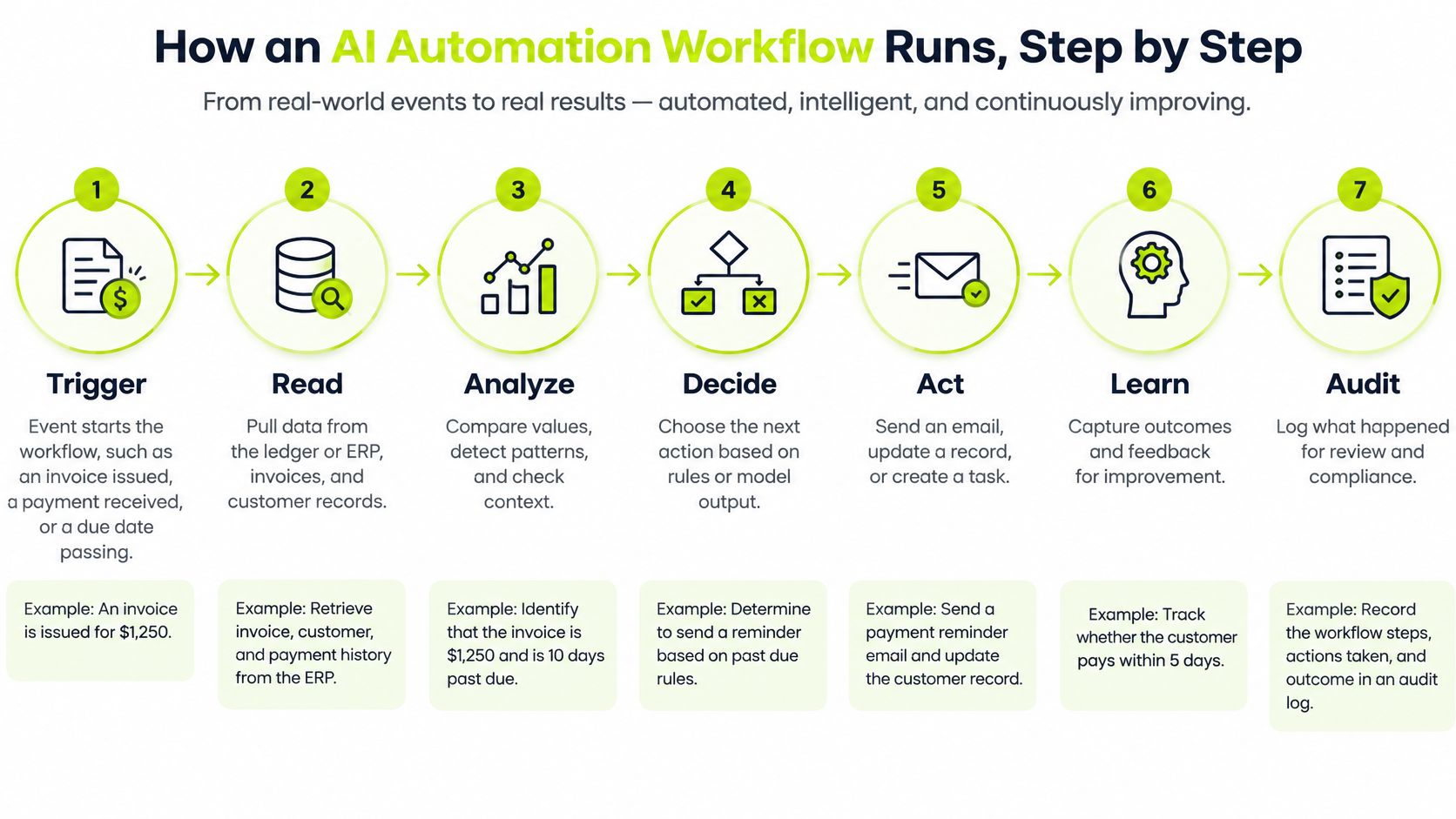
- Trigger. An event starts the run. An invoice is issued, a payment lands, or a due date passes. Nothing should "wake up" because a model felt like it.
- Read. Pull the ledger or ERP, the invoice, payment records, and the email thread. Stale open balances make every later step wrong.
- Predict or classify. Score late-pay risk, read intent, or flag a dispute. Store the confidence, not only the label.
- Choose. Pick from a pre-approved list. Friendly reminder, promise-to-pay request, cash application, or human review. No action outside that list.
- Act. Send the message, route the payment, or match the cash. Use the template your team wrote.
- Escalate. The NIST AI Risk Management Framework treats human and AI setups as a range from fully manual to fully autonomous, which means confidence thresholds, approved actions, audit logs, fallbacks, and escalation rules have to be explicit. High-confidence, reversible tasks can run on their own. Low-confidence or high-impact decisions need a person.
- Log. Record the input, the decision, and the outcome so a controller can replay Tuesday.
A Tuesday that should not need you
An invoice 12 days past due, from a client who has paid cleanly for two years, can take a short, friendly reminder with no staff touch. A disputed invoice of $40,000 does not. That one goes to the controller with the thread attached, and the reminder sequence stops.
Name the owner of each stage in your own process before you turn anything on. Trigger and log can sit with finance operations. Thresholds and the approved-action list sit with the controller. The account owner takes disputes. If a stage has no name next to it, that stage is not ready to run.
Measured Business Benefits Versus the Hype
Adoption is no longer a pilot story. The Stanford 2025 AI Index reports that 78% of surveyed organizations said they used AI in 2024, compared with 55% in 2023, and that global corporate AI investment reached $252.3 billion in 2024.
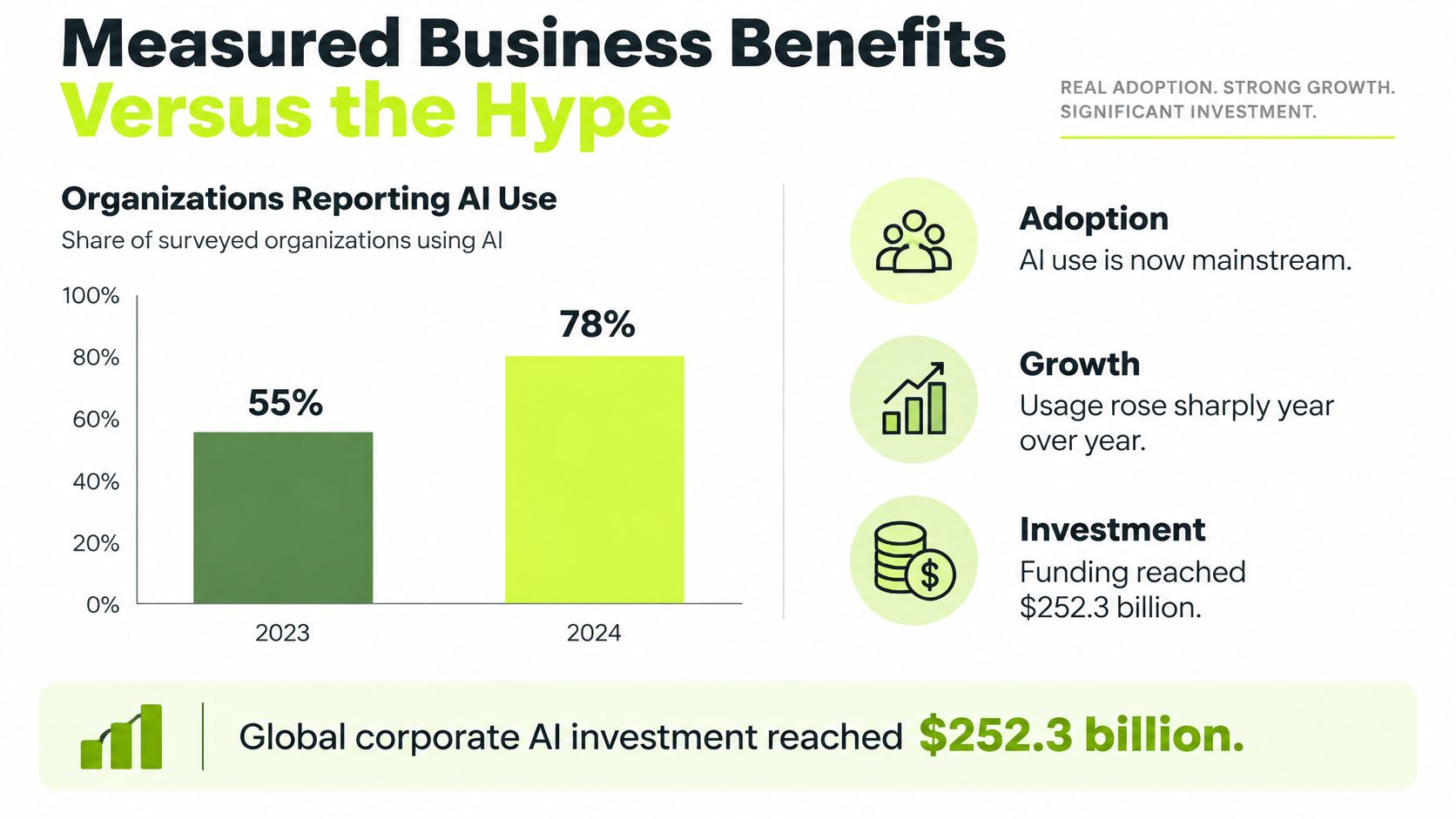
The same Index is blunt about results. Among organizations applying AI to service operations, 49% reported cost savings, and the most common savings level was below 10%. In marketing and sales, 71% of AI users reported revenue gains, most commonly below 5%. That is a gain you can book. It is not a transformation.
A separate look at a field deployment, summarized in the Stanford AI Index research, tracked a conversational assistant used by 5,179 technical-support workers across approximately 3 million chats. Productivity rose by about 14% on average, the gains sat mainly with less-experienced staff, and workers followed only about 38% of the suggestions.
Measure | Reported figure | What it means |
|---|---|---|
Organizations using AI (2024 vs 2023) | 78% vs 55% | Adoption is mainstream, not experimental |
Cost savings in service operations | 49% reported savings | Most savings were below 10% |
Revenue gains in marketing and sales | 71% of AI users | Most increases were below 5% |
Productivity gain in technical support | About 14% on average | Gains concentrated among less-experienced workers |
Suggestions actually followed | About 38% | Human judgment still filters most output |
Why the savings stay modest
Buying the tool does not shorten DSO. The gain shows up when the same steps run every day, manual handling drops, and prioritization stops depending on who had time to open the aging report. Staff still reject most suggestions when the suggestion is wrong for the client. That rejection is healthy. It is also why a vendor slide that promises autonomy will not match your month-end.
Track a short set and ignore the rest until these move. DSO, cycle time, exception rate, cash-application accuracy, recovery rate, and first-contact resolution. Pull 60 to 90 days of pre-automation baseline, then compare the same definitions after go-live. If the baseline month was a holiday trough or a single large write-off, throw it out and take the next clean window.
If you want the adoption numbers in a short visual walkthrough, this clip covers the same gap between use and payoff.
For receivables, the honest target is fewer untouched invoices, cleaner cash application, and a shorter, steadier collection cycle. Not a dark office.
Limits, Risks and the Controls That Matter
The replacement story is the wrong frame. An International Labour Organization analysis found that nearly six times as many jobs have potential for augmentation as for full automation. AI usually speeds specific tasks. It does not delete the occupation of controller, collector, or account owner.
The same analysis warns that a poor rollout can cut worker autonomy, intensify the workload, and raise stress. If the software sends more mail and your team still clears every exception by hand, you bought a faster queue, not a better close. Collections staff should move from retyping reminders to disputes, credits, and client conversations. If their week gets louder and their judgment gets smaller, stop and redesign the queue.
The governance gap is the real adoption gap
A 2025 Gartner survey found that 75% of respondents were piloting, deploying, or had deployed some form of AI agent, yet only 15% were considering fully autonomous agents, 74% viewed agents as a new attack vector, and only 13% strongly agreed their organizations had adequate governance. That same discussion of agent adoption reports that 71% of organizations could not fully trust autonomous agents for enterprise use, while only 46% had governance policies.
Experimenting is not the same as letting software act on a client or on cash. Require these controls before any run touches either.
- Permissions. Name which systems the workflow may read and which it may write.
- Data-access limits. Restrict client files, bank details, and unrelated mailboxes.
- Audit trails. Keep the input, the score, the action, and the person who overrode it.
- Confidence thresholds. Below the line, the item waits.
- Human override. Any user can stop outreach on one invoice.
- Pre-launch testing. Run known disputes, short pays, and odd file formats first.
- Rollback. You can turn the sequence off and return to the prior cadence the same day.
Automation bias is the quiet failure. Staff accept the score because it looks precise, then miss a dispute buried in a polite email. Review a sample every week, and rotate who does the review so one person's habits don't become the control.
Which actions on this workflow can run unattended, and which need approval before they touch a client or cash?
Put the answer in writing. A low-risk reminder can be autopilot. A dispute, a large balance, or a legal tone cannot. For the approval design itself, see how human review sits inside the workflow. If you can't name the approver, you are not ready to scale past a pilot.
AI Automation in Accounts Receivable, Worked Through
Consider a professional services firm using QuickBooks, where invoices are issued after work is complete. Until customers pay, the firm has less cash available for payroll, taxes, and subcontractors. Many small businesses have invoices that remain unpaid past their terms, as described in this small-business late-payment report. Accounts receivable automation is useful when it addresses that delay and gives the team a clearer view of what needs attention.

Four moves, then the metric
Start by sorting invoices according to age, value, customer history, and dispute status. A routine $1,200 balance should not sit in the same queue as a disputed $40,000 balance. Schedule reminders around the due date, rather than relying on someone to open an aging report. Match incoming payments with open invoices, then route disputes to the account owner and pause collection reminders while the issue is addressed.
Task | Manual approach | AI automation approach | Metric to track |
|---|---|---|---|
Invoice prioritization | Aging report reviewed weekly by hand | Invoices segmented by age, value, history and dispute status | Share of balance over 30 days |
Reminder timing | Reminder sent 10 days after due date | Reminder scheduled around the due date | Days to first reminder |
Payment matching | Staff match remittances in spreadsheets | Payments matched to open invoices automatically | Cash application accuracy |
Dispute routing | Disputes sit in the general reminder queue | Disputes routed to the account owner | Dispute cycle time |
The table describes tasks that can be organized in a workflow, not a promise that every exception will resolve without staff. A person still needs to investigate a disputed charge, confirm unclear payment details, or correct an invoice record. The operating layer should handle routine steps and make exceptions visible, while the team retains control over decisions that affect the customer relationship.
The U.S. Treasury Invoice Processing Platform provides a government example of keeping invoice status and documentation together. One federal agency cut the cost of processing undisputed invoices by 54% and disputed invoices by 43%. The setting differs from a professional services firm, but the process lesson applies: separate undisputed invoices from disputed ones, and keep relevant status and records connected. An overdue invoice may reflect a missing approval, a billing error, a service complaint, or nonpayment. Each cause calls for a different response.
For QuickBooks AR automation, the practical test is whether invoice status, payments, and credits stay in sync, avoiding repeated entry of the same information. Resolut detects a paid stamp on an uploaded PDF and automatically stops outreach for that invoice. A user can also mark an invoice paid manually in one click. That check matters because a reminder sent after payment can undermine a client relationship.
The value of AI AR automation is not measured by the number of messages sent. It is measured by whether avoidable delays fall, disputes surface earlier, and the path to reduce DSO becomes easier to explain to a partner. More messages sent to the wrong customers can create extra work without improving collections.
Track DSO, days to first reminder, and dispute cycle time across the workflow. Compare them with the firm's own starting point, and check whether the change comes with more exceptions or customer complaints. If the measures do not improve, review the rules, timing, and invoice grouping before expanding the workflow. This guide to AI for accounts receivable explains how automation can support receivables work while leaving people responsible for exceptions and customer decisions.
Evaluate One Receivables Workflow Before You Scale
Don't automate the whole book. Pick one workflow, write the rules, and make the result visible enough that a partner can argue with it. Six questions cover any vendor and any internal build.
- What decides each action? A written rule, a score, a reading of the email, or a person.
- Which actions run unattended? Name them. If the list is "everything," walk away.
- Where do exceptions go? A named queue, not a shared inbox that nobody owns.
- What accuracy evidence exists on your invoices? Their demo data is not your chart of accounts.
- What audit trail and rollback exist? You should be able to replay a decision and shut the sequence off the same day.
- How does staff time shift? Hours should leave reminder typing and show up in disputes and client calls.
Use autopilot for low-risk reminders to clean payers. Use a co-pilot setting, with a person approving the send, for disputes and large balances. The controller owns the thresholds. Nobody else edits them during a busy week.
A 90-day pilot you can actually finish
Choose one segment of about 200 open invoices, similar terms, no legal matters mixed in. Record DSO, cycle time, and exception rate for 60 days before launch, using the definitions you will keep using. Run the workflow for 30 days. Compare the two windows only after you've checked that mix and season didn't change underneath you.
An accounting firm can keep this sane with one login and a separate workspace per client, with email leaving from that client's own domain and signed by that client's team. White-glove onboarding is part of standing the pilot up, so the first reminder isn't a science project on a Friday.
Practical rule: If you can't name the approver, the threshold, and the metric before go-live, you don't have a pilot. You have a send button.
Resolut automates AR for professional services, consistent, accurate, and human.
Resolut is built for professional services firms that want AR software for professional services to chase invoices on a cadence you set, keep a person on the exceptions, and improve cash flow without treating every client like a collections case. If you want to see how that looks on a single workflow before you scale it, visit Resolut and run the pilot on one segment of the book.